MCP servers for WordPress: what actually exists and what each one can do
On this page, 13 sections
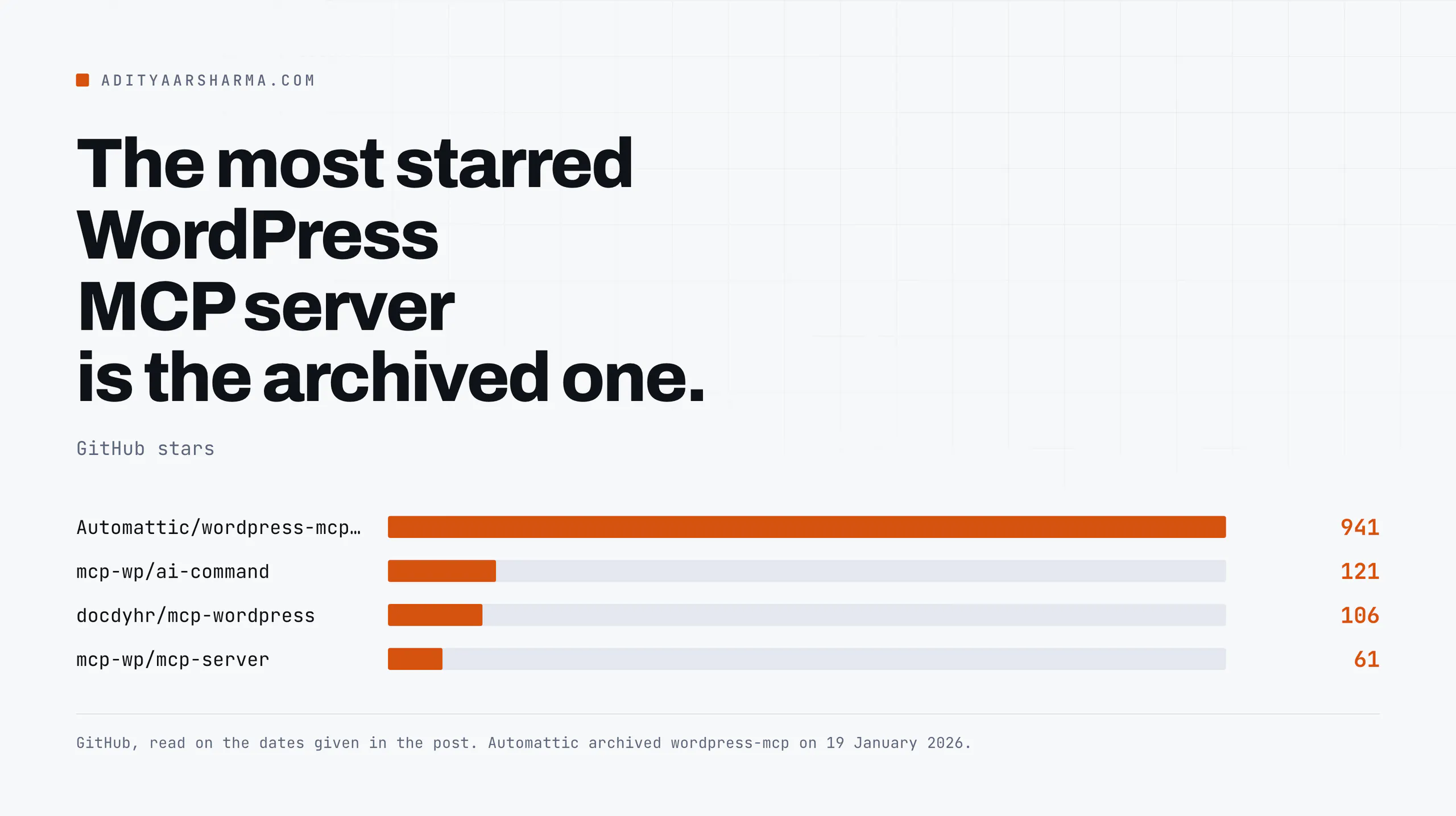
The WordPress MCP server with the most stars on GitHub is read-only. Automattic archived Automattic/wordpress-mcp on 19 January 2026.
It sits at 941 stars and 139 forks with a banner across the top of the page telling you to go somewhere else.
I checked the repository on 2 September 2026 and the banner is still the first thing you see.
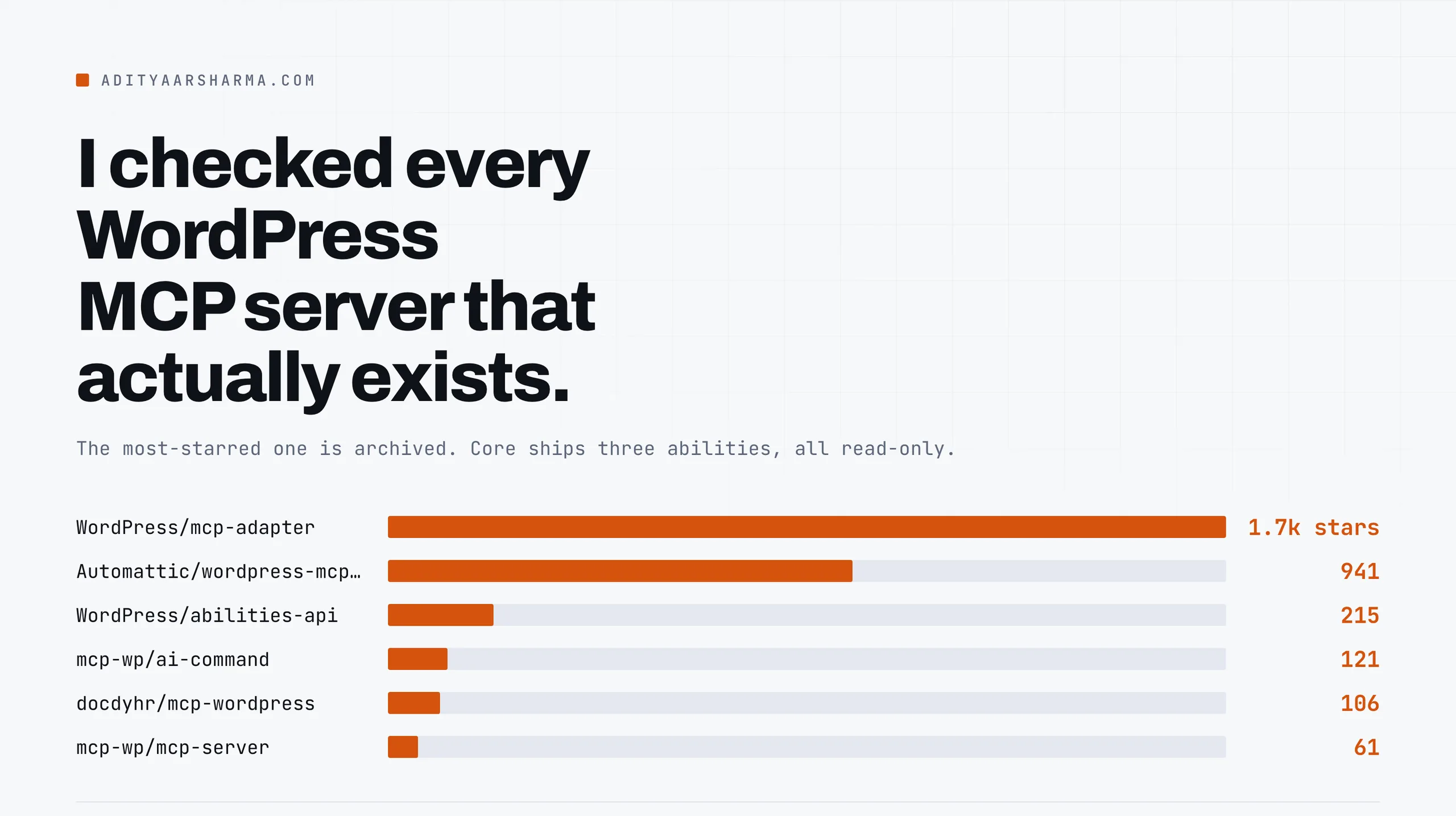
The notice gives two reasons and both of them matter more than the plugin did. The Abilities API was moving into WordPress core in 6.9. And WordPress/mcp-adapter had become the canonical package and Composer dependency for MCP in WordPress.
Which means that if you followed one of the many tutorials that tell you to POST JSON-RPC at /wp/v2/wpmcp/streamable, you built on a plugin whose last commit landed on 30 August 2025.
Here is what is actually maintained as of 2 September 2026, what each one can do, and where the boundary sits.
The line that splits this whole category
Every server here sits on one side of a single line: it either runs inside WordPress as a plugin and speaks MCP directly, or it runs outside WordPress as a Node process and speaks the REST API on your behalf.
Inside the site, or outside it
Inside means the tools are PHP callbacks with current_user_can() in front of them, and they can reach anything PHP can reach.
Outside means every tool is an HTTP request carrying an application password, and anything the REST API cannot do, the server cannot do either.
That one distinction predicts most of the differences below, including the ones people file as bugs.
If you have not set up the surrounding stack yet, the wiring for wp-cli over SSH, a PHP bridge, Playwright and a crawler is in my writeup on running Claude Code against WordPress. This post is only about the MCP layer.
WordPress/mcp-adapter: the official one
| Field | Value |
|---|---|
| Repository | github.com/WordPress/mcp-adapter |
| Licence | GPL-2.0-or-later (from composer.json) |
| Latest tagged release | v0.6.1 |
| Stars / forks | 1.7k / 191 |
| Activity | 152 commits, most recent 2 September 2026 |
| Runs | Inside WordPress, as a plugin or a Composer package |
What the adapter does
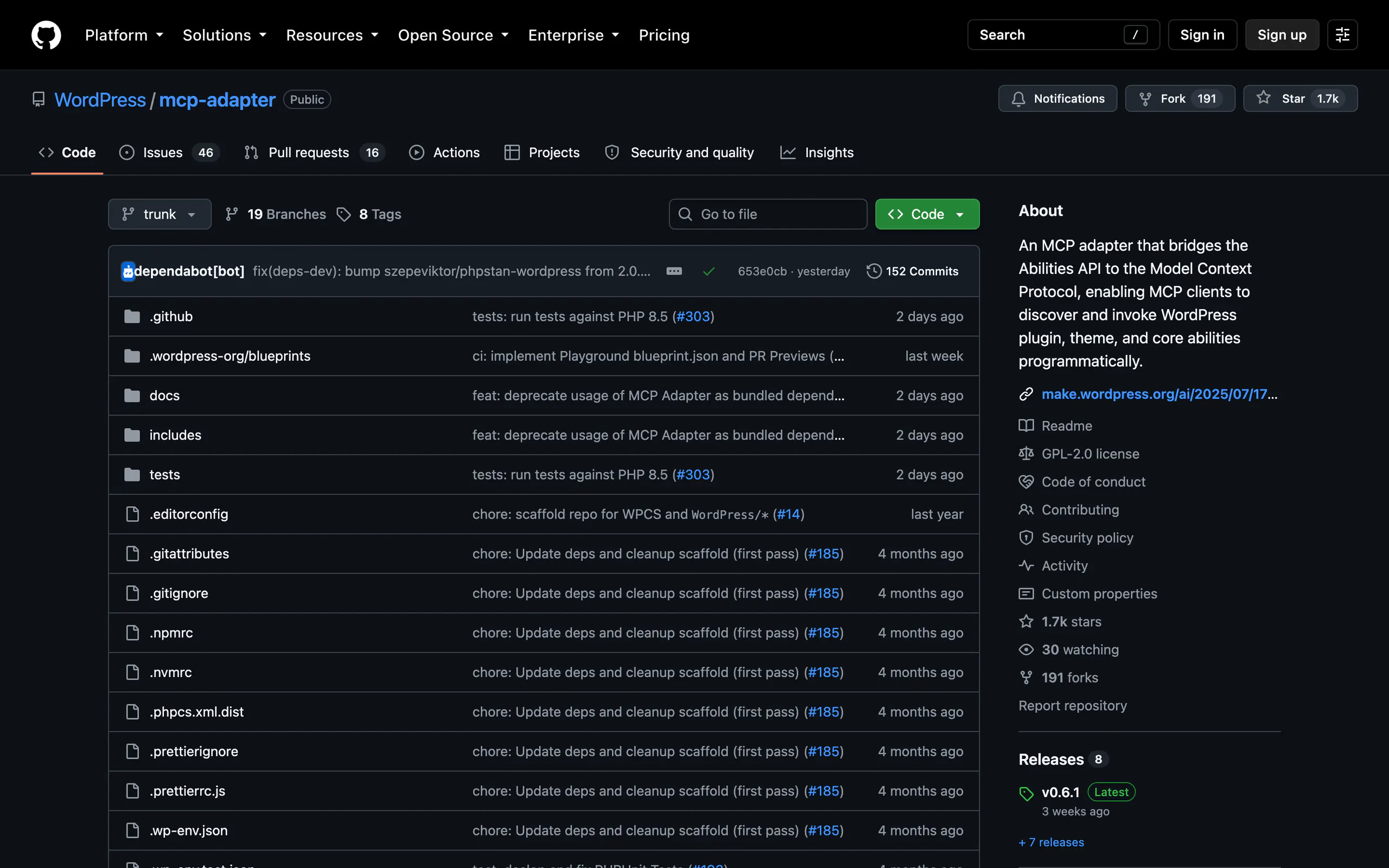
The adapter does one job: it takes abilities registered through the WordPress Abilities API and exposes them as MCP tools, resources and prompts. It ships HTTP and STDIO transports, a McpTransportInterface for custom ones, and pluggable error and observability handlers.
Abilities are private by default
The part people trip over is the default. WordPress abilities are private. A fresh install of the adapter exposes almost nothing until you set meta.public (or meta.mcp.public) to true on each ability you want reachable.
The adapter’s default server then gives an agent three meta-tools rather than one tool per ability:
mcp-adapter/discover-abilitiesmcp-adapter/get-ability-infomcp-adapter/execute-ability
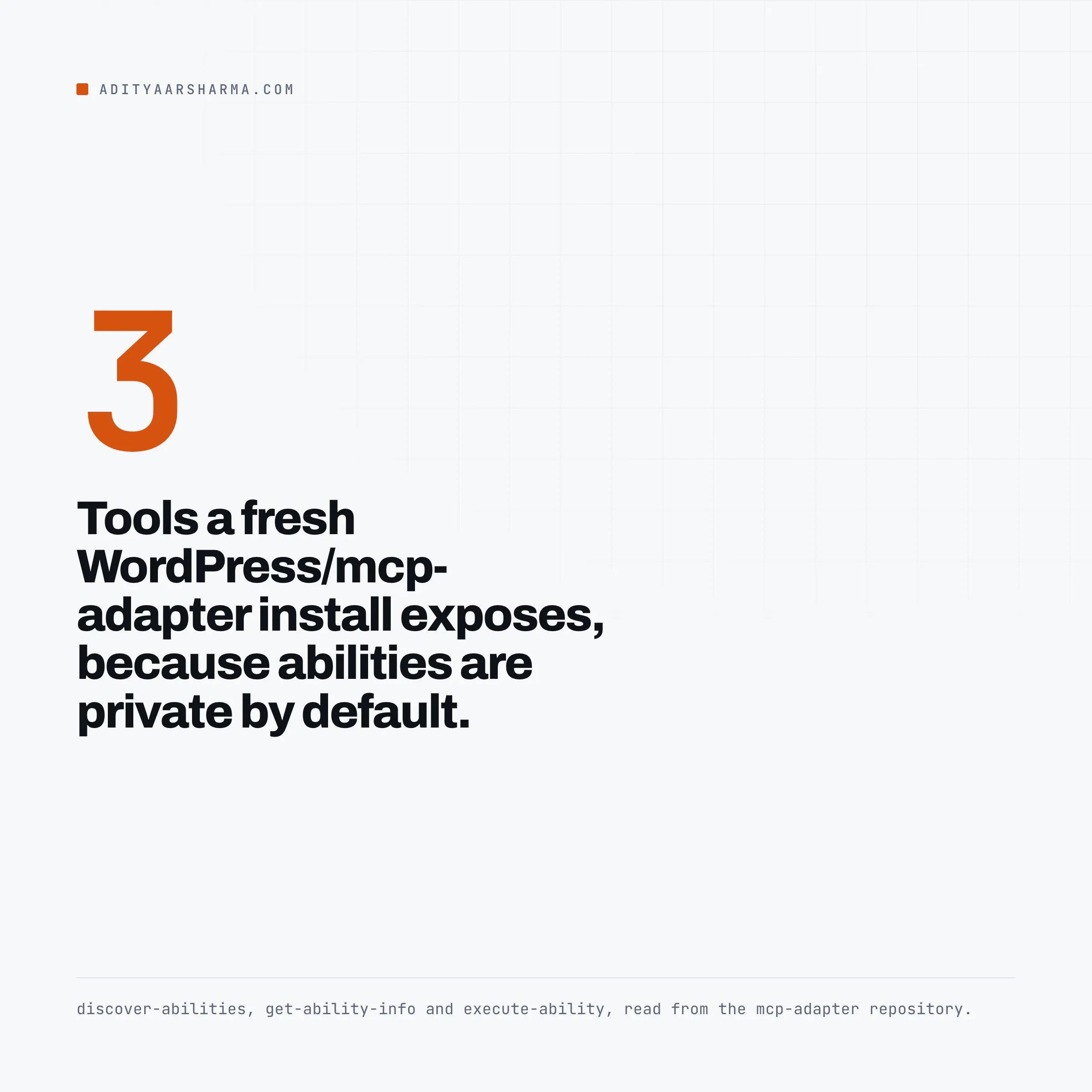
That is a deliberate design and it is the right one for context budgets. A site with sixty registered abilities does not send sixty tool schemas into every request. The agent discovers, inspects, then executes.
The cost is one extra round trip before the first useful call.
The endpoint, and the transports
The HTTP endpoint for the default server is /wp-json/mcp/mcp-adapter-default-server. Per-server transport authentication and per-ability permission checks are both configurable, which is the thing to read before you point anything at a live site.
WordPress/abilities-api: the layer underneath
The adapter is not much use without abilities to adapt, and that is a separate project which has now landed in core. wp_register_ability() lives in wp-includes/abilities-api.php and the core reference marks it as introduced in 6.9.0.
It is core code now, not a plugin you install.
Registration looks like this. Note the two callbacks and the annotations block, because those are the parts that decide what an agent is allowed to do:
wp_register_ability(
    'my-plugin/analyze-text',
    array(
        'label'               => __( 'Analyze text', 'my-plugin' ),
        'execute_callback'    => 'my_plugin_analyze',
        'permission_callback' => fn() => current_user_can( 'edit_posts' ),
    )
);
It hangs off add_action( 'wp_abilities_api_init', ... ). The full call also takes input_schema and output_schema, plus an annotations block carrying readonly, destructive and idempotent.
The two callbacks and the annotations are the parts an agent host actually reads.
Categories come first
Categories have to be registered first, on wp_abilities_api_categories_init, with wp_register_ability_category(). Schemas use a subset of JSON Schema draft 4, the same validator the REST API uses.
What core actually registers
Now the thing worth checking yourself. Open wp-includes/abilities.php in a 6.9 or later install and count the abilities core registers. There are three:
core/get-site-info, permission callbackcurrent_user_can( 'manage_options' )core/get-user-info, permission callbackis_user_logged_in()core/get-environment-info, permission callbackcurrent_user_can( 'manage_options' )
All three carry 'readonly' => true, 'destructive' => false, 'idempotent' => true. WordPress core’s own agent surface, today, reads site metadata and nothing else.
Every write your agent performs through this route comes from an ability that you or a plugin author wrote. That is not a criticism of the design.
It is the fact people miss when they install the adapter and wonder why the agent cannot publish anything.
One discrepancy worth knowing about
The WordPress Developer Blog post that introduced the Abilities API in November 2025 documents the REST routes as /wp-json/wp-abilities/v1/{namespace/ability}. The controllers that shipped in core use a rest_base of abilities, so the real paths carry an extra segment:
# list every registered ability (needs the 'read' capability, so any logged-in user)
GET  /wp-json/wp-abilities/v1/abilities

# inspect one
GET  /wp-json/wp-abilities/v1/abilities/core/get-site-info

# execute one (the ability's own permission_callback still runs)
POST /wp-json/wp-abilities/v1/abilities/core/get-site-info/run
Verified against class-wp-rest-abilities-v1-list-controller.php and class-wp-rest-abilities-v1-run-controller.php in wordpress-develop trunk on 2 September 2026, where $namespace is wp-abilities/v1 and $rest_base is abilities.
If a client of yours 404s on the documented path, that is why.
The listing permission
The listing permission is also worth a second look: get_items_permissions_check() returns current_user_can( 'read' ). A subscriber-level application password can enumerate every registered ability on the site, including their descriptions and input schemas. Running them is gated separately, per ability.
Automattic/wordpress-mcp: archived, and still the one in most tutorials
| Field | Value |
|---|---|
| Repository | github.com/Automattic/wordpress-mcp (archived 19 Jan 2026) |
| Licence | GPL-2.0-or-later |
| Last version in the tree | 0.2.5 |
| Stars / forks | 941 / 139 |
| Runs | Inside WordPress, as a plugin |
Why the archived one still matters
It is worth understanding because a lot of running installs still have it. Two transports: /wp/v2/wpmcp in a WordPress-shaped format, and /wp/v2/wpmcp/streamable speaking JSON-RPC 2.0.
The first accepted JWT and application passwords, the second accepted JWT only. Tokens were generated in the admin with a duration of one to twenty-four hours.
Its most interesting feature was also its most dangerous, and it was labelled experimental in the README. Turning on REST API CRUD tools gave the agent three generic tools: list_api_functions, get_function_details and run_api_function.
That last one executes any WordPress REST API route the current user has permission for.
The plugin let you disable create, update and delete tools individually and excluded a small set of routes such as JWT auth, oembed, autosaves and revisions.
Generic-execute tools
Generic-execute tools are the pattern to think hardest about.
They give an agent the entire REST surface of every plugin on the site in one tool, which means your blast radius is now defined by whichever plugin registered the most careless route.
If you are running that pattern today, the exposure question is the same one I work through in the post about a malware scanner that reported clean while the site served spam to Googlebot: what the tool reports and what is actually reachable are two different sets.
Automattic/mcp-wordpress-remote: the proxy
Published on npm as @automattic/mcp-wordpress-remote, version 0.4.0, MIT licensed. It is a client-side bridge that runs on your machine over STDIO and talks HTTP to the site, which is how you connect a client that does not speak remote MCP transports.
What the README points at now
Its README now uses /wp-json/mcp/mcp-adapter-default-server as the example WP_API_URL, which is the clearest signal that the migration to the adapter is real rather than announced.
It implements the MCP authorization specification dated 2025-06-18, OAuth 2.1 with PKCE, resource indicators per RFC 8707, dynamic client registration per RFC 7591 and protected resource metadata discovery per RFC 9728, alongside JWT and application passwords.
The client config is a standard mcpServers entry: command npx, args ["-y", "@automattic/mcp-wordpress-remote"], and an env block carrying WP_API_URL, WP_API_USERNAME and WP_API_PASSWORD.
mcp-wp/mcp-server and mcp-wp/ai-command: the WP-CLI route
Pascal Birchler’s mcp-wp/mcp-server is Apache-2.0, 61 stars, and takes a different approach: it wraps logiscape/mcp-sdk-php and exposes a server at wp-json/mcp/v1/mcp. Read the README before you deploy it.
It says plainly that the Streamable HTTP transport is not fully implemented, that there are no tests, and that it might not work as expected.
That is the kind of honesty you should reward by believing it.
The WP-CLI companion
The companion is mcp-wp/ai-command, 121 stars, a WP-CLI package that turns your terminal into an MCP host:
wp package install mcp-wp/ai-command:dev-main
wp plugin install --activate ai-services
wp mcp server add "mysite" "https://example.com/wp-json/mcp/v1/mcp"
wp ai "Greet my friend Pascal"
It needs WP-CLI 2.11 or greater and the AI Services plugin.
The README notes the command also works against a local WordPress install with no server plugin at all, which makes it the cheapest way to feel what this category does before you expose anything over HTTP.
docdyhr/mcp-wordpress: the third-party Node server
| Field | Value |
|---|---|
| Package | mcp-wordpress on npm, version 3.3.33 |
| Licence | MIT |
| Author | Thomas Dyhr |
| Stars | 106 |
| Runs | Outside WordPress, TypeScript, over the REST API |
Its own package.json describes 71 tools, an SEO toolkit, performance monitoring and caching. Authentication is a WordPress application password, and it manages multiple sites from one process.
Because it sits outside WordPress and speaks REST, it inherits every REST API limit, including the ones that surprise people. Which is the subject of the next post in this cluster.
WordPress/ai: not a server, worth knowing about
The WordPress/ai canonical plugin is the reference implementation that combines the building blocks: the PHP AI Client SDK, the Abilities API and the adapter.
Its own README calls it experimental and says features may change, move or break, and recommends against production. It is block-editor only by explicit project decision, with no Classic Editor support planned.
The abilities browser
What makes it useful even if you never ship it is the abilities browser: a screen that discovers, inspects, tests and documents every ability registered on the site.
That is the fastest way to see what your plugins are actually exposing to an agent, which is a question most people have never asked of their own site.
If you are tracking where WordPress is heading with all of this, I covered the wider shift in the piece on WordPress 7.0.
What to actually pick
- Building abilities into a plugin you own:
wp_register_ability()in core, plusWordPress/mcp-adapterwhen you need MCP transport. This is the route with a future. - Driving an existing site you did not build: a REST-based server such as
docdyhr/mcp-wordpress, or wp-cli over SSH, because there are no abilities registered to adapt. - Local development:
wp aifrommcp-wp/ai-command, no plugin required. - Already running
Automattic/wordpress-mcp: plan the move. It is archived, and the genericrun_api_functiontool is the widest thing on your site.
What star counts do not tell you
One caveat I will not paper over. Star counts and release tags tell you a project is alive. They do not tell you it survives a WordPress site with a decade of plugins on it.
I have not benchmarked these servers against each other on the same install, and I have not seen anyone publish that comparison.
Treat everything above as a map of what exists and what its own maintainers claim, verified against their repositories on 2 September 2026, and not as a performance ranking.
The one thing to do next
Install the Abilities API on a staging copy, hit GET /wp-json/wp-abilities/v1/abilities with a subscriber-level application password, and read what comes back.
If the list is longer than the three core abilities, some plugin on that site has already opened a door and you did not choose it.
That is a five-minute check and it changes what you do next.
For how the underlying HTTP surface behaves once you start writing through it, including which capability each route demands and what is not automatable at all, the companion post on the REST API as an agent surface goes route by route.
And if the thing you are actually trying to solve is where an agent keeps what it learned between sessions, that is a different problem, covered in the comparison of AI memory tools.
Resources
- WordPress/mcp-adapter (GPL-2.0-or-later)
- WordPress/abilities-api
- wp_register_ability() in the WordPress code reference
- Introducing the WordPress Abilities API, WordPress Developer Blog, November 2025
- Automattic/wordpress-mcp (archived 19 January 2026)
- Automattic/mcp-wordpress-remote
- mcp-wp/mcp-server and mcp-wp/ai-command
- docdyhr/mcp-wordpress
- WordPress/ai canonical plugin
- Model Context Protocol specification
- AI Building Blocks for WordPress initiative
Disclosure: I work on product and growth at POSIMYTH, which ships WordPress plugins across 500,000+ installs. None of the projects above are ours, and none of them paid for a mention.