WordPress Caching Layers, and Which One Your Problem Is Actually In
On this page, 9 sections
Two headers from the same response on my own site, 2 September 2026:
$ curl -sI https://adityaarsharma.com/ | grep -iE 'cache'
cf-edge-cache: cache,platform=wordpress
x-runcloud-cache: HIT
x-runcache-type: native
cf-cache-status: DYNAMIC
Line three says my page cache served that request from disk without running PHP. Line four says Cloudflare treated the same response as uncacheable and fetched it from my origin server anyway.
One cache is working. The other one, the one that would have saved the round trip, is doing nothing at all.
Four caches, four failure modes
That is the whole problem with WordPress caching advice. There are four caches, they sit in different places, they fail in different ways, and every article about “WordPress caching” is about one of them.
If you install a caching plugin to fix a problem that lives in another layer, you will get no result and conclude that caching does not work.
Here is each layer, what it actually stores, one command that tells you whether it is working, and the real tool with the version number I checked today.
Layer 1: the opcode cache, in PHP itself
What it stores: compiled PHP bytecode, in shared memory, inside the PHP-FPM process. Without it, every request re-reads and recompiles every PHP file WordPress touches. WordPress core alone is well over a thousand files before a single plugin loads.
Mechanism: PHP compiles a source file into opcodes, then executes them. OPcache keeps the opcodes in a shared memory segment keyed by file path, so the compile step is skipped on every subsequent request.
It is per-server, not per-site, and it is invisible to WordPress. No plugin can install it and no plugin can tell you it is missing.
How to tell it is failing:
php -r '$s = opcache_get_status(false);
printf("enabled=%s  hit_rate=%.2f%%  cached=%d/%d  oom_restarts=%d\n",
  var_export($s["opcache_enabled"], true),
  $s["opcache_statistics"]["opcache_hit_rate"],
  $s["opcache_statistics"]["num_cached_scripts"],
  $s["opcache_statistics"]["max_cached_keys"],
  $s["opcache_statistics"]["oom_restarts"]);'
Read it from the right process
Run it through the same PHP-FPM pool your site uses, not the CLI binary, or you will read a different process’s empty cache. Two numbers matter.
If num_cached_scripts is at or near max_cached_keys, your file table is full and PHP is evicting files that get recompiled on the next request.
If oom_restarts is above zero, the shared memory segment filled and the whole cache was thrown away, repeatedly.
The defaults that catch WordPress sites
The defaults, read from the PHP manual’s OPcache configuration page, are where WordPress sites get caught:
| Directive | Default | What it means for WordPress |
|---|---|---|
opcache.memory_consumption | 128 | Megabytes of shared memory. A site with 40 plugins can exceed this. |
opcache.max_accelerated_files | 10000 | Rounded up to the next prime in a fixed set, so 10000 actually gives you 16229 slots. |
opcache.validate_timestamps | 1 | PHP stats each file to see if it changed. |
opcache.revalidate_freq | 2 | It does that stat at most every 2 seconds. Set to 0 and it stats on every request. |
opcache.interned_strings_buffer | 8 | Megabytes for shared string storage. Small for a large plugin set. |
The prime-number detail
The prime-number detail is worth knowing because it is invisible. The manual lists the exact set: 223, 463, 983, 1979, 3907, 7963, 16229, 32531, 65407, 130987, 262237, 524521, 1048793.
Your configured value is rounded up to the first one greater than or equal to it. Setting 12000 and setting 16000 give you identical capacity, and neither does what the number in your config file suggests.
Where it goes wrong: turning off validate_timestamps for speed and then deploying code. PHP will keep running the old bytecode until you call opcache_reset() or restart the pool.
Every “I uploaded the fix and nothing changed” ticket I have seen on a tuned server was this.
Layer 2: the object cache, inside WordPress
What it stores: the results of database queries and computed values, keyed by group and key, for reuse. Options, post meta, term relationships, user objects, anything a plugin puts through wp_cache_set().
Mechanism, and the sentence most people have never read. From the WordPress developer reference for WP_Object_Cache:
By default, the object cache is non-persistent. This means that data stored in the cache resides in memory only and only for the duration of the request.
developer.wordpress.org, WP_Object_Cache reference, read 2 September 2026
What non-persistent actually means
Out of the box the object cache is a PHP array that is thrown away when the request ends. It still helps, because it stops the same query running forty times in one page load, but it saves nothing between visitors.
Making it persistent requires a drop-in file at wp-content/object-cache.php and a backend to store into.
WP_CACHE does not do what you think
The same page notes something that trips people up: since WordPress 2.5, adding define('WP_CACHE', true) to wp-config.php does not make the object cache persistent.
That constant is read by page-caching drop-ins. It has nothing to do with this layer, and it has not for eighteen years.
Where transients land
Transients sit on top. If a persistent object cache is configured, transients go through the wp_cache_* functions. If it is not, they are written to the options table, which means your “cache” is doing database writes to avoid database reads.
How to tell it is failing. Three checks.
wp cache typeprintsDefaultwhen nothing persistent is installed.ls -la wp-content/object-cache.phpeither shows the drop-in or says no such file.redis-cli info stats | grep -E 'keyspace_hits|keyspace_misses'tells you whether anything is reading it.
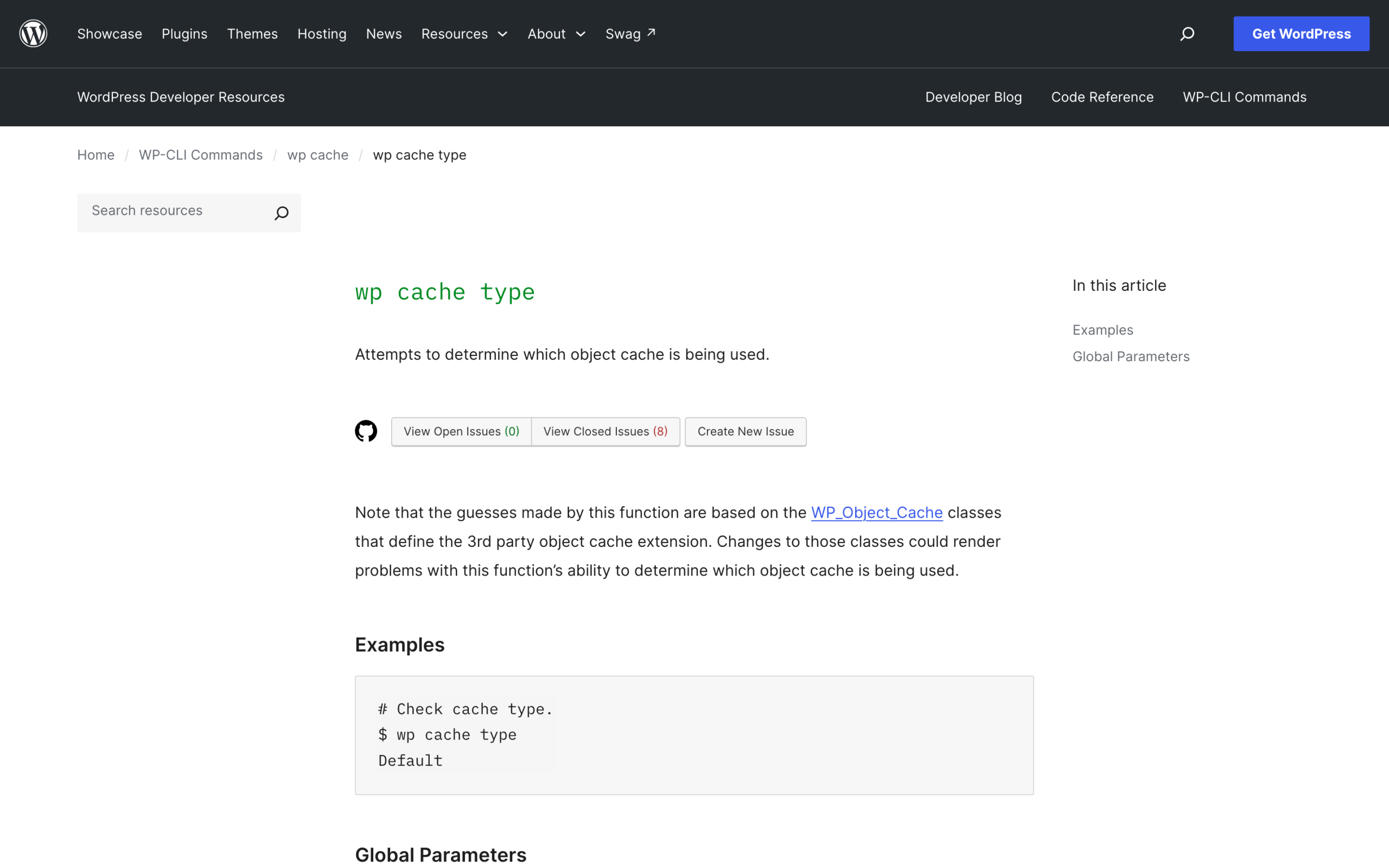
How much to trust wp cache type
wp cache type guesses by inspecting the WP_Object_Cache class, and the WP-CLI documentation says so plainly, so treat it as a strong hint rather than proof. The drop-in file either exists or it does not, and that is proof.
Real backends, checked on Docker Hub on 2 September 2026. Three images, three tags, three run commands.
- Redis 8.8.2, image pushed 27 August 2026:
docker run -d --name wp-redis -p 6379:6379 redis:8.8.2-trixie redis-server --maxmemory 256mb --maxmemory-policy allkeys-lru. - Valkey 9.0.6, the BSD-licensed fork, image pushed 1 September 2026:
docker run -d --name wp-valkey -p 6379:6379 valkey/valkey:9.0.6-alpine3.24. - Memcached 1.6.45, image pushed 25 August 2026:
docker run -d --name wp-memcached -p 11211:11211 memcached:1.6.45-alpine -m 256.
Set the eviction policy on purpose
Set --maxmemory-policy allkeys-lru deliberately. Redis defaults to noeviction, which means that when the instance fills, writes start failing instead of old keys being dropped. An object cache that returns errors under load is worse than no object cache.
On the WordPress side, the plugin numbers from the WordPress.org API today:
| Plugin | Version | Active installs | Last updated |
|---|---|---|---|
| Redis Object Cache | 2.8.0 | 500,000 | 4 May 2026 |
| Docket Cache, file-backed, no server needed | 26.04.05 | 20,000 | 1 August 2026 |
| Object Cache 4 everyone | 2.3.3 | 5,000 | 11 June 2026 |
| Memcached Redux | 0.1.7 | 100 | 7 May 2020 |
Why I list versions
That last row is why I list versions. Memcached Redux is still the plugin recommended in a lot of older tutorials. It was last updated in May 2020 and declares compatibility only up to WordPress 5.4.21.
One hundred sites still run it. Do not be one of them because a 2019 article told you to.
Where it goes wrong: the developer reference warns that testing for newer cache functions with function_exists() is unsafe, because WordPress polyfills them. You have to use wp_cache_supports().
Get it wrong and a call to wp_cache_flush_group() on a backend that cannot flush one group will flush the entire cache instead. A plugin that clears its own group on every save can therefore empty your whole object cache on every save.
Layer 3: the page cache, in front of PHP
What it stores: the finished HTML document, so an anonymous visitor gets a file instead of a WordPress execution.
Mechanism: either a PHP drop-in at wp-content/advanced-cache.php that short-circuits early in wp-settings.php, or a web-server rule that serves a static file and never enters PHP at all.
The second is much faster and much fussier, because the server has to decide cacheability without asking WordPress.
How to tell it is failing: request the same URL three times in a loop with curl -s -o /dev/null -D h.txt -w 'ttfb=%{time_starttransfer}', then grep the saved headers for x-litespeed-cache, x-cache, x-runcloud-cache, x-proxy-cache, cf-cache-status and age. Every page cache announces itself.
Then do it again with a cookie
Then repeat it with a session cookie attached.
A page cache that serves cached HTML to logged-in users is a correctness bug, not a performance win, and it is how people end up seeing someone else’s admin bar or, worse, someone else’s cart.
| Plugin | Version | Active installs | Last updated |
|---|---|---|---|
| LiteSpeed Cache | 7.9.1 | 7,000,000 | 1 September 2026 |
| WP Super Cache | 3.1.3 | 1,000,000 | 26 August 2026 |
| W3 Total Cache | 2.10.5 | 900,000 | 18 August 2026 |
| Cache Enabler | 1.8.16 | not published by the API | 2 March 2026 |
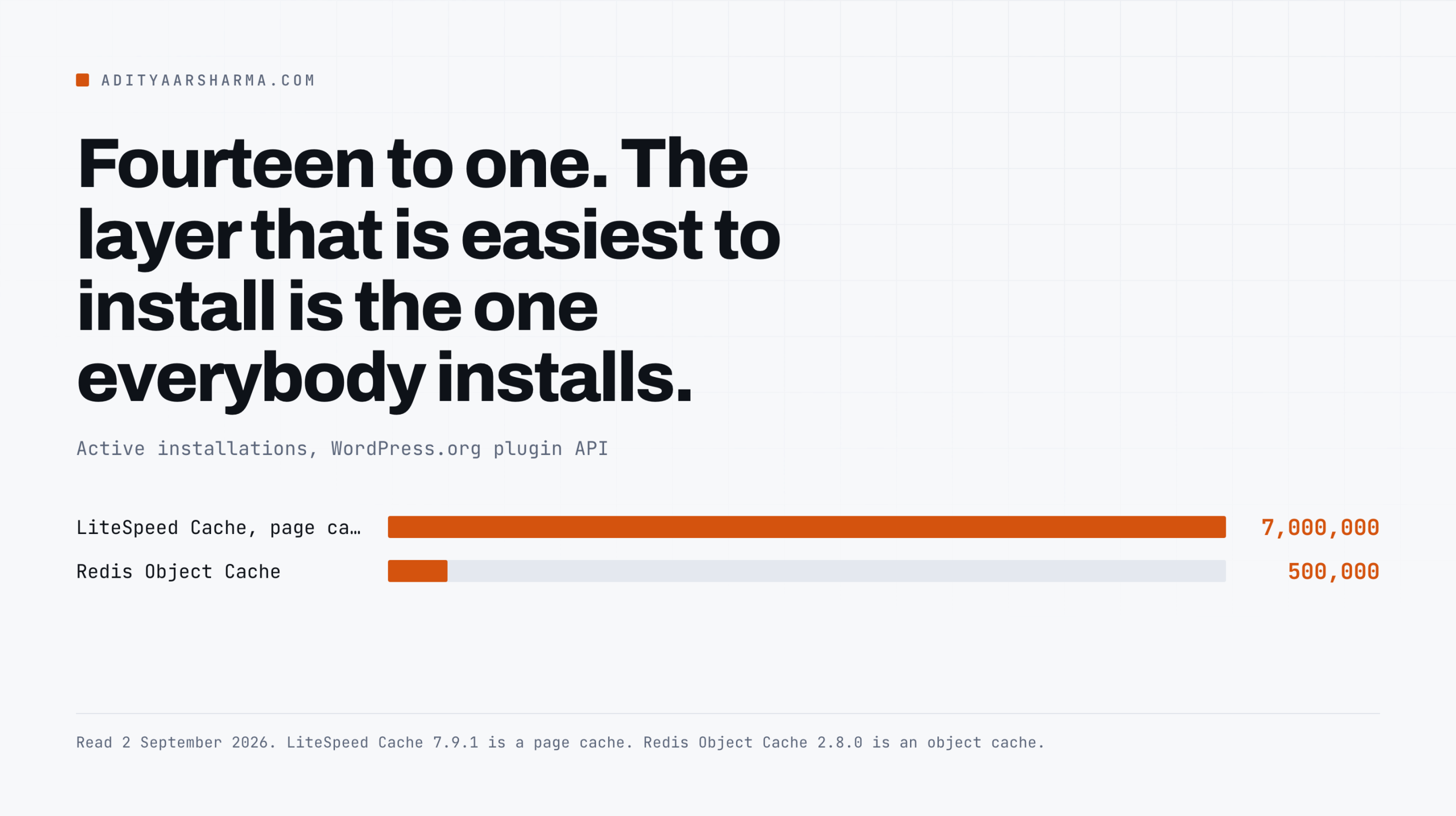
The fourteen to one ratio
Seven million sites run a page cache and half a million run an object cache.
That fourteen to one ratio is the shape of the whole problem: the layer that is easiest to install is the one everybody installs, whether or not it is the layer that was failing.
Where it goes wrong: query strings. A page cache keyed on the full URL treats /product/ and /product/?fbclid=abc as different pages, so every visitor arriving from an ad or a social link gets a cache MISS and a full WordPress render.
If your cache hit rate looks fine in testing and terrible in production, this is usually why. I ran into the same class of problem with WooCommerce add-to-cart URLs, which generate an unbounded number of unique paths.
Layer 4: the CDN, and the one my own site is failing
What it stores: responses at an edge location physically near the visitor, so the request never reaches your origin.
Mechanism: a CDN caches static assets by default and refuses to cache HTML by default, because HTML is assumed to be personalised.
That refusal is the correct default and it is also the reason most WordPress sites get far less from a CDN than they expect.
The failure on my own site
Here is that failure on my own site, measured today. A static stylesheet from the edge, then the same file forced to origin with a random query string, then the HTML document:
| Request | Cache state | TTFB |
|---|---|---|
| 5,829 B stylesheet | Cloudflare edge HIT | 0.225 s |
Same file, ?bust=random | Cloudflare MISS, went to origin | 0.580 to 1.448 s |
| Homepage HTML | cf-cache-status: DYNAMIC, always origin | 0.488 to 1.572 s |
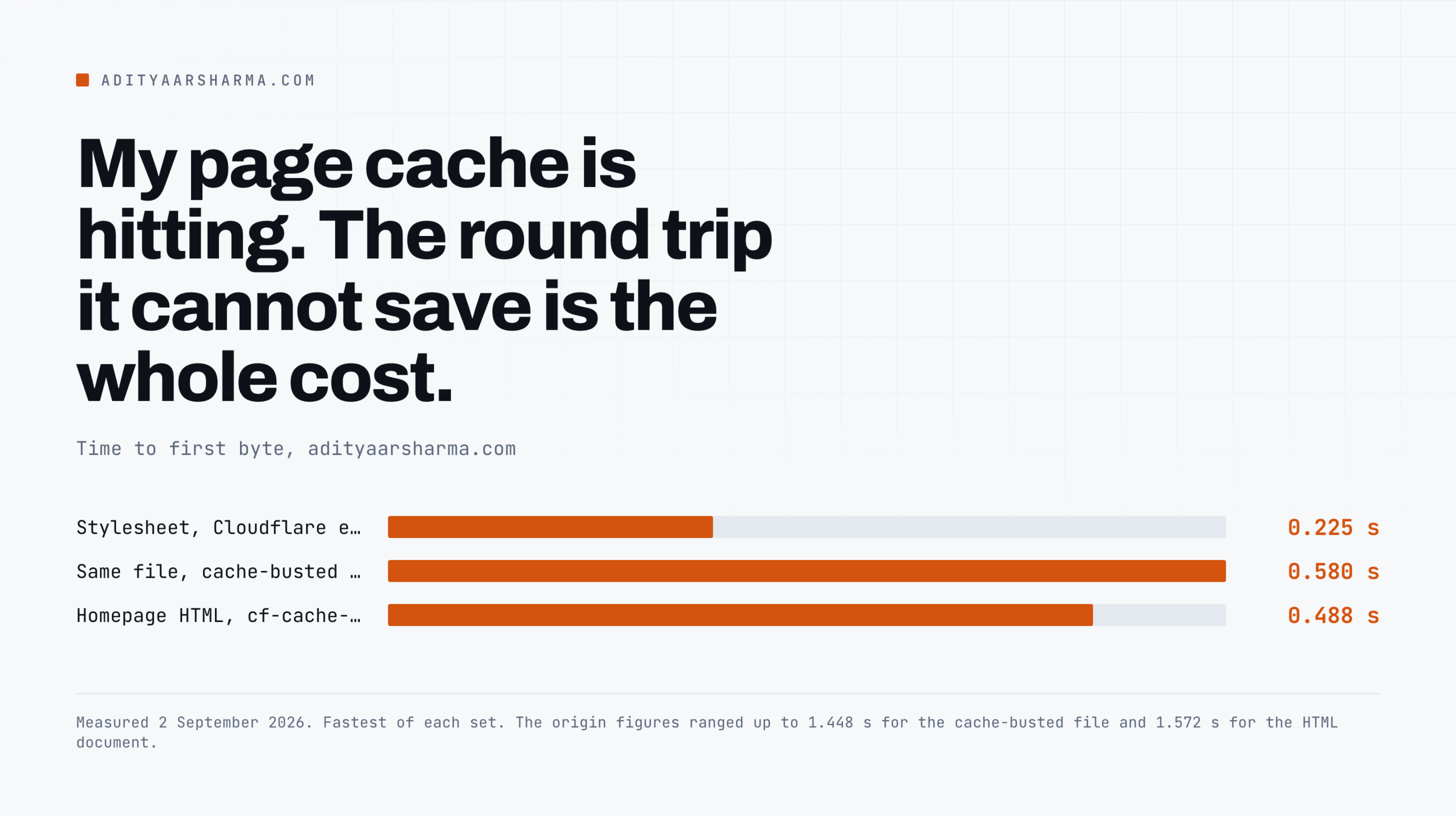
Which layer would actually fix it
My WordPress page cache is hitting on every one of those HTML requests. It saves the PHP execution and it cannot save the eight hundred millisecond round trip, because that trip happens before my server is involved.
The layer that would fix it is the one returning DYNAMIC.
So I went and read what the vendor claims for exactly this:

Does the mechanism support the claim
Does the mechanism support the claim? For TTFB, yes, and my own measurements are the argument. APO’s mechanism is caching the HTML document at the edge.
On my site that would replace a 0.5 to 1.5 second origin trip with something close to the 0.225 seconds an edge HIT already costs me.
A 72 percent reduction is the right order of magnitude for an origin as far from its readers as mine.
The second number is the honest one
The more interesting number is the second one. Cloudflare claims only 23 percent on First Contentful Paint, and that gap is itself evidence the mechanism is honest.
Edge-caching the document moves the document. It does not move the 27 stylesheets and 25 scripts that have to arrive before anything paints. A vendor inflating this would have quoted one big number for both.
Quoting 72 and 23 is what the mechanism actually predicts.
Two things I will not repeat
Two things I will not repeat from that page. It says “our tests” without linking a methodology on the page itself, so treat both figures as vendor-reported.
And a percentage improvement is meaningless without the baseline: 72 percent off a slow origin is large, 72 percent off an origin in the same city as your readers is a rounding error.
The number describes their test site, not yours.
Which layer is your problem? Read the symptom
| What you see | Layer | First thing to check |
|---|---|---|
| TTFB is slow and the cache header says HIT | CDN | cf-cache-status on the HTML. If DYNAMIC, no HTML is edge-cached. |
| TTFB is slow and the cache header says MISS every time | Page cache | Cookies and query strings defeating the cache key. |
| Logged-out is fast, logged-in or WooCommerce is slow | Object cache | wp cache type returns Default, so nothing persists between requests. |
| The whole server is slow under concurrency, all sites on it | Opcode cache | oom_restarts above zero, or scripts cached at the key limit. |
| Fast for you, slow for readers on another continent | CDN | Compare edge HIT TTFB against a cache-busted origin request. |
| Fast until you deploy, then wrong output for minutes | Opcode cache | validate_timestamps is off and nothing reset it. |
How the table is ordered
The table is ordered by how often I find each one, not by how often it gets written about. The top row is where most sites actually sit, and it is the row that a caching plugin cannot touch.
What I have not tested
- I have not enabled APO on my own site and measured the result. The 72 percent figure above is Cloudflare’s, clearly labelled as theirs. When I turn it on I will publish the before and after with the same curl commands.
- The Docker commands start a server, they do not tune one. Memory limits, persistence and eviction for a production object cache depend on your working set, and I have not benchmarked those images under WordPress load.
- I read the OPcache defaults from the PHP manual, not from your server. Hosts override them constantly. Run
opcache_get_status()rather than trusting the documented default.
Do this in the next ten minutes
Run one command against your own site and read two headers:
curl -sI https://YOURSITE/ | grep -iE 'cache|age:'If you see a vendor cache header saying HIT and a CDN status of DYNAMIC or BYPASS on the same response, you have my problem: the cheap cache is working and the expensive round trip is not being saved.
That is a CDN configuration job and no plugin in the directory will do it for you.
If you see no cache header at all, you do not have a page cache, and that is the one time the standard advice is the right advice.
Related reading
- The full measurement run behind the TTFB numbers here, with the commands: what actually makes a WordPress site slow.
- How the cached document is graded once it arrives, and which metric each layer touches: how Google grades the loaded page in 2026.
- Unbounded query-string URLs are the classic page-cache killer, and this is the WooCommerce version: how to prevent WooCommerce add to cart dynamic URLs from crawling.
- A redirect in front of a cached page costs you the round trip the cache was meant to save: how to fix 301 errors in WordPress.
- A cache that serves different HTML to different user agents is also how cloaked spam hides: the scanner said clean, the site was serving spam to Googlebot.
- Checking these headers across a portfolio rather than one site at a time: how to manage WordPress websites for clients.
Resources
- WP_Object_Cache, WordPress developer reference. Source of the non-persistent-by-default quote.
- PHP OPcache configuration, php.net. Source of every default and the prime-number set.
- wp cache type, WP-CLI command reference.
- Redis Object Cache 2.8.0, WordPress.org plugin directory.
- LiteSpeed Cache 7.9.1, WordPress.org plugin directory.
- redis, valkey/valkey and memcached on Docker Hub. Tags above read on 2 September 2026.
- Cloudflare Automatic Platform Optimization, the vendor page quoted and screenshotted above.