MCP vs API: Why I Think You Need Both
On this page, 13 sections

I run 3 small MCP servers, and they changed how I think about MCP vs API.
MCP does not replace an API. It can’t, and I don’t think it should.
The API does the actual work. The MCP server gives an AI application a way to discover that work, understand it, and call it when needed.
That is the distinction I wish more people understood when they argue about MCP vs API.
My 3 servers cover very different ground: one for WordPress, one for Google Search Console, and one for Safari.
I have not benchmarked any of them for speed, cost or token use. This is my practical view from running them and reading the protocol docs.
Let’s break it down.
1. Why MCP and an API are different things
First, the plain definitions.
An API is a way for software systems to talk to each other.
WordPress has a REST API. An application can send an HTTP request to read posts, inspect pages or do other things, depending on the endpoints and permissions.
Google has an API for Search Console too. It lets an application pull search performance data.
The API defines how you reach the service.
MCP solves a different problem.
It is an open-source standard for connecting AI applications to external systems. The docs use a comparison I like: think of MCP as a USB-C port for AI applications (modelcontextprotocol.io, read 19 Nov 2026).
You don’t want every AI app to invent its own connection method for every service.
MCP gives them one common way to find and use outside capabilities.
Here is how I split the roles:
- API: gives access to the real functionality.
- MCP server: makes that functionality available through the MCP protocol.
- MCP client: connects to the server and talks to it.
- AI host: the app where the model runs and decides which tools to use.
An API on its own doesn’t tell an AI model what it can do in a form the model can discover.
MCP is that missing layer.
2. What happens when an AI calls an MCP server
Why this matters: once you see the moving parts, you stop treating MCP as magic.
A host, such as Claude Code, creates one client for each connected server. Messages between them are JSON-RPC 2.0.
A server can offer 3 kinds of things:
- Tools: functions the AI app can call.
- Resources: context data the app can read.
- Prompts: reusable templates.
The client finds them with list methods. tools/list shows which tools exist. tools/call runs one.
Take a simple WordPress case.
I want to know which posts went live recently.
Without MCP, the app needs to know the WordPress REST API: which endpoint, which parameters, how to read the reply.
With MCP, I expose one tool called wp_get.
The AI app discovers it and decides when to call it, based on what I ask.
I don’t explain the endpoint every time.
One limit worth stating: MCP only covers context exchange. It does not decide how an AI application uses a model or runs its workflow. That stays the app’s job.
3. Why I still keep the underlying API
This is where most MCP vs API arguments go wrong.
If Google offers an API for Search Console, I still need it to get the data. If WordPress offers a REST API, that is what my server talks to in the end.
MCP is an extra layer on top. It makes the capability reachable by an AI app.
Say I want Search Console numbers for a site. There are 2 ways.
Option A: use the API directly.
I write a script that signs in to Google, sends the request, reads clicks and impressions, and builds a report.
Everything is fixed. I know which calls happen and in what order.
Option B: use MCP.
I expose the Search Console operations as tools.
Now I can ask an AI app to look at a site’s search performance, check one URL, or list sitemaps.
The model sees the tools and picks the ones that fit.
The API still does the work in both cases.
The difference is who decides what to call, and when.
That is the part that matters to me.
For a fixed pipeline, I don’t need MCP just to say I used it.
When I want the model to decide at run time, MCP starts to make sense.
4. What the 3 servers I run actually look like
I run 3 small MCP servers. Each one is a single file.
WordPress, read-only
My WordPress server is 1 Python file, 73 lines, standard library only. It talks over stdio and exposes 1 tool: wp_get.
That’s it.
Here is what it enforces in code:
- Only GET requests.
- Requests stay inside the site’s
/wp-jsonpath. - Paths containing
..or//are rejected. - Any reply is cut at 200,000 characters.
- The credential comes from an environment variable, not from the file.
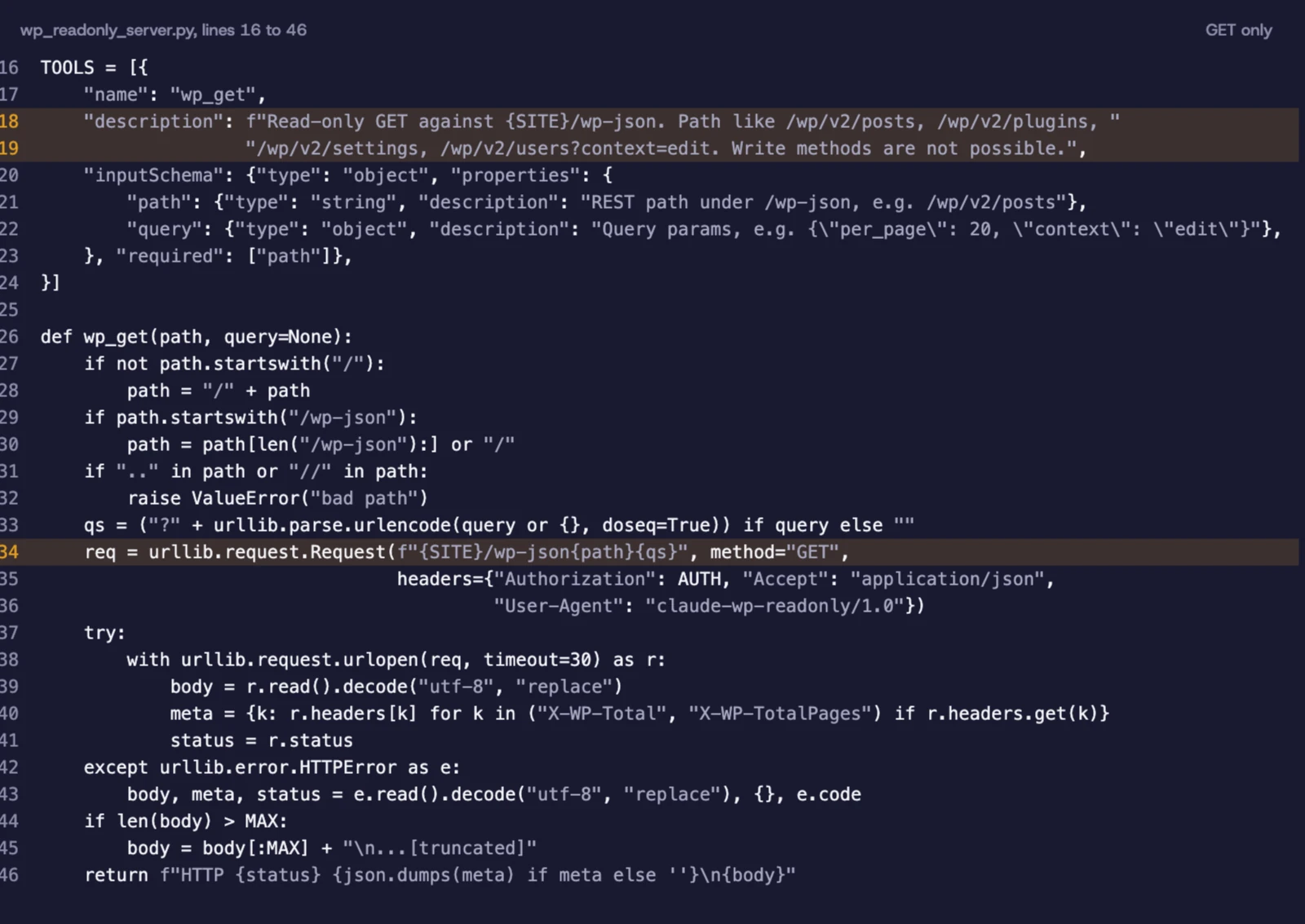
It cannot write.
Not because I told the model not to. Because the server has no way to do it.
For me, that is a better starting point than trusting a prompt. A tool that cannot write is a safety control that lives in code.
Google Search Console
The second one is named gsc-readonly. It is 1 Node file, 87 lines, with 4 tools:
- List the Search Console sites.
- Search analytics: clicks, impressions, CTR and position.
- List sitemaps.
- Inspect a URL.
It wraps Google’s own API, so I don’t rebuild anything. I just make what exists reachable.
An AI app can now see the 4 tools and pick the right one. Ask about a URL and it uses the inspect tool. Ask about performance and it uses analytics.
It is read-only on purpose. I want to read the data, not hand an integration the power to change my account.
Safari
This is the exception.
My Safari server is 1 Python file, 220 lines, with 9 tools: tabs, open, select tab, close tab, read, JavaScript, click, type and history.
It drives my real signed-in Safari through AppleScript.
There is no Safari API being wrapped here.
That is why I don’t think every MCP server has to be an API adapter. Sometimes what you want to expose is a local capability with no convenient API.
It also has rules in code:
- It never types into password fields.
- Clicks on buy, pay, delete, send or post style controls are refused unless
confirm=trueis passed.
There is a difference between exposing a tool and handing over unrestricted control.
5. MCP or API: how I choose
Here is the decision as a table.
| Area | API | MCP |
|---|---|---|
| Main purpose | Let applications talk to services | Let AI apps discover and use outside capabilities |
| Who decides the calls | Your code, in a fixed order | The AI app, at run time |
| Discovery | Docs and your own glue code | Standard list methods |
| What it does | Provides the real service | Wraps an API or exposes another capability |
| Best for | Fixed workflows | AI-driven workflows |
| Reuse | Depends on how you wire it | One server can work in different AI apps |
Neither one wins every time.
My rule is simple:
- Fixed pipeline: call the API directly.
- You want the model to choose the operation: use MCP.
- An API already does the job: wrap it, don’t copy it.
- No API exists: MCP can expose the capability another way.
I would not add MCP to every project.
Sometimes a plain API request is exactly right.
6. How MCP connects to the AI app
The MCP docs define 2 transports.
stdio. This is what my 3 servers use. The AI app starts a local process and talks to it over standard input and output. No public endpoint needed.
Streamable HTTP. This one is for remote servers. It works over HTTP POST, supports bearer tokens and API keys, and the docs recommend OAuth (modelcontextprotocol.io, read 19 Nov 2026).
Which one you pick depends on where the server runs.
In Claude Code, a local stdio server is added like this:
claude mcp add [options] name -- command [args...]A remote one like this:
claude mcp add --transport http <name> <url>(code.claude.com/docs/en/mcp, read 19 Nov 2026)
7. Start read-only and add power slowly
This is my biggest tip if you are trying MCP.
Start read-only.
I would not expose tools that publish, delete, send messages or take payments on day one.
Looking at something and changing something are very different permissions.
My WordPress and Search Console servers are both read-only. That is on purpose.
A few habits I would keep from the start:
- Few tools: don’t expose 30 operations when 3 will do.
- Credentials outside the code: use environment variables or a proper sign-in method.
- Narrow access: don’t let a tool reach paths it doesn’t need.
- Confirmation for risky actions: don’t count on the model remembering every rule.
- Small replies: a huge response is extra context the app has to carry.
MCP tools are model-controlled. The model can find and call them based on the task (modelcontextprotocol.io, read 19 Nov 2026).
That is useful.
It also means human oversight matters, and the docs talk about the host asking for approval.
I prefer limits at more than one level, in the server and in the host.
8. The limits I want to be honest about
MCP is still changing.
My Search Console and Safari servers declare protocol version 2024-11-05.
The docs I read on 19 Nov 2026 are the 2026-07-28 revision, and it adds a server/discover request.
I have not tested my servers against that revision.
So I won’t claim they work with everything in the newer protocol.
There are also things I have not measured:
- Speed against direct API calls.
- Cost differences between API and MCP workflows.
- Token overhead when many tools are exposed.
- Compatibility with the 2026-07-28 revision.
I would test these before any big design decision.
I also would not assume MCP makes an AI app better by itself.
I expect too many tools give the model more to weigh. A flaky API stays flaky behind MCP. A fully predictable workflow may gain nothing from another layer.
Use it where it solves a real problem.
9. Where to go next
If you are new to this, learn the basics before connecting 10 services.
I have covered the related pieces:
- What an MCP server is: the basic concepts and how the protocol fits in.
- Build one in Python: a walk-through of a small server.
- MCP vs CLI: another comparison, for when a shell is already there.
- Claude Code hooks: another way to put limits around what an AI does.
My suggestion: pick one thing you already do through an API, expose 1 or 2 read-only tools, connect it to an AI app, and see if it feels right.
You don’t need a big architecture to see the value.
10. My checklist before choosing MCP or API
Before I decide, I go through these:
- Does an API already provide this?
- Is the workflow fixed, or should the AI decide?
- Does the AI app need to discover tools on its own?
- Can I expose only the operations I need?
- Can I start read-only?
- Are credentials outside the source code?
- Have I added limits for risky actions?
- Do I know which protocol version my server declares?
- Have I tried it in the AI app I will actually use?
If most of the answers say predictable logic, an API is probably enough.
If you want the AI to decide what to reach for, MCP is worth a try.
The short version
It is not MCP vs API.
After running these 3 servers, my view is simple. MCP is a way to make existing functionality reachable by AI apps through one common protocol.
My WordPress and Search Console servers show a small MCP layer over an existing API.
My Safari server shows MCP exposing something with no API to wrap.
I would still use an API for fixed pipelines. I would use MCP when the model should decide what to call, or when I want the same tools in more than one AI app.
You don’t have to pick one.
Often the answer is both.
Frequently asked questions
Is MCP replacing REST APIs?
No. MCP does not replace REST APIs or the services behind them. It gives AI apps a standard way to find and use outside capabilities, and that can include an existing REST API.
Can an MCP server work without an API?
Yes. A server can expose capabilities through other routes, such as local processes or operating system automation. My Safari server uses AppleScript instead of wrapping a Safari API.
Should I use MCP or an API for AI agents?
It depends on the workflow. Use an API directly when you are building a fixed sequence yourself. Use MCP when you want an AI app to discover tools and choose operations at run time.
What about you?
Are you connecting your AI work straight to APIs, through MCP servers, or both?
I would like to hear what you are trying.