MCP Server Security: 8 Fixes and a Version Number Trap
On this page, 10 sections
Eight MCP server fixes shipped on 18 November. Your package manager may not offer them.
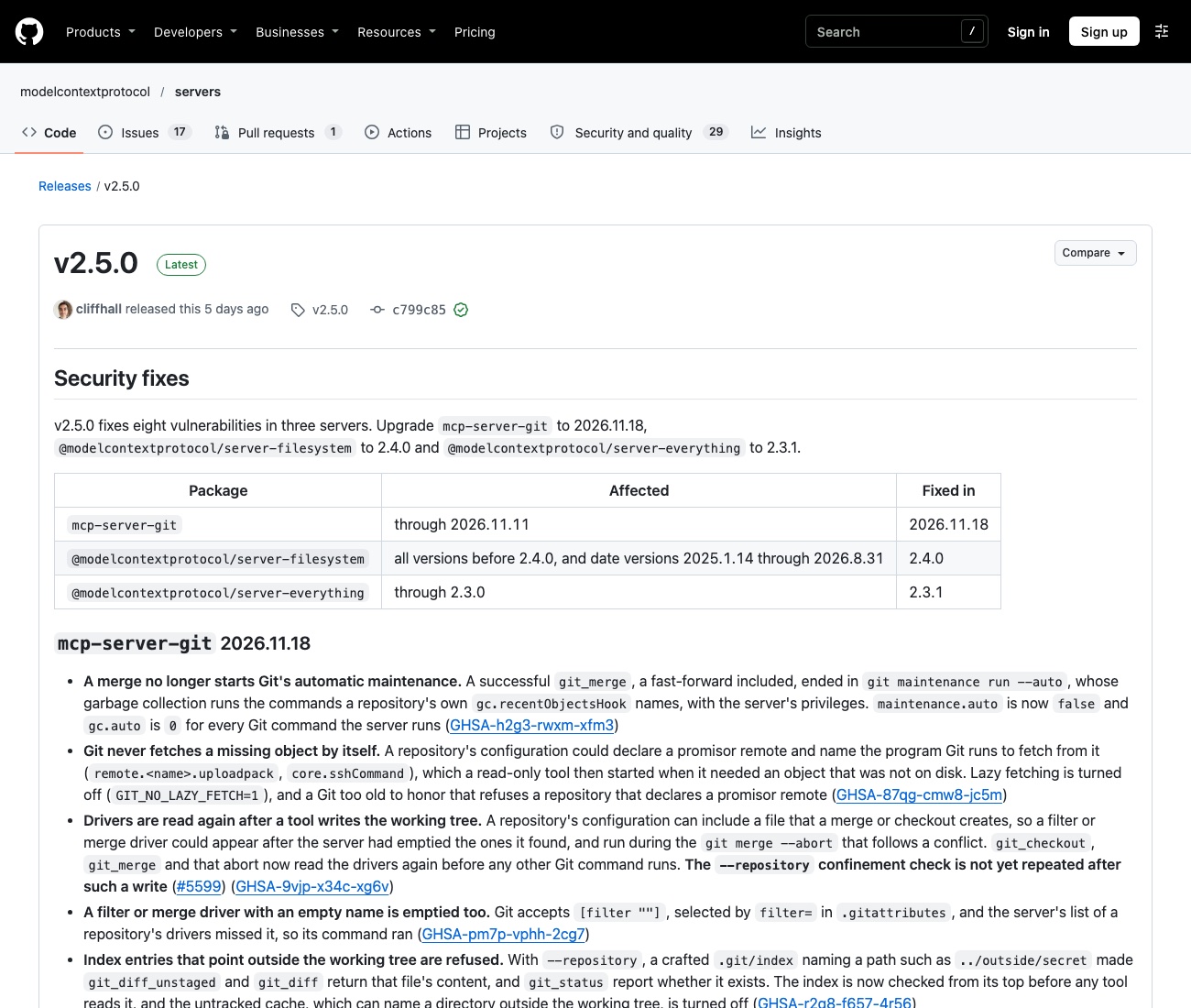
On 18 November, the MCP project released v2.5.0 of its reference servers. It fixes eight security problems in three of them: the Git server, the filesystem server and the “everything” test server.
The part I care about most is a note at the bottom of the release page. If you installed the filesystem server a while ago, your package manager may never tell you a fix exists.
I read the release page and the advisories it links on 23 November 2026, then looked for these servers on my own machine. This post covers what was fixed, the version number trap, what is still open, and the check I ran.
1. What v2.5.0 fixed
The v2.5.0 release notes list every fix with a GitHub advisory number. Here is the short version, by package.
| Package | Affected versions | Fixed in | Fixes |
|---|---|---|---|
| mcp-server-git (PyPI) | through 2026.11.11 | 2026.11.18 | 6 |
| @modelcontextprotocol/server-filesystem (npm) | before 2.4.0, and date versions 2025.1.14 through 2026.8.31 | 2.4.0 | 1 |
| @modelcontextprotocol/server-everything (npm) | through 2.3.0 | 2.3.1 | 1 |
2. The Git server: six fixes, one pattern
The six Git fixes look different, but they share one idea. A Git repository carries its own configuration, and that configuration can name programs for Git to run. When an agent points the Git server at a repository it did not create, it is trusting someone else’s config.
- After a merge, the server ran Git’s automatic maintenance, and its garbage collection can run a command the repository names (GitHub advisory).
- A repository could declare a promisor remote and name the program used to fetch from it. A read-only tool then started that program when it needed an object that was missing (GitHub advisory).
- Filter and merge drivers could appear after a merge or checkout wrote a file, and then run during the
git merge --abortthat follows a conflict (GitHub advisory). A driver with an empty name slipped past the same check (GitHub advisory). - A crafted .git/index could name a path such as ../outside/secret, so git_diff returned the content of a file outside the repository (GitHub advisory).
- A submodule’s own configuration could run programs when git_diff looked inside it (GitHub advisory).
My reading: a tool that only looks read-only can still start a program, if the repository it opens is hostile. So “I only let the agent read” is not a safety plan. What matters is whose repository the agent is allowed to open.
3. The filesystem and everything fixes
In the filesystem server, list_directory, list_directory_with_sizes, directory_tree and search_files checked a directory and then listed it. In between, the directory could be swapped for a symlink, so names of entries outside the allowed folders could come back (GitHub advisory). The fix lists a directory in place after checking it, on Linux and macOS.
In the everything server, the gzip-file-as-resource tool tried to block private addresses, but it read an address in the NAT64 range as public. On a network with a NAT64 gateway, a URL could reach a private IPv4 address through it (GitHub advisory).
One more fact from the project’s own README. The servers in that repository are described as reference implementations that demonstrate MCP features and SDK usage, “not as production-ready solutions”. If one of them runs your daily work, you are running a demo.
4. The version number trap
The TypeScript servers used to carry date versions such as 2025.1.14 or 2026.8.31. They moved to semantic versions, starting at 1.0.0. The release note says it plainly: package managers rank 2.4.0 below every 2025.x and 2026.x version, so they will not offer it as an upgrade.
If you are on a date version of the filesystem server, the fix is an explicit install. The latest tag points to 2.4.0 as of 23 November:
npm install @modelcontextprotocol/server-filesystem@latestOn 23 November I confirmed on npm that the latest filesystem server is 2.4.0 and the latest everything server is 2.3.1. The Git server is a Python package, and PyPI lists 2026.11.18 as its newest version, so a normal upgrade works there.
5. Two things are still open
The release notes also say what is not fixed. For the Git server, the confinement check set by the --repository option is not repeated after a merge or checkout writes files (issue 5599). For the filesystem server on Windows, a directory listing is not anchored yet (issue 5600).
If you run either setup, treat that server as less trusted until those issues close.
6. I checked my own machine
I wanted to know whether any of this applied to me. I looked in the places this kind of server hides: pip, uv, global npm, the npx cache, and my two Claude config files.
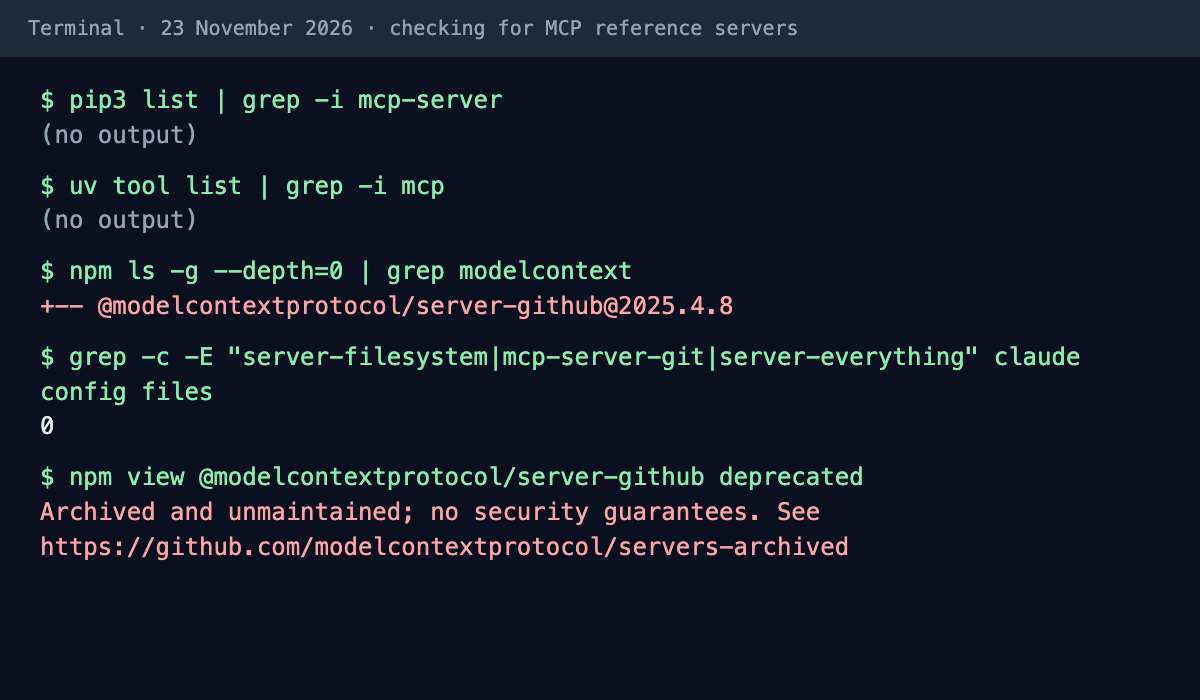
None of the three affected servers is installed, and my config files name none of them. So v2.5.0 does not touch me.
But the check turned up something else. A global npm package, @modelcontextprotocol/server-github 2025.4.8, is installed, and one of my configured servers still launches it. npm marks that package as deprecated with this message: “Archived and unmaintained; no security guarantees.”
That means the fixes above will never reach it. GitHub now publishes its own maintained server at github/github-mcp-server. Moving to it is on my list.
7. Where this sits in the bigger picture
Adversa AI published an MCP Security Top 25 on 9 November 2026. Five of the 25 are rated critical: prompt injection, command injection, tool poisoning, remote code execution and unauthenticated access. Path traversal, which is what the filesystem and index fixes above are about, is ranked 10th.
Adversa also says command injection affects 43% of MCP servers. That is their figure, and I have not checked it myself. I mention it because the Git fixes above are the same family: input from outside that ends up starting a program.
If you want the basics first, I wrote about what an MCP server is and about why MCP and an API are not the same thing. On the practical side, see the MCP servers that exist for WordPress.
8. What I would do this week
- List every MCP server your agent can start. Look at pip, uv, global npm and your client config file. It takes about 5 minutes.
- For each one, write down who maintains it. If npm says deprecated or archived, plan its replacement.
- If you run the filesystem server on a date version, install 2.4.0 by name.
- If you run the Git server, update to 2026.11.18, and do not point it at repositories you did not write.
- Pin versions in your config, so a change in a package does not arrive silently.
I run this kind of check on my own setup before I write about it. The same approach, applied to my server logs, is in my post on ChatGPT Business Hub against my access log.
Frequently asked questions
Do I need to update if I only use the Git server on my own repositories?
The six Git fixes are about hostile repository configuration, so your own repositories are lower risk. Updating to 2026.11.18 is still cheap, and it removes the question.
Why won’t npm offer me the filesystem server 2.4.0?
The package moved from date versions to semantic versions. Package managers rank 2.4.0 below every 2025.x and 2026.x version, so they do not treat it as newer. Install it with the latest tag: npm install @modelcontextprotocol/server-filesystem@latest.
Are the MCP reference servers meant for production?
The project’s README calls them reference implementations that demonstrate MCP features and SDK usage, and says they are not production-ready solutions. Evaluate your own security needs before relying on one.
How can I tell if an MCP package is still maintained?
Ask npm or PyPI. On npm, run npm view with the package name and the deprecated field. For @modelcontextprotocol/server-github, npm returns “Archived and unmaintained; no security guarantees.”