Two Schedulers on One Site: WP-Cron Against Action Scheduler
On this page, 9 sections
Two schedulers run on a WooCommerce site, and only one of them uses a database table. Here is the other one, in full, from wp-includes/cron.php in WordPress 7.1:
$cron['version'] = 2;
$result = update_option( 'cron', $cron, true );
Every scheduled event on the site is one PHP array, serialized into one row of wp_options, rewritten in full every time anything is scheduled or unscheduled.
The third argument to update_option() is boolean true, so that row is autoloaded on every request.
That is the design. Everything else about WP-Cron follows from it. I read WordPress 7.1, downloaded from wordpress.org on 3 September 2026, and Action Scheduler 4.1.0 from the woocommerce/action-scheduler repository on the same day.
What the option-array model costs
Three consequences, all of them structural rather than incidental.
Read whole, written whole
It is read whole and written whole. _get_cron_array() calls get_option( 'cron' ) and returns the entire structure.
There is no way to query for one hook. Scheduling one event means unserializing every event, adding to the array, reserializing and writing the lot back.
Exempt from the 6.6 size guard
It is exempt from the 6.6 autoload size guard. WordPress 6.6 added a 150,000 byte threshold above which an option is no longer autoloaded by default.
That guard sits on the wp_default_autoload_value filter, and passing boolean true returns from wp_determine_option_autoload_value() before the filter is ever reached.
On a site with a large queue the cron option can be megabytes and still be loaded on every request. I traced that whole mechanism in the autoload audit.
Deduplication is a linear scan. wp_schedule_single_event() builds md5( serialize( $event->args ) ) and walks every timestamp in the array looking for a match within ten minutes either side.
Two events that differ only in argument order, or in an integer versus a numeric string, hash differently and both get scheduled. The core docblock warns about this directly.
Measure yours before assuming it is fine:
wp db queryforLENGTH(option_value)andautoloadon the row whereoption_name='cron'. That is the byte cost you pay on every request.wp cron event list --format=countfor the number of scheduled events.wp cron event list --fields=hook,next_run_relativeto see what is actually queued.
Action Scheduler stores rows instead
Three tables, defined in classes/schema/ActionScheduler_StoreSchema.php at schema version 8. The one that does the work is actionscheduler_actions.
Its columns are action_id, hook, status, scheduled_date_gmt and scheduled_date_local, priority, args, schedule, group_id, attempts, the two last_attempt columns, claim_id and extended_args.
Nine indexes, and what they buy
Nine secondary indexes sit on top of that, keyed on hook plus status plus date, on status plus date, on date alone, on args, on group, on last attempt, on claim plus status plus priority plus date, on status plus last attempt, and on status plus claim.
That is what buys you the things WP-Cron cannot do: query one hook, count pending work, filter by status, and above all claim a batch of rows so two workers do not run the same job.
The claim_id column and the separate actionscheduler_claims table are the concurrency control that the option array has no way to express.
Nine indexes also means every insert writes nine index entries, and a store that queues a hundred thousand actions pays for that. It is a real trade, not a free upgrade.
The args column has a spill
Note args varchar(191) with extended_args varchar(8000) beside it. Arguments above the index-safe length spill into the second column, which is not indexed, so lookups by argument get slower for those rows.
Action Scheduler does not take over. It rides on WP-Cron.
This is the part that gets stated wrongly most often. In classes/ActionScheduler_QueueRunner.php, WP_CRON_HOOK is action_scheduler_run_queue and WP_CRON_SCHEDULE is every_minute. It calls wp_schedule_event() when nothing is scheduled, then hooks its own run() to that event.
The every_minute schedule is one it adds itself.
There is also an async dispatcher that fires a loopback request, but the reliable path is the cron event.
If WP-Cron is broken, both are broken
So if WP-Cron is broken on your site, Action Scheduler is broken too. Setting DISABLE_WP_CRON without a working system cron entry stalls both.
The failure looks different, because Action Scheduler has an admin screen that shows a growing pending count while WP-Cron just quietly does nothing, but the cause is the same one I went through in why posts miss their schedule.
Which scheduler runs a given job is decided by the plugin author, not by the site. WooCommerce puts its own recurring work into Action Scheduler.
Core events like wp_version_check, wp_scheduled_delete and delete_expired_transients stay in the cron option. Both queues are live at once, and neither knows about the other.
What the retention actually is
From classes/ActionScheduler_QueueCleaner.php in 4.1.0. The class holds $month_in_seconds = 2678400, which is 31 days. The lifespan runs through action_scheduler_retention_period, and failed actions get three times that through action_scheduler_retention_period_for_failed.
So: 31 days for completed and cancelled actions, 93 days for failed ones. The default purge list in the same file is only two statuses, STATUS_COMPLETE and STATUS_CANCELED.
Nothing purges pending
Nothing purges pending. A recurring action whose plugin was deactivated without cleanup leaves pending rows in the table permanently, and no retention setting will remove them. That is usually where a table with millions of rows came from.
The 93 day failed-action retention was introduced in 4.0.0, released 16 June 2026, and the changelog lists it as a breaking change.
The comment in the source explains the choice: three months to align with a quarterly accounting cycle, with a filter for stores that need a different period for PCI DSS reasons.
The batch size of 20, and when it stopped losing the race
This is the widely repeated criticism, and it needs a date attached to it, because it is no longer true on a current install.
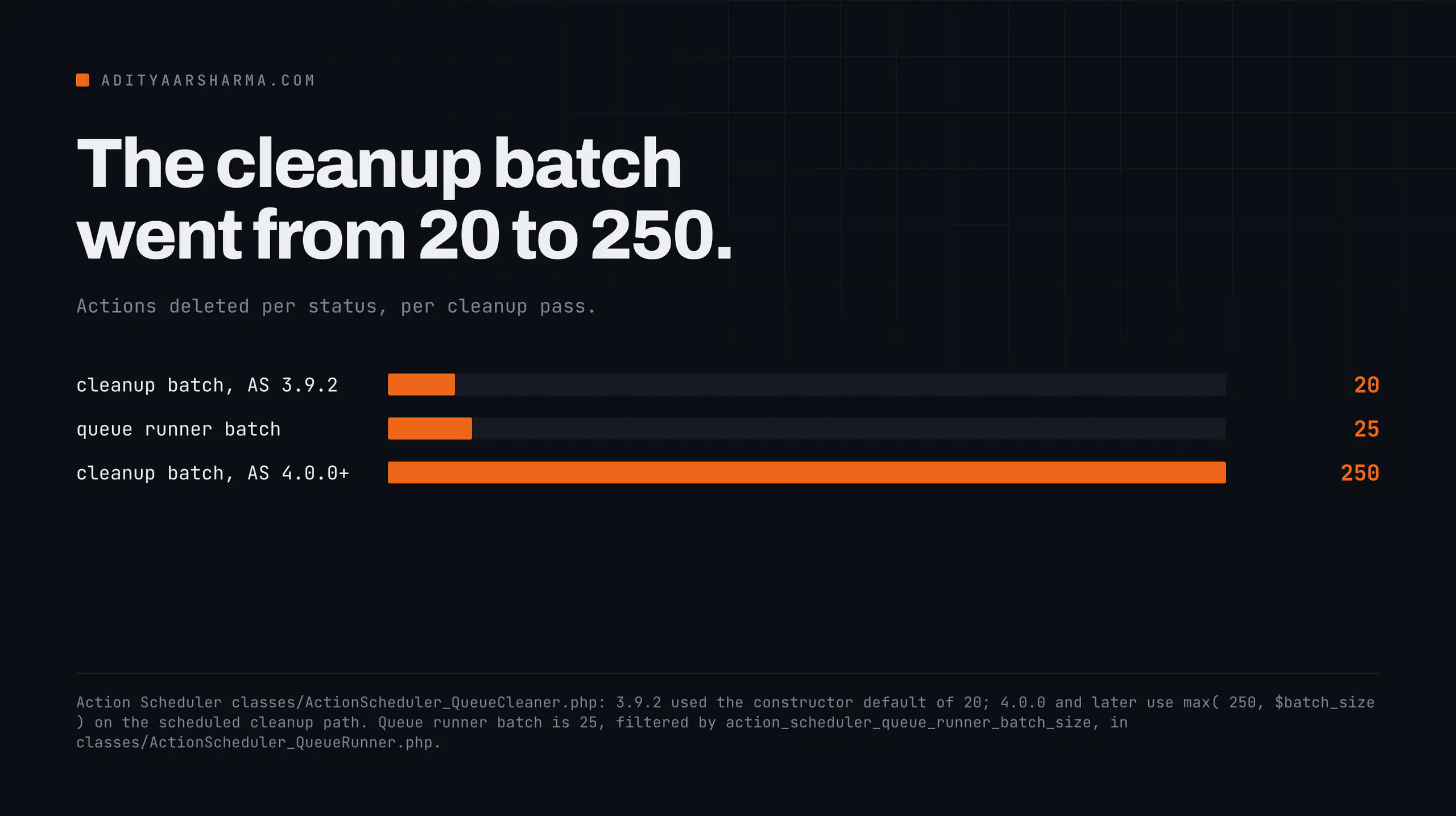
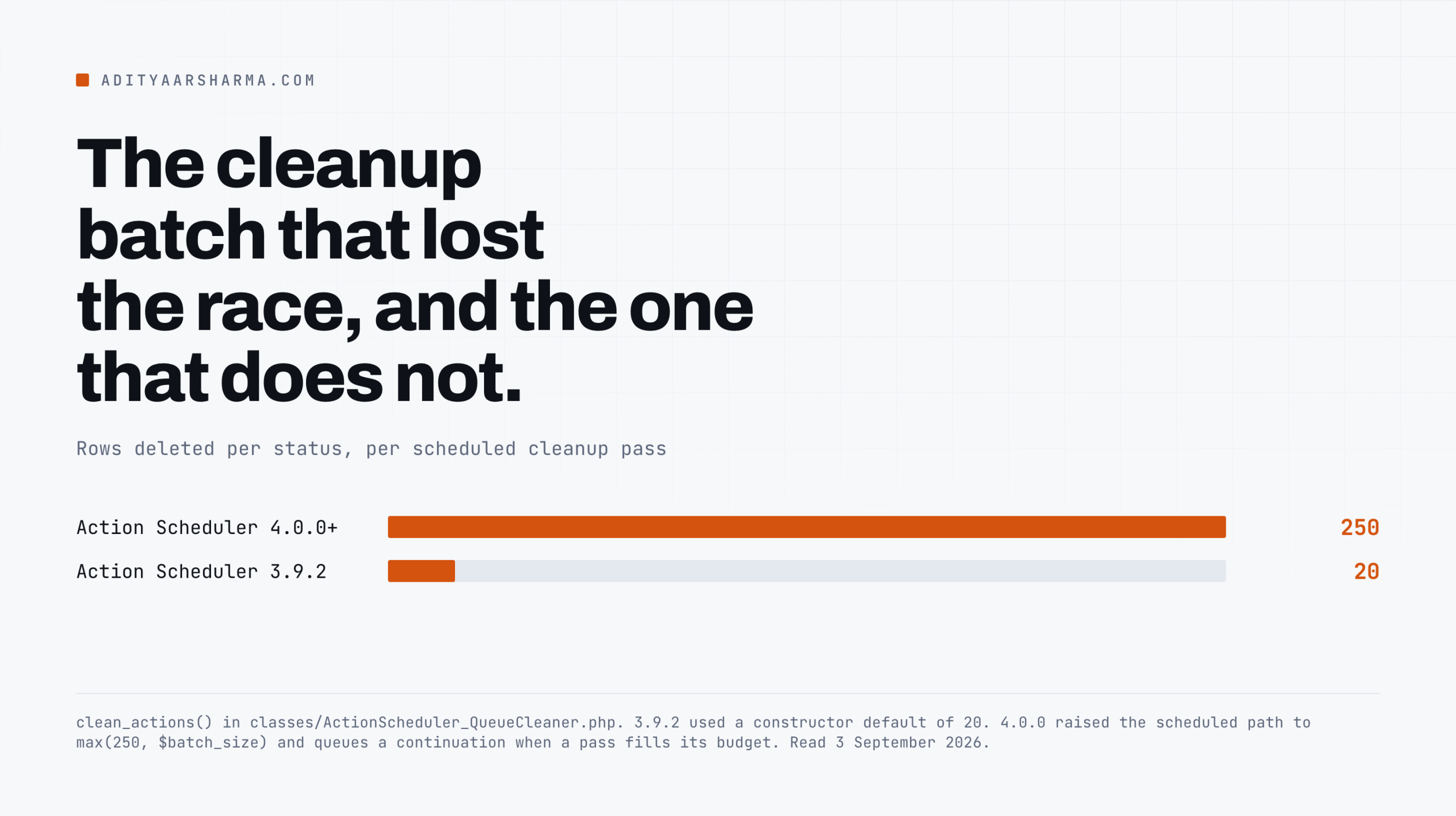
In Action Scheduler 3.9.2, clean_actions() took its $batch_size from a constructor default of 20 and passed it straight into query_actions() as per_page, once per status.
Why twenty lost the race
Twenty rows per status, per cleanup pass, and cleanup ran once at the start of a queue run. A store completing several hundred actions an hour deleted twenty completed and twenty cancelled per pass.
The table grew faster than the cleaner emptied it, and it never caught up. That is the race, and it was real.
Version 4.0.0 changed it. The same method in 4.1.0:
$is_scheduled_cleanup = doing_action( self::RUN_SCHEDULED_CLEANER_HOOK )
	|| doing_action( self::CONTINUE_SCHEDULED_CLEANER_HOOK );
// 250 balances replication safety, backlog clearance speed, and claim slot duration on high-volume stores.
$iteration_batch_size       = $is_scheduled_cleanup ? max( 250, $batch_size ) : $batch_size;
And at the end of the same method there is a continuation: if the pass was a scheduled cleanup and there is more to do, it calls as_schedule_single_action() on CONTINUE_SCHEDULED_CLEANER_HOOK straight away.
If a pass fills its budget, it queues another pass immediately. Cleanup keeps going until the backlog is gone, rather than doing a fixed twenty and stopping.
Cleanup also became its own daily action at 3am site time, from register_recurring_actions(), rather than something bolted onto the front of a queue run.
The constructor default of 20 is still there. It applies to the inline cleanup path during a queue run, deliberately, so that path does not get heavier.
Which version are you actually on
That is the only question that matters here, and the answer is not the version on wordpress.org. WooCommerce bundles Action Scheduler rather than depending on the standalone plugin.
WooCommerce 11.0.1, the current release on 3 September 2026 with 7,000,000 active installs according to the wordpress.org plugin API, pins woocommerce/action-scheduler at 4.0.0 in its composer.json.
The standalone plugin is at 4.1.0. Both have the fix. An older bundled copy in some other plugin does not, and Action Scheduler resolves to the highest version present across every plugin that ships it.
Check, do not assume. wp eval 'echo ActionScheduler_Versions::instance()->latest_version();' prints the version that actually resolved. Then run the status count:
wp db query "SELECT status, COUNT(*) AS n
  FROM $(wp db prefix --allow-root)actionscheduler_actions
  GROUP BY status ORDER BY n DESC;"
Group by hook, status instead to see which hook is responsible, and clear the safe statuses with wp action-scheduler clean --before='31 days ago' --batch=500 --status=complete,canceled.
If the second query shows a large pending count against a hook you do not recognise, that is a deactivated plugin’s leftovers and no retention setting will clear it.
Throughput, which is a separate limit
Cleanup is not the only budget. From ActionScheduler_QueueRunner.php and the abstract runner it extends:
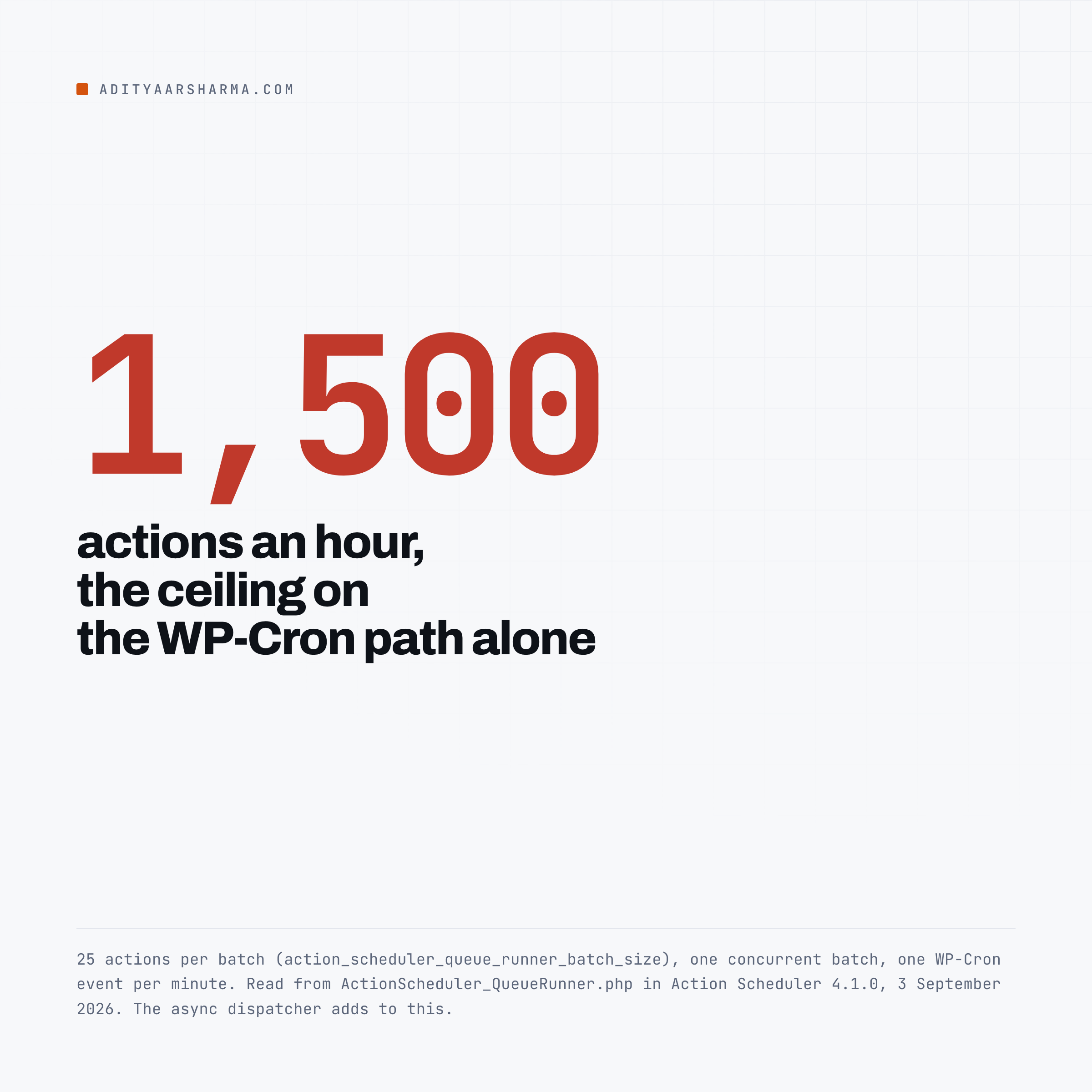
- 25 actions per batch, filter
action_scheduler_queue_runner_batch_size - 30 second time limit per batch, filter
action_scheduler_queue_runner_time_limit - 1 concurrent batch, filter
action_scheduler_queue_runner_concurrent_batches - memory ceiling at 90 percent of the PHP limit, defaulting to 128M when
memory_limitis unreadable
One batch of 25 per minute is a ceiling of 1,500 actions an hour on the WP-Cron path alone, before the async dispatcher adds anything.
A store generating more than that will fall behind no matter how well the cleaner performs, and raising the retention period does not help. If the pending count grows steadily, that is a throughput problem, not a cleanup problem.
What does not work
Truncating the tables. It removes pending actions along with completed ones, including recurring actions that will not reschedule themselves because the row that would have triggered them is gone. Use wp action-scheduler clean with an explicit status filter.
Setting action_scheduler_retention_period to a very small number. It reduces how long rows survive, not how fast they are deleted. If the cleaner is already behind, a shorter retention just makes the backlog it is chasing larger.
Moving core events to Action Scheduler. There is no supported way to do it, and core’s own events assume the WP-Cron API. Both queues stay.
Fixing the tables while ignoring the cron option. The two are independent. A store can have a healthy actions table and a two megabyte autoloaded cron row from something else entirely.
The other queries worth running on a store are in the WooCommerce performance breakdown.
The one thing to do
Run the status count query above. If pending is larger than complete, you are behind on throughput and the cleaner is not your problem.
If complete is enormous and the site is on a bundled Action Scheduler older than 4.0.0, you are on the wrong side of a fix that already shipped.
MRK WP has a short practical walkthrough of clearing an oversized scheduled action log. It covers the admin screen and the table cleanup rather than the mechanism, so it pairs with the queries above rather than replacing them.

Resources
- actionscheduler.org, the official documentation
- woocommerce/action-scheduler on GitHub, including the changelog quoted above
- WP-Cron in the Plugin Handbook
- wp-includes/cron.php on wordpress-develop
- wp cron event in the WP-CLI command reference
- WP Crontrol, for inspecting the cron option through the admin