block.json and the asset loading nobody configures
On this page, 10 sections
Same post, same theme, same WordPress install. The only difference between these two numbers is one filter:
| CSS on that one post | WordPress default | Block assets forced off |
|---|---|---|
twentytwentyone/style.css | 155,367 B | 155,367 B |
twentytwentyone/assets/css/print.css | 2,897 B | 2,897 B |
block-library/style.min.css | not sent | 140,761 B |
| inline | 28,399 B | 18,515 B |
| Total CSS | 186,663 B | 317,540 B |
should_load_separate_core_block_assets filter.The post contains a paragraph, a heading, a list and a code block. Nothing else.
In the second run WordPress sends 140,761 bytes of stylesheet covering all 115 core blocks so it can style four of them. That is 130,877 extra bytes of CSS on a page that needed roughly 13,000.
The number people quote for this, 140,761 bytes, is real. I checked it two ways: ls -l on wp-includes/css/dist/block-library/style.min.css inside the WordPress 7.1 release zip, and a curl of the same file over HTTP from a running 7.1 install.
Both give 140,761. The RTL build is 140,818. The unminified style.css is 164,440, which is what you get in any environment with SCRIPT_DEBUG on, including wp-env out of the box.
What is not true any more is the claim wrapped around that number. Everything below was measured on 2 September 2026 against WordPress 7.1 in Docker, using @wordpress/env pinned to the 7.1 tag.
The filter default is false. The default behaviour is not.
Here is the function everyone points at, in wp-includes/script-loader.php:
function wp_should_load_separate_core_block_assets() {
	if ( is_admin() || is_feed() || wp_is_rest_endpoint() ) {
		return false;
	}
	return apply_filters( 'should_load_separate_core_block_assets', false );
}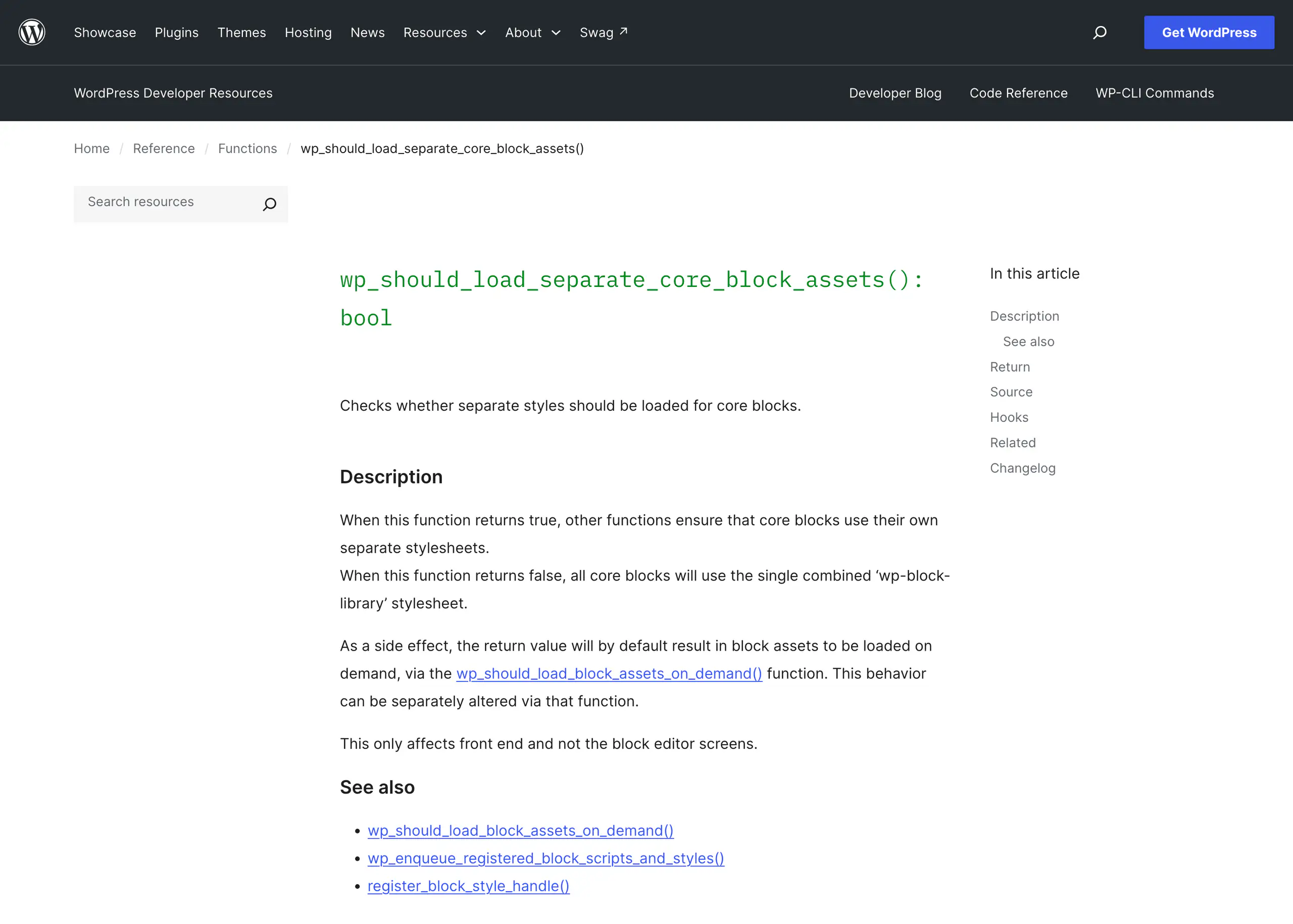
The default argument is false, so reading that one function tells you the combined stylesheet always loads. It does not, because core itself adds filters before that function is ever called.
Core adds the filters before that function ever runs
- Block themes:
_add_default_theme_supports()inwp-includes/theme.phpadds__return_trueto bothshould_load_separate_core_block_assetsandshould_load_block_assets_on_demand. - Classic themes:
wp_load_classic_theme_block_styles_on_demand()does the same job. It is marked@since 6.9.0and moved to thewp_default_stylesaction at priority 0 in 7.0.
The registration line in default-filters.php carries its own comment: it must run before wp_default_styles() and register_core_block_style_handles(). That is why it sits at priority 0.
So since WordPress 6.9, a classic theme gets on-demand block styles too, unless it opts out. The function bails early if wp_is_block_theme() is true, then checks wp_should_output_buffer_template_for_enhancement() and bails if the site has turned the template output buffer off.
That gate matters: the on-demand path needs the buffer, because block styles are discovered while blocks render and then hoisted from the footer into the head by wp_hoist_late_printed_styles().
What I measured, rather than read
I confirmed the outcome rather than trusting the reading. On WordPress 7.1 with Twenty Twenty-One, a classic theme, no plugins, no filters of mine: the combined stylesheet does not load.
On the same install with the two filters forced back to false, it does. That is the pair of measurements at the top of this post.
What a real page loads when on-demand is on
Here is every stylesheet on that same post, with SCRIPT_DEBUG off so the numbers are the ones a visitor gets:
| Handle | Bytes |
|---|---|
wp-block-library-inline-css (common.css) | 4,274 |
wp-block-search-inline-css | 2,521 |
wp-block-latest-posts-inline-css | 2,316 |
wp-block-latest-comments-inline-css | 1,374 |
wp-block-heading-inline-css | 1,247 |
wp-block-paragraph-inline-css | 739 |
wp-block-categories-inline-css | 403 |
the core/code block handle | 253 |
wp-block-group-inline-css | 197 |
wp-block-list-inline-css | 174 |
wp-block-archives-inline-css | 172 |
| Total core block CSS | 13,670 |
global-styles-inline-css (theme.json output) | 13,904 |
SCRIPT_DEBUG off, WordPress 7.1, 2 September 2026.Zero extra HTTP requests. Every one of those was inlined into the head. The search, latest posts, latest comments, categories and archives entries are the theme’s sidebar widgets, not the post.
13,670 bytes against 140,761 is a factor of ten, and it is the default now.
Inlining has a 40,000 byte budget
Inlining has a budget. wp_maybe_inline_styles() sets $total_inline_limit = 40000, filterable through styles_inline_size_limit, and the docblock records that the default went from 20K to 40K in 6.9.
Stylesheets are sorted by size and inlined until the budget runs out; the rest get a link tag.
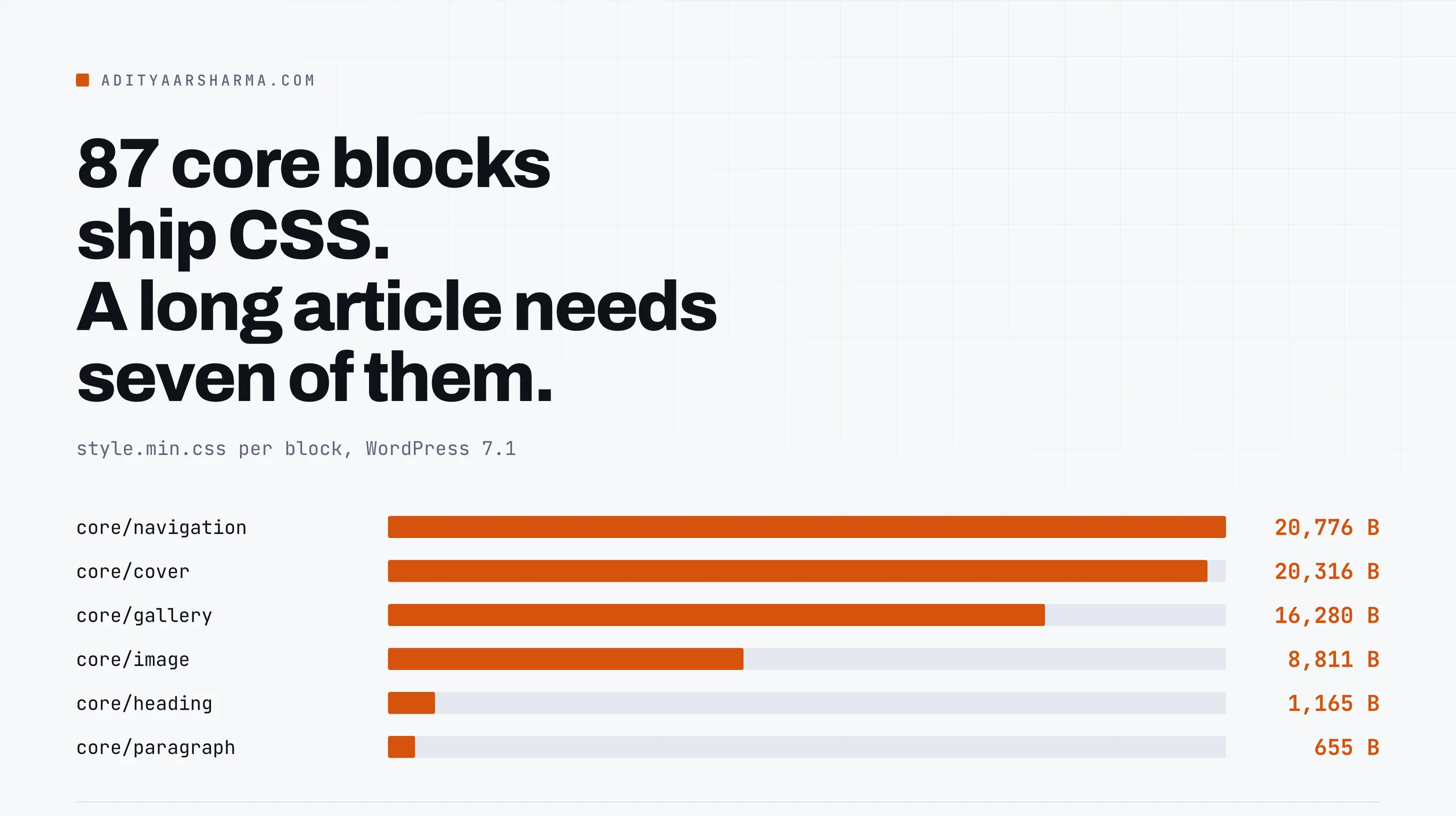
On a Twenty Twenty-Five page on the same 7.1 install, the Navigation block’s stylesheet, 20,776 bytes minified, was the only one that came over the wire as a file. Everything else on the page was inlined.
Why the big file got bigger
| File | WordPress 6.9.7 | WordPress 7.1 |
|---|---|---|
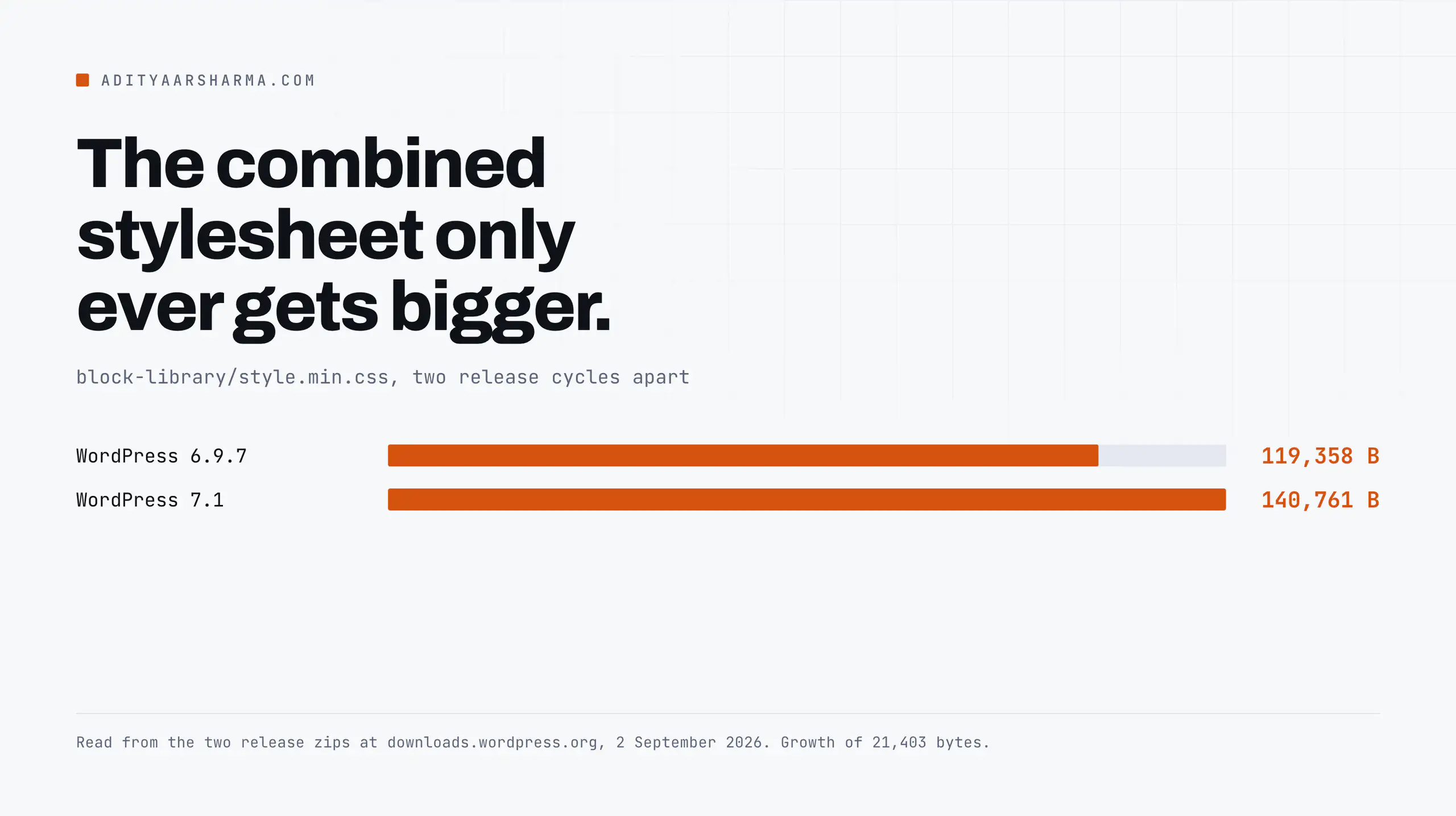
block-library/style.min.css | 119,358 bytes | 140,761 bytes |
block-library/style.css | 128,165 bytes | 164,440 bytes |
block-library/style-rtl.min.css | 119,140 bytes | 140,818 bytes |
Read from the two release zips on 2 September 2026.
The combined stylesheet grew 21,403 bytes across two release cycles, which is the argument for the on-demand default in a single line: the file that covers every block only ever gets bigger, and no individual site uses more of it than it did before.
Where the weight sits, block by block
Where the weight sits, per block, in the 7.1 minified builds:
| Block | style.min.css |
|---|---|
core/navigation | 20,776 bytes |
core/cover | 20,316 bytes |
core/gallery | 16,280 bytes |
core/social-links | 11,762 bytes |
core/playlist | 9,443 bytes |
core/image | 8,811 bytes |
core/table | 3,908 bytes |
core/button | 2,559 bytes |
core/heading | 1,165 bytes |
core/paragraph | 655 bytes |
core/code | 174 bytes |
core/list | 95 bytes |
87 of the 115 core block directories ship a style.min.css, and they total 135,164 bytes.
A long-form article using paragraph, heading, list, quote, image, code and separator needs 12,004 bytes of that. Navigation and Cover alone are 41,092 bytes, and a post page usually renders neither.
The five asset fields, and which one leaks
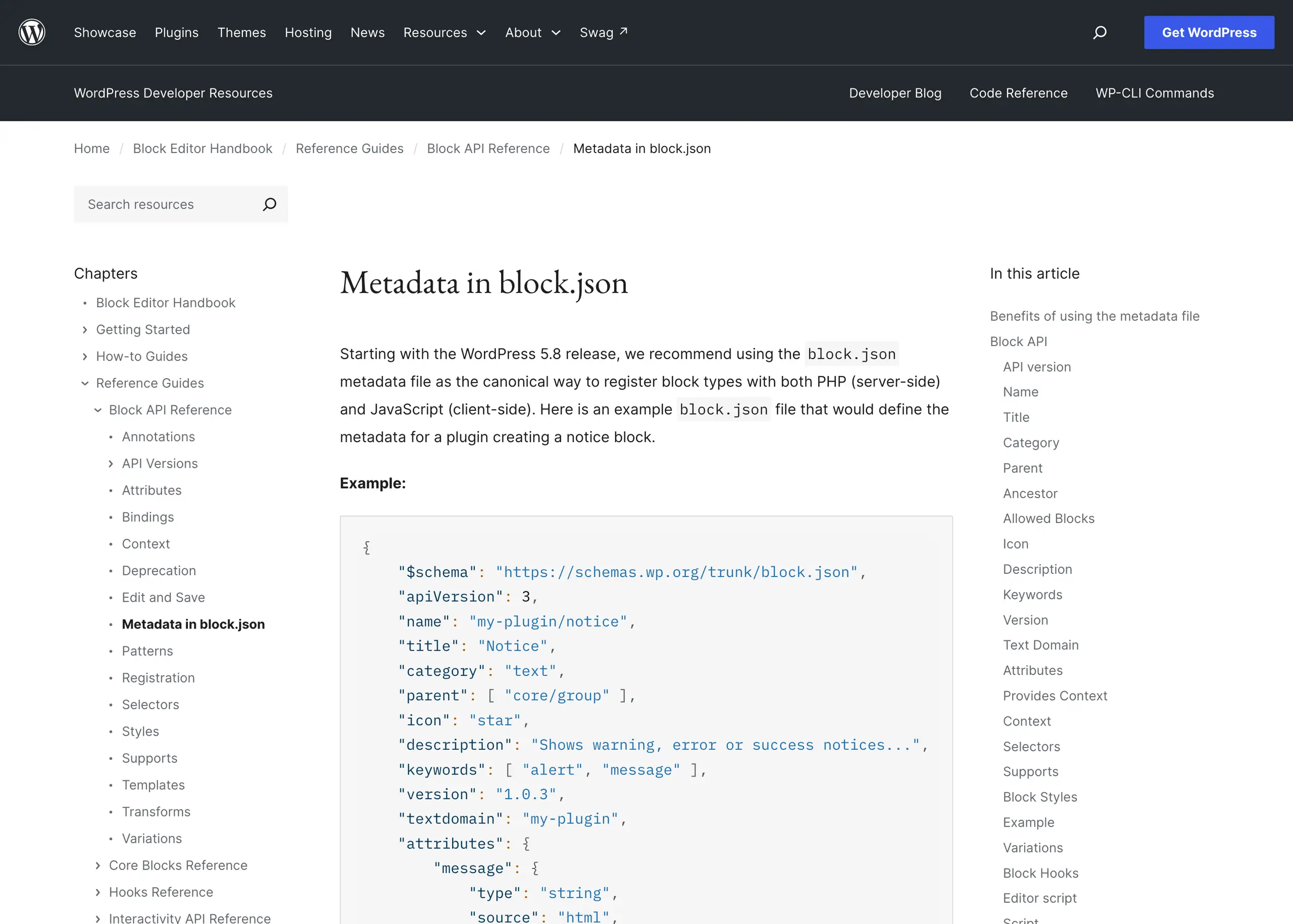
This is the part nobody configures, because five of the fields look interchangeable in the docs and are not. register_block_type_from_metadata() in wp-includes/blocks.php maps them like this:
| block.json field | WP_Block_Type property | Enqueued where |
|---|---|---|
editorScript | editor_script_handles | editor only |
editorStyle | editor_style_handles | editor only |
script | script_handles | editor and front end |
style | style_handles | editor and front end |
viewScript | view_script_handles | front end, on render |
viewScriptModule | view_script_module_ids | front end, on render, as a module |
viewStyle | view_style_handles | front end, on render |
The words on render are doing all the work
The words “on render” are doing all the work. The view* handles are enqueued from inside WP_Block::render(), so they only appear when the block appears.
The script and style handles are enqueued from wp_enqueue_registered_block_scripts_and_styles(), which loops every registered block type on the enqueue_block_assets hook.
That loop opens with an early return: if wp_should_load_block_assets_on_demand() is true it stops there. If it is false, it walks $block_registry->get_all_registered() and calls wp_enqueue_style() on every style_handle and wp_enqueue_script() on every script_handle it finds.
I proved the leak instead of inferring it
So when on-demand is off, every registered block’s script and style go on every page whether the block is there or not.
I proved it rather than inferring it. I scaffolded a block, gave it a script as well as a viewScript, and loaded a post that does not contain the block:
- On-demand off, page without the block:
aditya-code-copy-style-inline-cssandaditya-code-copy-script-jsboth present. - On-demand on, the WordPress default, page without the block: nothing.
- On-demand on, page with the block: the style, the script and
aditya-code-copy-view-script-js.
viewScript never leaked in either configuration, because it is not in that loop at all. script and style leaked in the configuration that is still one badly chosen plugin filter away.
That is the answer to why your CSS loads on every page. It is not a bug in your block. It is the style field doing what it says, on a site where something turned on-demand loading off.
Search your plugins for should_load_separate_core_block_assets and should_load_block_assets_on_demand before you blame anything else.
viewScript gets defer for free. script does not.
There is one more thing in register_block_script_handle() that is easy to miss:
$script_args = array();
if ( 'viewScript' === $field_name && $script_uri ) {
	$script_args['strategy'] = 'defer';
}
Only viewScript gets it. On the front end of my test post, aditya-code-copy-script-js comes out as a plain <script src> tag. aditya-code-copy-view-script-js comes out with data-wp-strategy="defer" and a real defer attribute.
Same plugin, same build, same directory. One blocks the parser and one does not, decided entirely by which key you typed in block.json.
If you have front-end JavaScript in script because a tutorial from 2020 put it there, moving it to viewScript is a two character edit that removes a render-blocking request from every page and stops the file loading on pages that do not use the block.
viewScriptModule, and when to reach for it
viewScriptModule is the third option, core since 6.5.0. It goes through register_block_script_module_id() and is enqueued with wp_enqueue_script_module() rather than wp_enqueue_script(), which means a real ES module with import maps rather than a global.
It is what the Interactivity API uses. Use it for new front-end code and keep viewScript for anything that has to run in an environment you do not control.
Check your own site in one command
To count the CSS bytes on a URL yourself, pull the page with curl -sL, extract every href ending in .css, fetch each one through wc -c, and add the length of every <style> block in the HTML. Files plus inline is the number that matters, rather than the request count.
Then the one-line diagnosis:
curl -sL "$URL" | grep -c "block-library/style"Reading the result
A 1 means something on your site has turned off separate block assets and you are shipping the whole 140,761 byte file. A 0 means you are on the modern path.
That check takes ten seconds and it is the first thing I would run on a site that feels heavy for no visible reason, before touching anything in the usual media query and CSS specificity rabbit hole.
The failure modes worth knowing
is_admin(),is_feed()andwp_is_rest_endpoint()short-circuit both functions to false before any filter runs. The editor always gets the combined stylesheet, which is why a page can look right in the editor and lose styles on the front end.- A classic theme that turns off the template enhancement output buffer loses on-demand loading entirely, because
wp_load_classic_theme_block_styles_on_demand()returns early whenwp_should_output_buffer_template_for_enhancement()is false. Anything that streams the response will do this. - The two filters are added at priority 0 specifically so a theme can override them at any normal priority. That is deliberate, and it is also why a plugin adding
__return_falseat priority 10 wins silently. - Registering a block on a hook later than
initmeansregister_core_block_style_handles()has already run and your handles may not exist when the enqueue loop reaches them. wp-envsetsSCRIPT_DEBUGto true in the development environment, so every CSS size you read there is the unminified one. Set it to false in.wp-env.jsonbefore you measure anything.
One thing to do in the next ten minutes
Open the block.json of every block you ship and look at the script key. If there is one, ask whether that code needs to run in the editor.
If it does not, rename the key to viewScript, rebuild, and load a page that does not contain the block.
The file should be gone from the source. That is the highest-value ten minutes in this whole post, and it costs you nothing but a rebuild.
The wider context for why so much of this moved at once is in the writeup on WordPress 7.0 being the biggest change since Gutenberg.
If you are chasing page weight rather than CSS specifically, bulk image compression is usually the larger win, and the client site management notes cover how to keep it from coming back.
Resources
- wp_should_load_separate_core_block_assets() in the code reference.
- wp_should_load_block_assets_on_demand(), added in 6.8.0, the function that decides on-render loading.
- Metadata in block.json, the reference for every asset field.
- wp-includes/script-loader.php in wordpress-develop, where the two functions, the inline size limit and the enqueue loop all live.
- WordPress Developer Hours: Styling Blocks on WordPress.tv, with Michael Burridge, Justin Tadlock and Ryan Welcher, 26 July 2023. It covers CSS custom properties in blocks; it predates the 6.9 loading changes, so read it for the styling and not the loading.