Product Feeds in 2026: Google Merchant Center, and What AI Surfaces Read
On this page, 8 sections
If your store still talks to the Content API for Shopping, this is the response body it started getting yesterday.
{
  "error": {
    "code": 410,
    "message": "Content API for Shopping was sunset on August 18, 2026 for GCP project with id YOUR_PROJECT_ID and number 123456789012. Please migrate to the Merchant API v1 version.",
    "status": "ABORTED",
    "details": [{
      "@type": "type.googleapis.com/google.rpc.ErrorInfo",
      "reason": "content_api_sunset",
      "domain": "shoppingcontent.googleapis.com"
    }]
  }
}
Google’s own deprecation and sunset guide gives the timetable in two rows.
The Content API for Shopping was sunset on 18 August 2026.
From 1 September 2026, requests from projects without an active extension begin intermittently failing with HTTP 410 Gone. Full decommissioning is scheduled for early 2027.
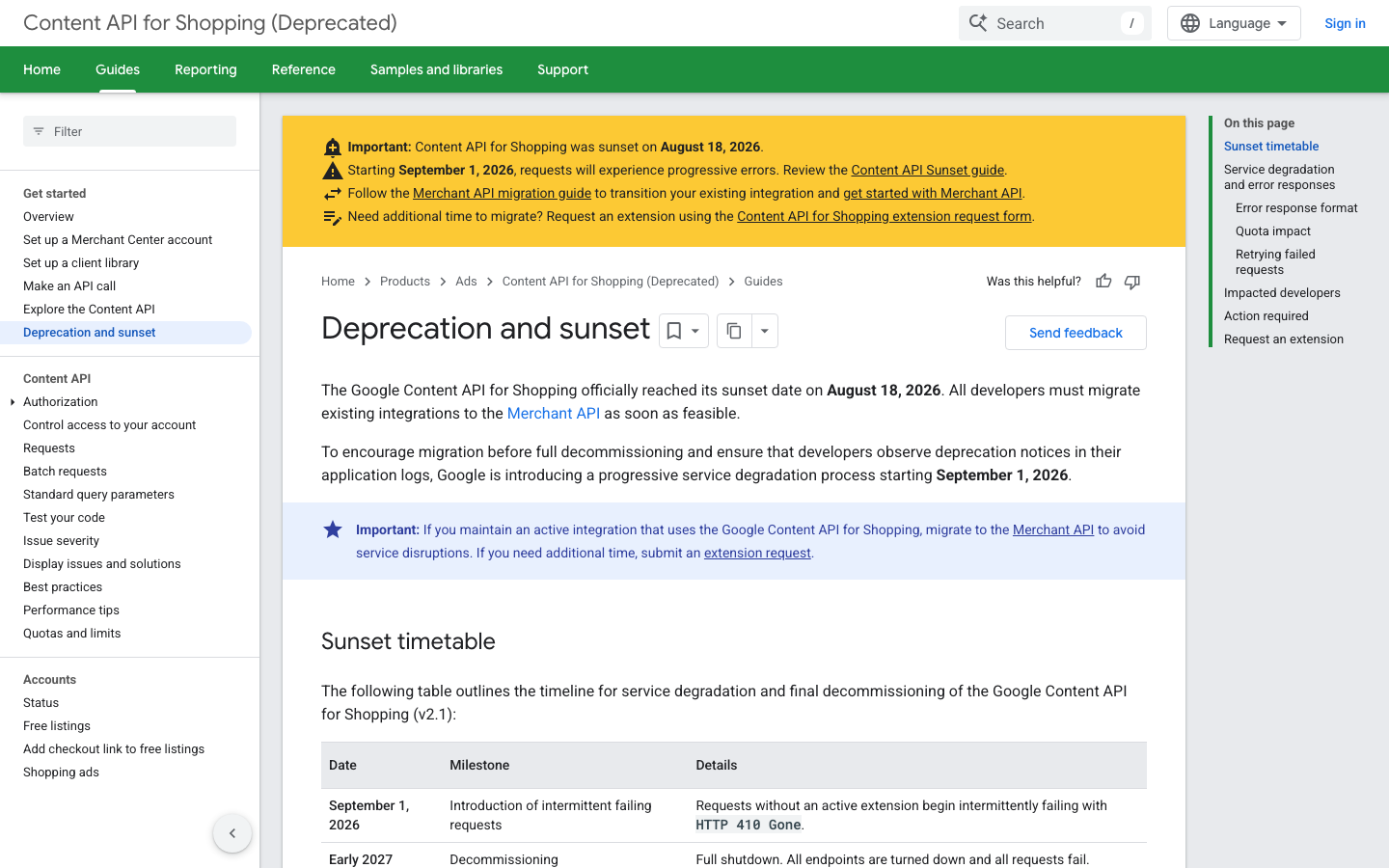
Two details in that page are the ones that will decide whether this is your problem.
The errors are intermittent at first, so a retry often succeeds, which is precisely how a broken integration hides for a month.
And Google states that the artificial error responses do not count against your project’s quota, so quota graphs will look normal while your feed silently stops updating.
Here is what actually changed in feeds this year, what the spec requires now, and the part everyone is asking about, which is what AI surfaces read.
I went through Google’s own documentation rather than the summaries of it, and I have dated every claim.
If you use Google for WooCommerce, check your version number now
The official plugin is Google for WooCommerce, slug google-listings-and-ads, and the plugin directory reports 800,000+ active installations, version 3.9.2, last updated 1 September 2026. Reading its changelog on trunk, one line matters more than the rest:
- 3.8.0, 21 July 2026. “Break – Migrate to the Merchant API from the Content Shopping API.” The same release bumped the WooCommerce tested up to version to 10.9.
- 3.7.3, 8 July 2026. “Add – Added update notification when plugin version 3.8.0 is available”.
Twenty eight days of notice
The migration landed in 3.8.0 on 21 July 2026, twenty eight days before the sunset, and the team flagged it as a breaking change.
Anything on 3.7.x is calling an API that Google has switched off. That is not a warning about the future, it is a description of last week.
The one command to run
Run this on every store you touch:
wp plugin get google-listings-and-ads --field=version
# 3.8.0 or higher: on the Merchant API. Below that: on a dead endpoint.
If you built the integration yourself
If you are on a custom integration rather than the plugin, the migration target is the Merchant API compatibility guide.
Google has an extension request form for projects that need more time, which is the only reason a Content API call still works at all today.
The spec, counted rather than described
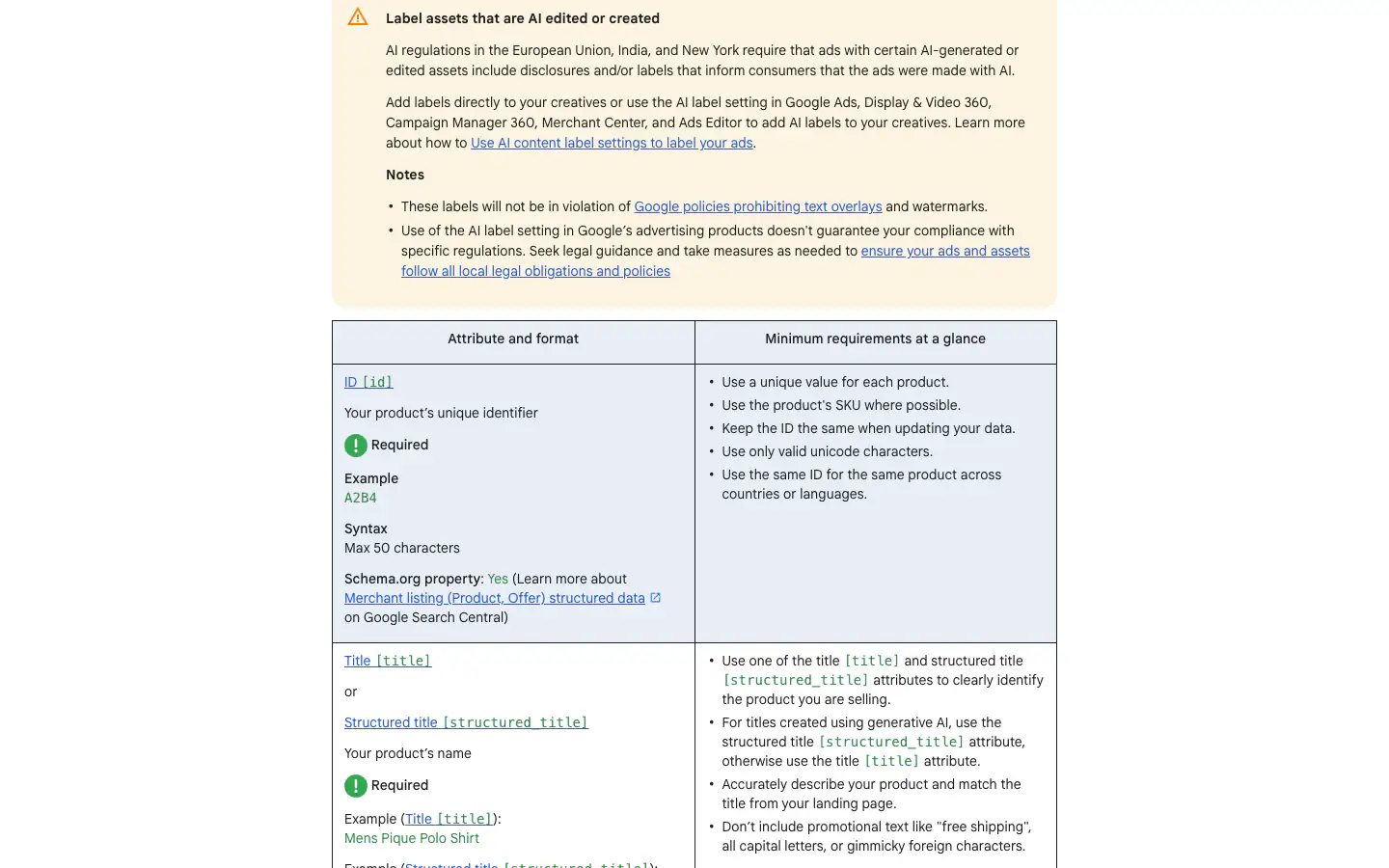
I fetched the product data specification on 2 September 2026 and parsed its attribute tables. It contains 85 attribute rows. Seven of them are required with no conditions attached:
| Attribute | Note from the spec |
|---|---|
id | Max 50 characters. Use the SKU where possible. Keep it the same when updating. |
title or structured_title | Plain text, max 150 characters. |
description or structured_description | Plain text, max 5000 characters. |
link | Your verified domain, RFC 2396 or RFC 1738 encoded. |
image_link | See the January 2027 size change below. |
availability | Supported values only, submitted in English. |
price | For example 15.00 USD. |
The conditional four that cause disapprovals
Everything else is conditional, and the conditions are where disapprovals come from. The four that account for most of them, quoted from the spec’s own requirement lines:
brandis “Required (For all new products, except movies, books, and musical recording brands)”, optional otherwise. Max 70 characters.gtinis “It Depends (strongly recommended if available)”. Max 14 digits per value.mpnis “Required (Only if your product does not have a manufacturer assigned GTIN)”.item_group_idis required in Brazil, France, Germany, Japan, the United Kingdom and the US if the product is a variant, and “Required for free listings for all product variants”.
That last one catches WooCommerce stores hard, because a variable product in WooCommerce produces one feed row per variation and nothing in the platform forces them to share a group id.
Without it, Google treats fourteen sizes of one shirt as fourteen unrelated products.
One attribute that stopped being required
A change worth noting in the other direction: google_product_category is now marked Optional. Google will infer it. Plenty of feed guides still call it required.
What changed, with dates
Images must be 500 x 500, enforced 31 January 2027
Written into the image_link row of the spec, in bold:
We recently announced new image size requirements of at least 500 x 500 pixels for all product images. Enforcement of the new requirements will begin January 31, 2027.
Google Merchant Center product data specification, read 2 September 2026
Five months of notice, on every product image, on every store.
This is a job you can start today with a single query against your media library, and it is the kind of bulk operation that compressing WordPress images in bulk was written for, run in reverse: find the small ones rather than the large ones.
AI-generated titles and descriptions get their own attributes
structured_title and structured_description are alternatives to the plain attributes, each with two sub-attributes. content is the text.
digital_source_type takes two values, default or trained_algorithmic_media, and the spec says the second one “Specifies that the title provided using the content sub-attribute was created using Generative AI”. Omit it and default is assumed.
A plain title is submitted as title: Mens Pique Polo Shirt. The same title declared as machine written is structured_title: trained_algorithmic_media:"Mens Pique Polo Shirt".
Neither structured variant is a schema.org property. The spec’s own Schema.org column says Yes for title and description, and No for both structured versions.
So the AI disclosure travels through the feed and has nowhere to go in your page markup.
If you are generating product copy at volume, that is the field that says so, and it exists because of the AI labelling rules the spec cites for the European Union, India and New York.
Energy labels moved to the EPREL database in April 2025
From the certification row: “Starting April 2025, for products targeting countries in the European Union and that are required to show graphical energy efficiency class labels, use the certification attribute, which references the necessary graphical energy efficiency source data through the EU EPREL database.”
The older energy_efficiency_class attributes are now only for Switzerland, Norway and the United Kingdom. Format is EC:EPREL:123456.
Newer optional attributes that read like they were built for machines
question_and_answer, up to 30 pairs, 10,000 characters total, merchant or user authored.popularity_rank, a float from 0 to 100.related_product,lifestyle_image_link,virtual_model_link,short_title.loyalty_program, seven sub-attributes, for member pricing and points.
Those are not rich snippet fields.
A question and answer block and a popularity score are exactly the shape of thing a model uses to answer “is this the right one for me”, which is a different question from “does this match the query”.
What AI surfaces actually read, separated from what is claimed
Here is the part I can document, and then the part I cannot.
What the merchant listing reference requires
Documented. Google’s merchant listing structured data reference, last updated 7 July 2026, lists three required Product properties for merchant listing experiences: name, image and offers.
The nested offer must be an Offer rather than an AggregateOffer, because Google requires the marked up party to be the seller, and unlike product snippets, merchant listings require a price greater than zero.
The precedence order for shipping and returns
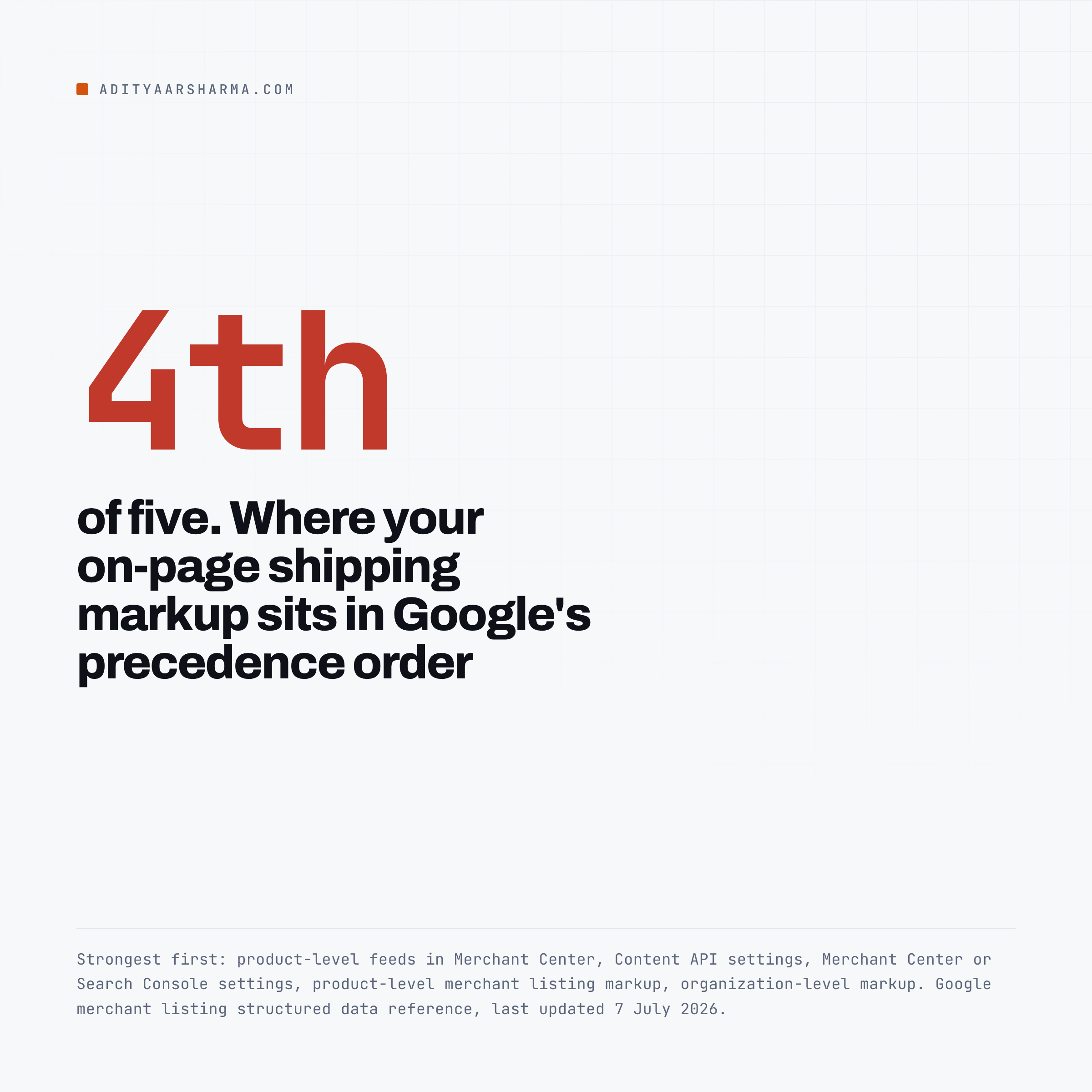
Documented, and the most useful thing on that page. When you have described shipping and returns in more than one place, Google publishes a precedence order, strongest first:
- Product-level feeds submitted in Merchant Center
- Settings in the Content API for Shopping
- Settings in Merchant Center or Search Console
- Product-level merchant listing markup
- Organization-level markup
Your on-page structured data is fourth of five. Every hour spent hand-writing OfferShippingDetails into a product template is overridden by a feed you already submit.
If the two disagree, the feed wins and the markup is decoration. That single list should change how most WooCommerce stores allocate their effort.
The part nobody has published
Not documented, and I will not pretend otherwise. Google has not published a mapping from Merchant Center attributes to what appears in AI Overviews or AI Mode.
The spec’s opening paragraph says the data is used “as a foundational input to help optimize and enhance the content of the ads being served in our AI powered formats and experiences”, which is a sentence about ads, written carefully.
Anyone telling you that a specific attribute causes a specific AI citation is describing a correlation at best.
The other feed spec, and how much smaller it is
For contrast, here is the whole required set of the Agentic Commerce Protocol Feed API schema, version 2026-04-17, read from the JSON Schema on 2 September 2026:
Product   required: [ id, variants ]
Variant   required: [ id, title ]
Price     required: [ amount, currency ]
Media     required: [ type, url ]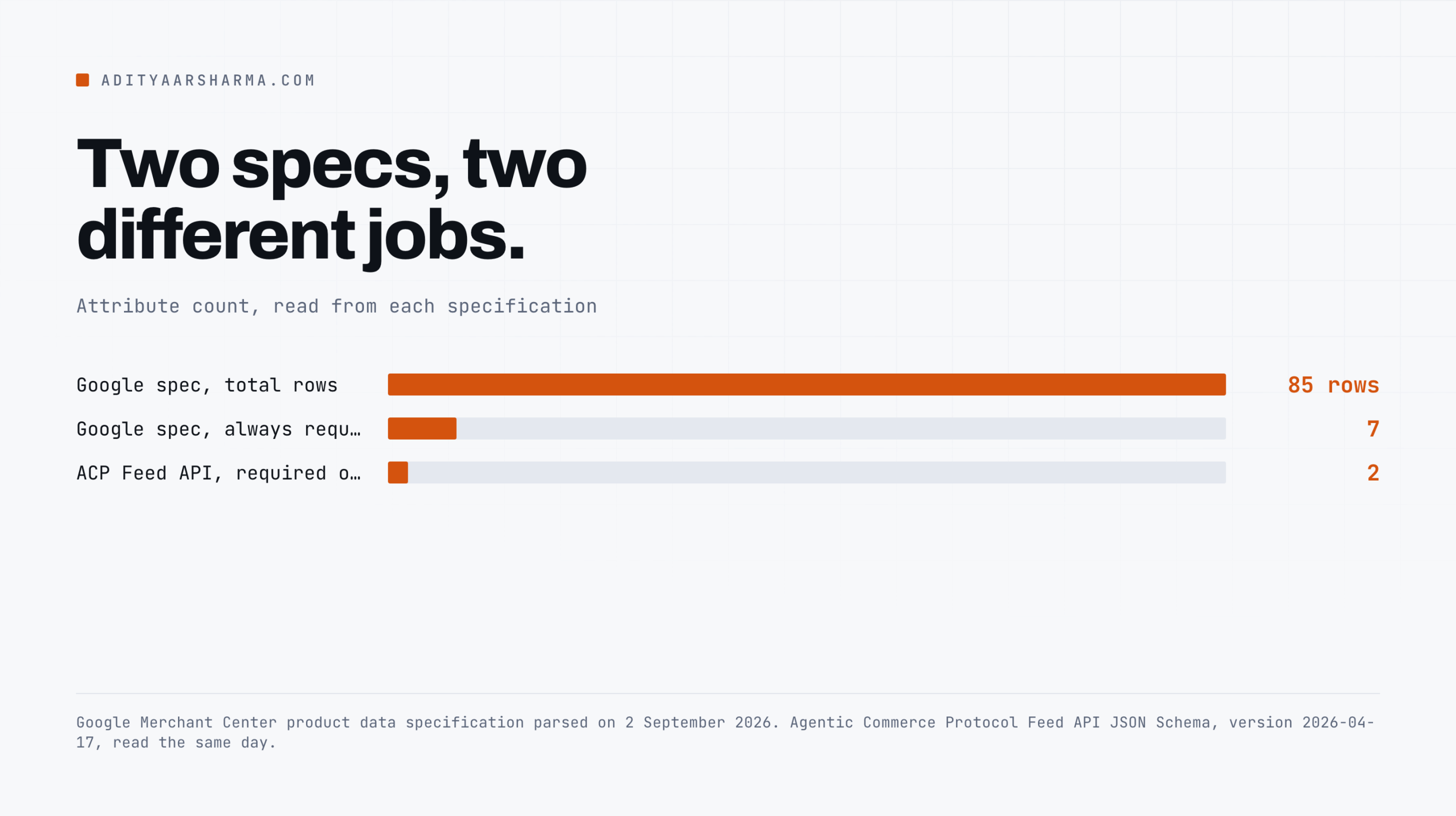
Two required fields against seven
Two required fields on a product. Two on a variant.
Google’s spec has seven unconditionally required attributes and 85 rows in total.
The gap is not sloppiness on one side, it is a difference in what the receiving system does: Google is running an ads auction and a shopping index with policy enforcement, and ACP is handing a checkout session to an agent that already decided.
Practically, that means a feed built to Google’s spec is a superset of what ACP asks for. Get the Merchant Center feed correct and you have the harder job done. The reverse is not true.
What WooCommerce gives you for free, and what it does not
WooCommerce core writes Product JSON-LD from includes/class-wc-structured-data.php.
Reading trunk on 2 September 2026, the Product node has name, url, description, image, sku, an Offer with price, availability, seller and priceValidUntil, plus gtin when global_unique_id is set.
It does not write brand, category, color, size, material, shippingDetails or hasMerchantReturnPolicy.
Two gotchas in the same file
So core covers Google’s three required merchant listing properties and none of the recommended ones. Two gotchas from the same file:
- If a product has no SKU, WooCommerce writes the numeric post ID into
sku. That satisfies validators and means nothing to Google, and it will disagree with your feed’sid. priceValidUntilis computed as 31 December of next year. It is not a date you set, and it does not reflect any real price commitment.
The one piece of care worth crediting
There is one piece of care in that file worth crediting.
When a URL targets a fully specified variation, WooCommerce emits a single Offer at that variation’s exact price instead of the parent’s AggregateOffer range, and the code comment says it exists to avoid Merchant Center price mismatch disapprovals.
That mismatch is the single most common disapproval on variable product stores, and it is a landing page problem before it is a feed problem.
If your product URLs are being redirected on the way to the variation, the price Google sees is the parent’s, and the piece on fixing 301 errors in WordPress covers finding those.
What to do this week
- Check the plugin version.
wp plugin get google-listings-and-ads --field=version. Below 3.8.0 means you are calling a sunset API. - Count images under 500 x 500. Five months to the enforcement date is enough time if you start now and not enough if you start in January.
- Look at your feed’s
item_group_idcolumn. If it is empty on variable products, your variants are competing with each other. - Stop hand-writing shipping markup. It is fourth in Google’s precedence order. Put the effort into the feed or into Merchant Center settings.
If you want the walkthrough from Google rather than from me, their own tutorial on missing attributes is embedded on the specification page.

Fix Missing Attributes in Google Merchant Center, on the Google Ads channel. Google’s own walkthrough of diagnosing a missing attribute in the Issue Details Page. Verified via the YouTube oEmbed endpoint on 2 September 2026.
The related surfaces: what a WooCommerce store exposes to AI shopping agents covers the unauthenticated Store API and the JSON-LD that sits alongside your feed,
extracting site URLs from a sitemap into Sheets is the quickest way to build the URL list you need to audit product landing pages at volume,
and the site that served clean pages to me and spam to Googlebot is the reminder that what a machine is given is not always what you see.
If a feed job is what is slowing your admin down, the WooCommerce queries that actually cost you has the mechanism.
And for the crawler side of WooCommerce URLs, stopping add-to-cart URLs from being crawled.
Resources
- Google Merchant Center product data specification
- Content API for Shopping deprecation and sunset, the 410 timetable
- Merchant API migration guide
- Merchant listing (Product, Offer) structured data, last updated 7 July 2026
- Google for WooCommerce changelog, the 3.8.0 migration entry
- ACP Feed API JSON Schema, 2026-04-17
- schema.org/Product
- EU EPREL database, for the
certificationattribute