WordPress Image Formats in 2026: What Core Does, and Bytes I Measured Myself
On this page, 10 sections
WordPress 7.1 does not convert your JPEGs to WebP. It does not convert them to AVIF either.
The default output format map in core is four lines long and it maps HEIC to JPEG, which is the opposite direction from the one everybody assumes.
Here is the whole function, from wp-includes/media.php in the 7.1 tarball I downloaded on 3 September 2026:
function wp_get_image_editor_output_format( $filename, $mime_type ) {
    $output_format = array(
        'image/heic'          => 'image/jpeg',
        'image/heif'          => 'image/jpeg',
        'image/heic-sequence' => 'image/jpeg',
        'image/heif-sequence' => 'image/jpeg',
    );
    return apply_filters( 'image_editor_output_format', $output_format, $filename, $mime_type );
}
A JPEG upload is not in that map, so it comes out the other end as a JPEG. A PNG comes out as a PNG. The docblock records the only change that ever happened:
@since 6.7.0 The default was changed from an empty array to an array containing the HEIC/HEIF images mime types. Before 6.7 the default was nothing at all.
So if a post tells you core generates WebP automatically now, that post is wrong, and it has been wrong through several release cycles.
What core actually gives you is the ability to read WebP and AVIF, to serve them if you upload them, and one filter to change the conversion policy. The conversion itself is a plugin’s job.
What core does do with the modern formats
Three things core does do
It accepts them as uploads. image/avif and image/webp are in the allowed mime map in wp-includes/functions.php, and both image editors handle them.
WP_Image_Editor_GD has explicit branches for image/avif gated on function_exists( 'imagecreatefromavif' ), and WP_Image_Editor_Imagick has its own. Whether AVIF works on your host is a question about your PHP build, not about WordPress.
It can read their dimensions without PHP support. wp_getimagesize() falls back to parsing the file headers itself when the PHP build cannot: there is a wp_get_avif_info() helper in core that pulls width and height straight out of the AVIF container.
That fallback is what lets an AVIF upload still get correct width and height attributes on the front end, which matters more than it sounds, because core refuses to make any loading or priority decision on an image with no dimensions.
It sets different default quality per format. This one is buried in WP_Image_Editor::get_default_quality() and almost nobody knows it. The switch has one case, image/webp, which returns 86. Everything else falls through to $this->default_quality, which is 82.
Those are the numbers a WordPress site will actually encode at, so those are the numbers I measured with.
The storage multiplication, counted on a real upload
Before comparing formats it is worth being precise about how many files one upload becomes, because the conversion decision multiplies against this number.
A stock install registers six sizes. Four come from options set in wp-admin/includes/schema.php:
| Size | Width | Height |
|---|---|---|
| thumbnail | 150 | 150 |
| medium | 300 | 300 |
| medium_large | 768 | 0 |
| large | 1024 | 1024 |
Two more are added in code by _wp_add_additional_image_sizes(), present since 5.3.0: 1536x1536 and 2048x2048, described in the source as 2x medium_large and 2x large.
Sizes larger than the original are skipped, which you can verify from outside with curl -o /dev/null -w "%{http_code} %{size_download}" against each size. My own avatar is a 1000 by 1000 upload, so only the three smaller sizes exist:
| File | Status | Bytes |
|---|---|---|
Aditya-Sharma.jpg | 200 | 108,189 |
Aditya-Sharma-150x150.jpg | 200 | 2,887 |
Aditya-Sharma-300x300.jpg | 200 | 8,143 |
Aditya-Sharma-768x768.jpg | 200 | 47,493 |
Four files, 166,712 bytes, from one upload. On a 3000 pixel wide photograph all six sizes generate, plus core’s own scaled copy:
big_image_size_threshold defaults to 2560, and anything wider gets a -scaled version created and served as the full size while the true original is kept alongside.
That is eight files for one upload before a single theme size is registered, and a theme with four custom crops takes it to twelve.
Why the multiplication decides your strategy
The multiplication is the part that decides your conversion strategy. Generating both a modern format and a fallback for every registered size doubles that number.
The Modern Image Formats plugin makes exactly this call, and it makes it the right way round, which I will come back to.
Honest byte comparisons, measured on real files
Every WebP-versus-AVIF article quotes a percentage from somebody’s benchmark.
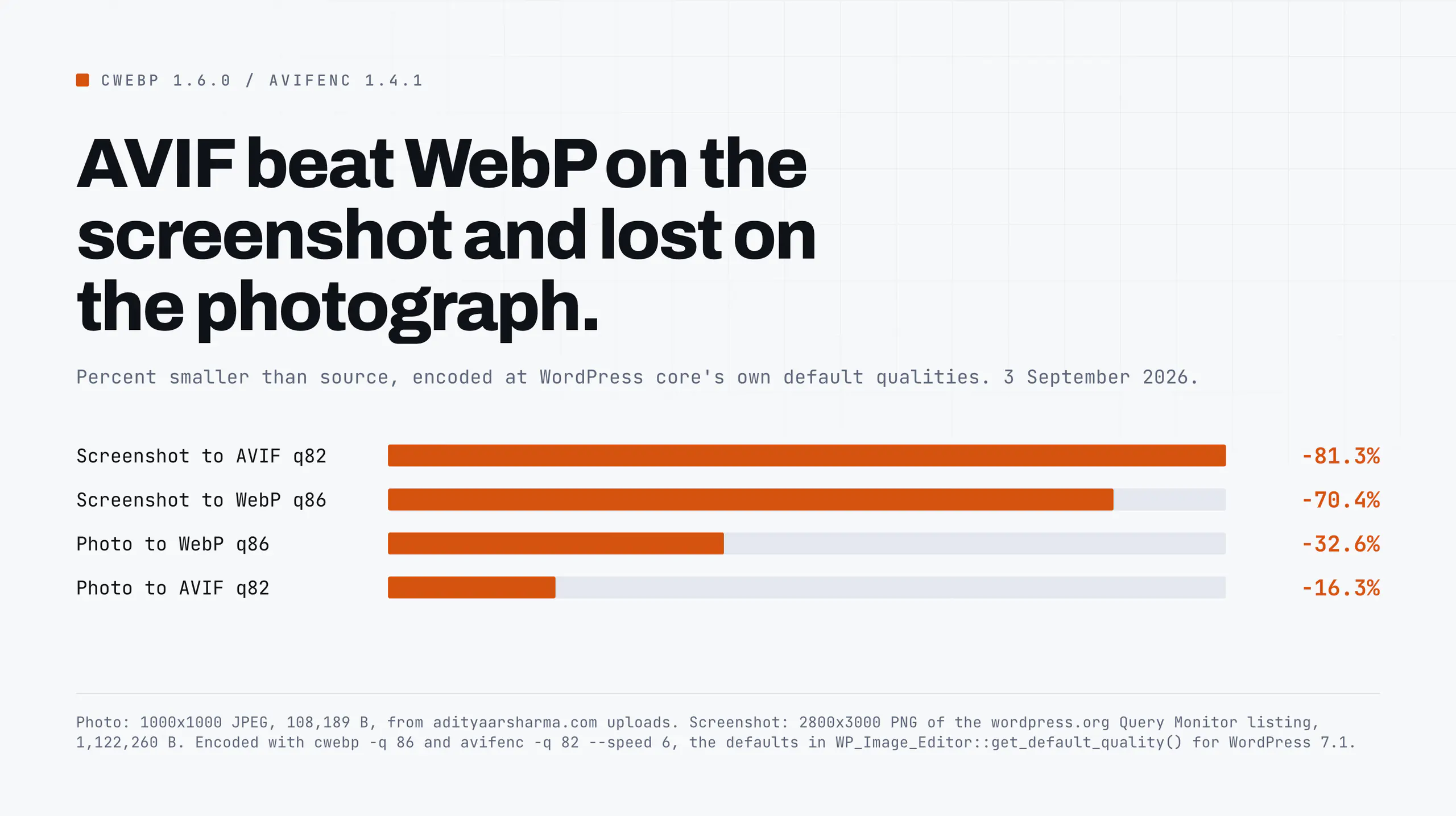
I converted two of my own files at the exact quality settings WordPress core would have used, with the encoders on my laptop, and got a result that contradicts the received wisdom on one of them.
The tools, versioned: cwebp 1.6.0 with libsharpyuv 0.4.2, and avifenc 1.4.1 with dav1d 1.5.3 and aom 3.13.3.
File one: a photograph
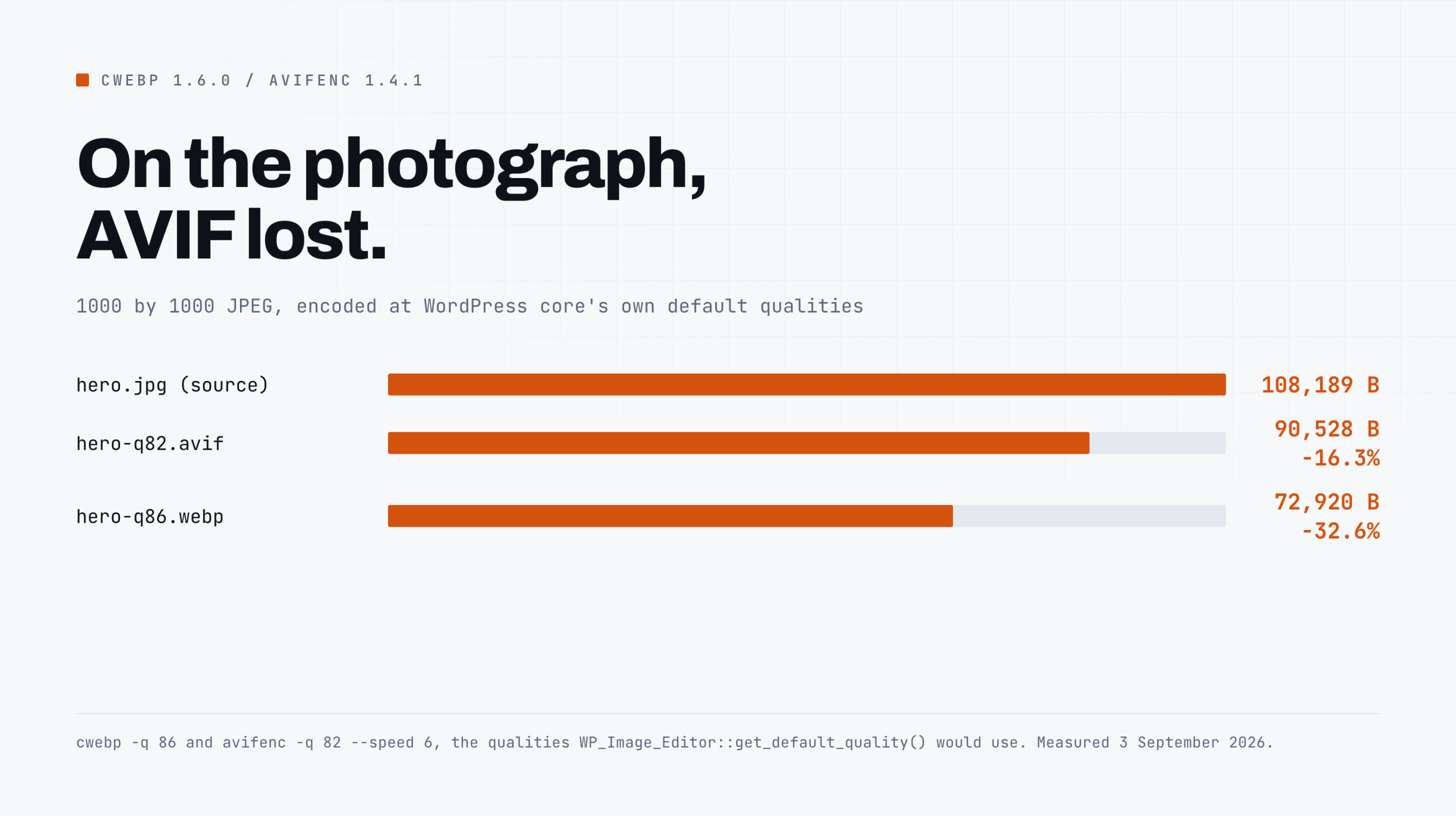
The 1000 by 1000 JPEG above, 108,189 bytes, exported from Photoshop:
| File | Bytes | Against the source |
|---|---|---|
hero.jpg | 108,189 | source |
hero-q86.webp | 72,920 | -32.6% |
hero-q82.avif | 90,528 | -16.3% |
cwebp -q 86 and avifenc -q 82 --speed 6, the qualities core would use.AVIF produced a file 24% larger than WebP on the same source at WordPress’s own default quality settings. If your mental model is that AVIF is always smaller, that result should bother you. Mine did.
File two: a screenshot
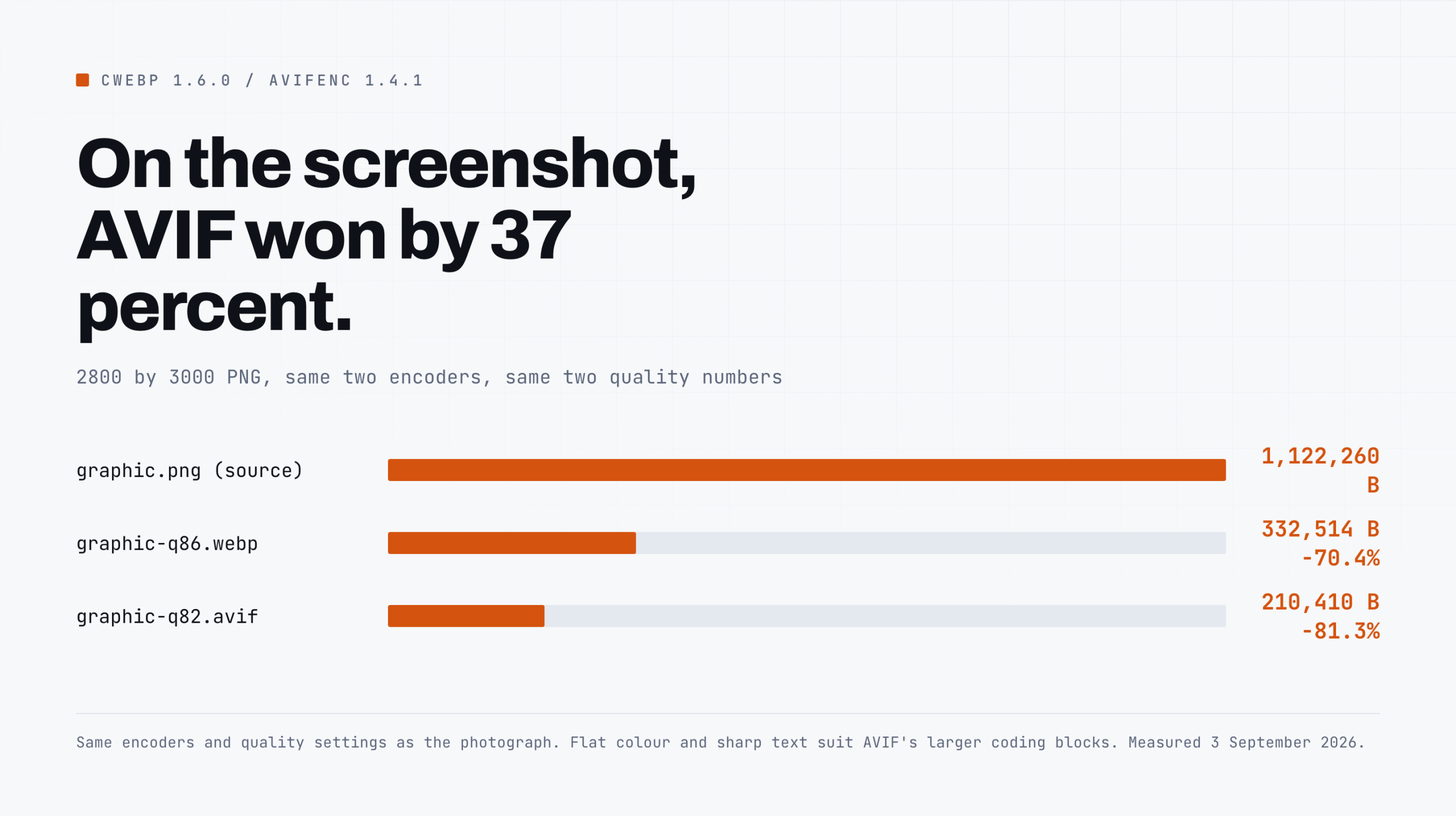
A 2800 by 3000 PNG, a full-page screenshot of the Query Monitor listing on wordpress.org. Flat colour, sharp text, one photographic banner in the middle. 1,122,260 bytes:
| File | Bytes | Against the source |
|---|---|---|
graphic.png | 1,122,260 | source |
graphic-q86.webp | 332,514 | -70.4% |
graphic-q82.avif | 210,410 | -81.3% |
Here AVIF wins, and wins clearly: 37% smaller than the WebP of the same image. Same two encoders, same two quality numbers, opposite conclusion.
Why the two files disagree, which is the part worth keeping
Three mechanisms, and none of them is a benchmark result you have to take on trust.
The quality scales are not the same scale
cwebp -q 86 and avifenc -q 82 are two encoders’ internal knobs.
They are not calibrated against each other, and neither is calibrated against JPEG’s quality number. WordPress core treats them as interchangeable because a single integer is what its API exposes.
A fair comparison would fix a perceptual quality target such as SSIM or Butteraugli and find the bitrate each encoder needs to hit it.
I did not do that here, and any post that quotes a single AVIF-versus-WebP percentage without saying how it equalised quality is quoting a number that means nothing.
I am telling you what WordPress will actually produce with its own defaults, which is a different and more useful question than which codec is better.
The photograph was already lossy
hero.jpg is a JPEG that has already been through a DCT quantiser. Re-encoding it stores the artifacts as if they were image detail, and high-quality settings preserve them faithfully and expensively.
This is exactly what WordPress does when a plugin converts an uploaded JPEG, so the number is representative rather than a mistake, but it does mean the comparison is between two re-encodes and not between two encodes of an original.
AVIF’s advantages are structural
They suit graphics. AVIF inherits AV1’s intra-prediction modes and its much larger coding block sizes. Flat regions and hard edges, which is what a screenshot is made of, compress extremely well under that model.
Photographic noise does not, and that is where the cheaper, older WebP model stops losing. This is why the two files disagree and why a single blanket percentage cannot be right for both.
The cost nobody puts in the comparison: encode time
Timed with /usr/bin/time -p on the same 2800 by 3000 image: cwebp took 0.39 seconds real, avifenc --speed 6 took 0.86.
Roughly twice as long on a 2800 by 3000 image, on an idle laptop, at --speed 6. Lower the speed number for better compression and it gets slower fast.
Now multiply that by six registered sizes, and by two if you also generate fallbacks, and run it inside a PHP upload request on shared hosting with a 30 second execution limit.
That is the mechanism behind the upload timeouts people report after turning on modern format generation, and it is why the honest answer for a large existing library is to regenerate in the background with WP-CLI rather than at upload time.
The plugin that actually does the conversion
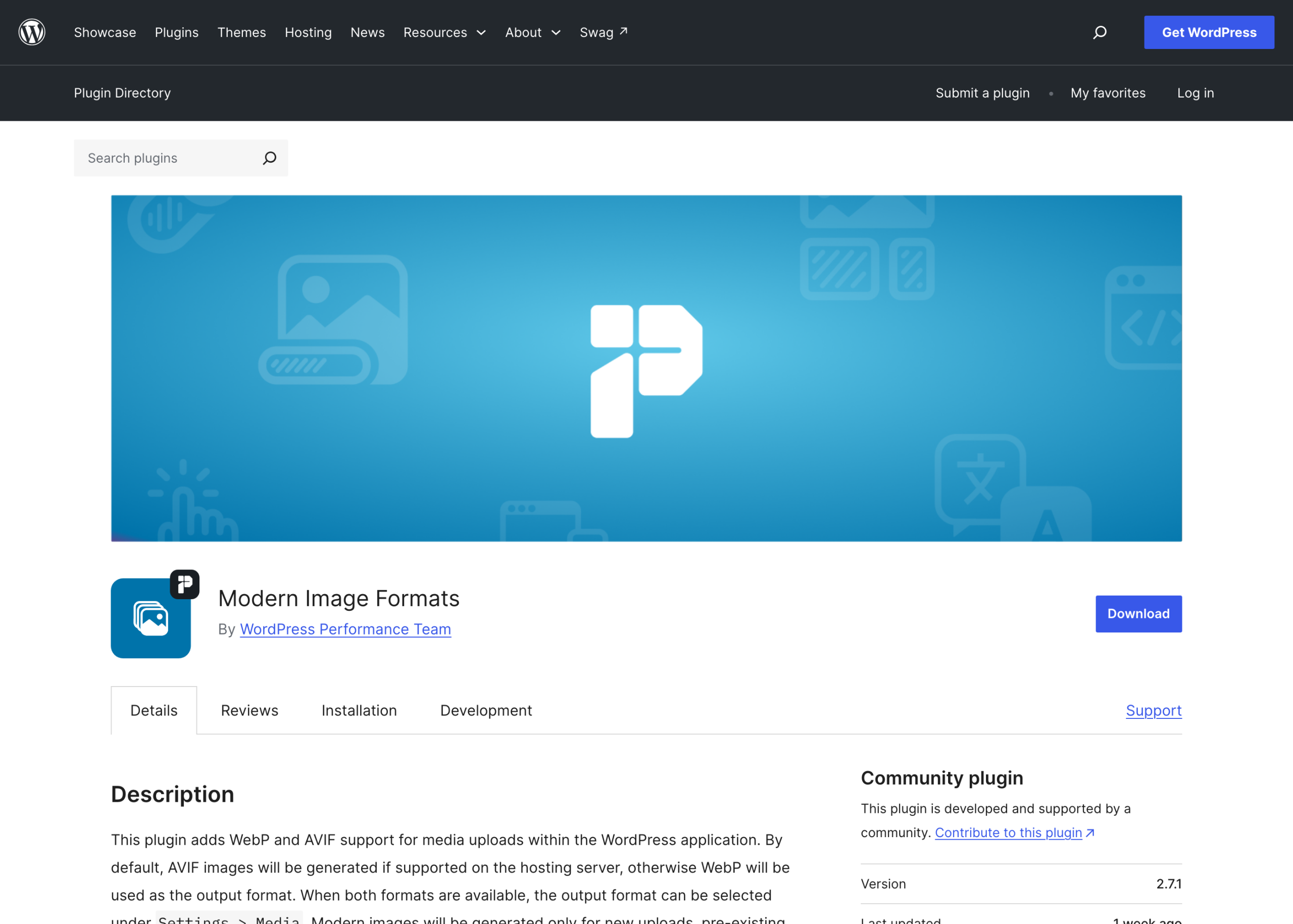
The WordPress Performance Team ships it. It is called Modern Image Formats, its slug is still webp-uploads from when it was called WebP Uploads, and I pulled its numbers from api.wordpress.org/plugins/info/1.2/ rather than the listing page.
Version 2.7.1, 100,000 active installs, tested against 7.1, last updated 26 August 2026. Its own description page states the policy plainly:
AVIF is generated if the hosting server supports it, otherwise WebP, and the choice is exposed under Settings then Media when both are available.
Two behaviours people get caught by
First, only new uploads are converted; existing images stay as they are until you regenerate them, with wp media regenerate or a plugin.
Second, and this is the good design decision, by default only the sub-sizes become modern format. The originally uploaded file stays a JPEG or PNG.
There is an Output fallback images checkbox that generates both formats for every sub-size, and turning it on is what doubles your storage.
That default is the right way round. The original is your archive copy and the thing you regenerate from, so it should stay in the format with the widest possible tool support.
The sub-sizes are disposable derivatives, so they should be in whatever format is smallest today.
Doing it yourself with the filter, and when not to
If you want the behaviour without the plugin, the filter is one callback. Hook image_editor_output_format, then set $formats['image/jpeg'] and $formats['image/png'] to 'image/webp'.
Return the array core gave you with your entries added, rather than a fresh one. Replacing it wholesale drops the HEIC and HEIF mappings, and then an iPhone photo uploaded through the media library stops being converted to something browsers can display.
Three reasons not to do it by hand
First, core’s REST attachment controller deliberately disables the filter in places, with add_filter( 'image_editor_output_format', '__return_empty_array', 100 ) around image editing operations, so that editing an image does not silently change its format; you would need to reproduce that care.
Second, your host may support WebP in GD but not AVIF, and you get to find out in production. Third, there is no fallback generation, so a visitor on a browser without WebP support gets nothing.
The plugin handles all three. Use the filter when you want to understand the mechanism, use the plugin when you want it to work.
What does not work
Converting everything to AVIF because a chart said it is smallest. My photograph got 24% larger than the WebP. Convert a sample of your own library and count bytes before committing.
Generating both formats for every size, everywhere. That is six sizes times two formats plus two originals for one upload.
If your library is 20 gigabytes you now need 40, and your backups take twice as long. Turn on fallbacks only if your analytics show browsers that need them.
Converting at upload time on shared hosting. The encode-time numbers above are from a laptop with nothing else running. Do the initial pass with WP-CLI over SSH.
Assuming a smaller file is a faster page. On my own homepage the heaviest asset by a wide margin is a third-party JavaScript file, not an image, which is what measuring the whole asset list showed.
Image format work is worth doing and it is rarely the largest number on the page.
The Core Web Vitals piece has the framing for deciding which number to chase first, and the bulk compression walkthrough covers the pass you should run before any of this.
One thing to do next
Take the largest image in your uploads directory and convert it twice, at the exact qualities core would use:
cwebp   -q 86 -quiet yourfile.jpg -o out.webp
avifenc -q 82 --speed 6 yourfile.jpg out.avif
ls -l yourfile.jpg out.webp out.avif
If AVIF is smaller, your library is probably graphics and screenshots and you should prefer AVIF.
If WebP is smaller, your library is photographs and you should prefer WebP. Repeat on four or five files before you set a site-wide policy, because one file is an anecdote.
If you need to sweep a lot of attachments once you have decided, the bulk editing over the REST API post covers doing that without breaking things.
Resources
- Modern Image Formats on wordpress.org, the Performance Team plugin. Version 2.7.1, 100,000+ installs, updated 26 August 2026.
- image_editor_output_format, the one filter that changes conversion policy.
- wp media regenerate, for converting an existing library outside a web request.
- cwebp command line reference, from the libwebp project.
- libavif on GitHub, which ships the avifenc binary used above.
- caniuse: AVIF support, for deciding whether you still need fallback images.