WordPress Capabilities and Roles, Read From the Source
On this page, 10 sections
There is no row in your database that says a user can edit_post. There is no row that says they cannot.
The capability exists only as a string passed into a switch statement, and it is resolved fresh on every check against a specific post ID.
That is the single fact that explains most of the confusion about WordPress permissions, and it is worth reading the code that produces it. Everything below is from WordPress 7.1, downloaded from wordpress.org on 3 September 2026. api.wordpress.org/core/version-check/1.7/ reports 7.1 as the current release.
What each default role is actually granted
The roles are built once, at install, by populate_roles() in wp-admin/includes/schema.php line 719. It calls eight versioned functions in order, each adding what a given WordPress release introduced: populate_roles_160(), _210(), _230(), _250(), _260(), _270(), _280() and _300().
Nothing has been added since populate_roles_300(), which corresponds to WordPress 3.0. Every capability a default role holds in 7.1 was decided by 2010.
The real per-role totals
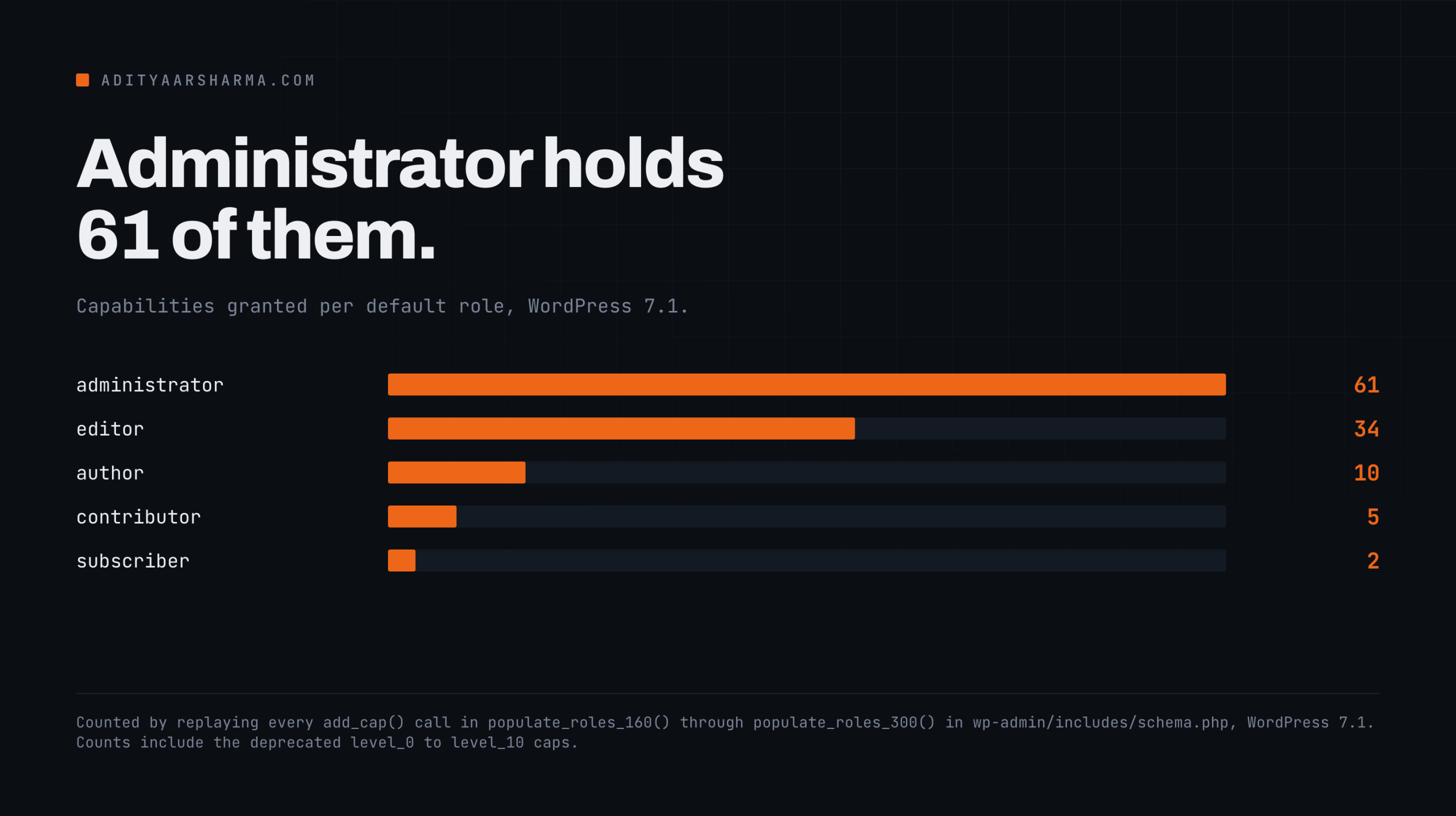
I replayed every add_cap() call across those eight functions to get the real per-role totals. Counting the deprecated level_0 through level_10 caps, which are still granted:
- administrator: 61 capabilities, of which 50 are named and 11 are levels
- editor: 34, of which 26 are named
- author: 10, of which 7 are named
- contributor: 5, of which 3 are named
- subscriber: 2, of which 1 is named
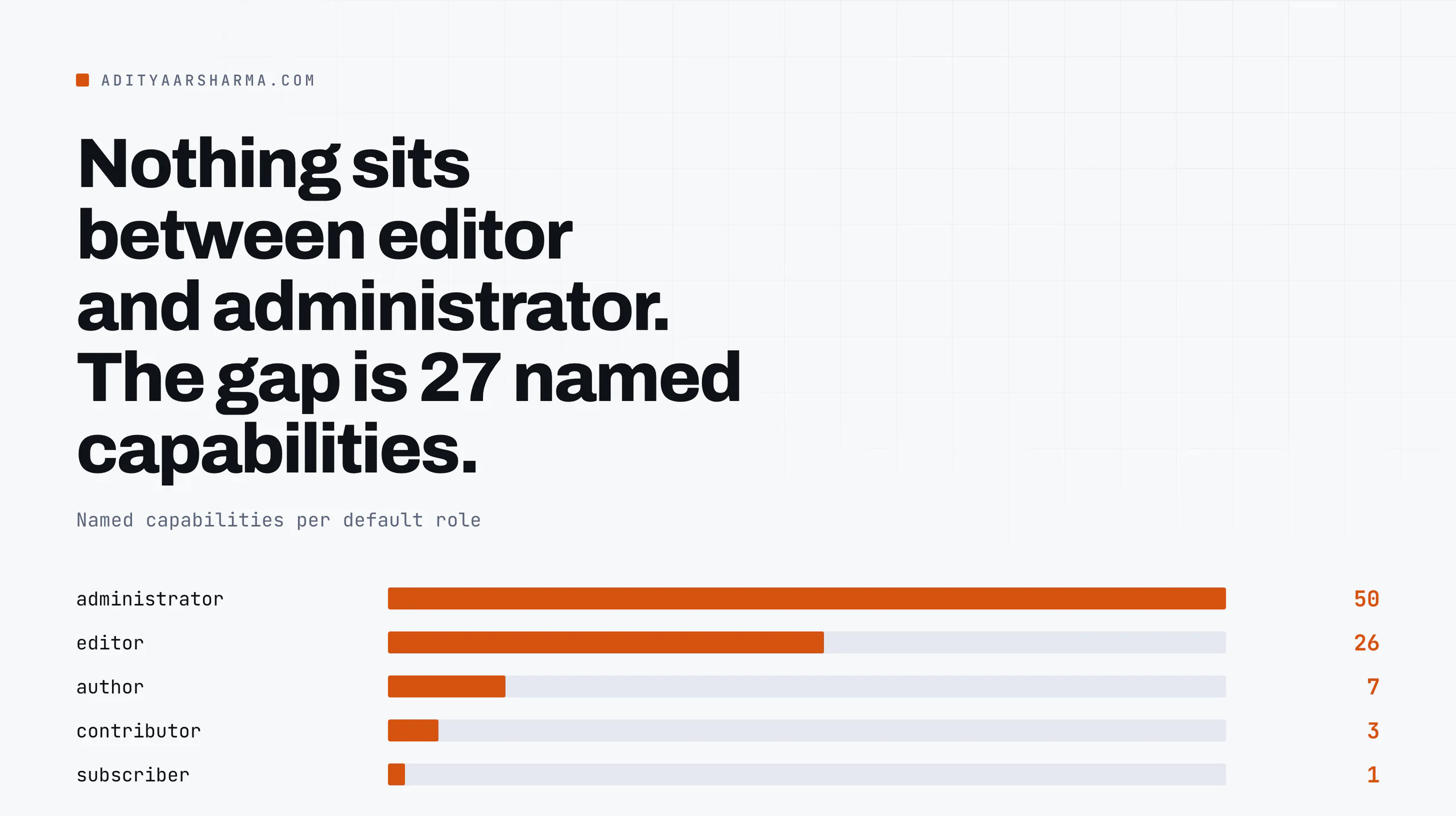
Subscriber holds exactly read and level_0. Contributor adds edit_posts and delete_posts. That is the entire difference between the two roles: two strings.
Author, the one that matters for automation
Author is where it gets interesting for anything automated. The full named set is upload_files, edit_posts, edit_published_posts, publish_posts, delete_posts, delete_published_posts, read. Seven strings, and one of them is upload_files, which is the only file-writing capability below editor.
Editor gains the _pages and _others and _private variants, plus moderate_comments, manage_categories, manage_links and unfiltered_html. It has no capability that touches plugins, themes, users, options or the dashboard.
The gap between editor and administrator
Administrator adds all of those at once: activate_plugins, install_plugins, update_plugins, delete_plugins, edit_plugins, the same five for themes, edit_files, manage_options, edit_users, create_users, delete_users, promote_users, list_users, remove_users, update_core, import, export, edit_dashboard, unfiltered_upload and switch_themes.
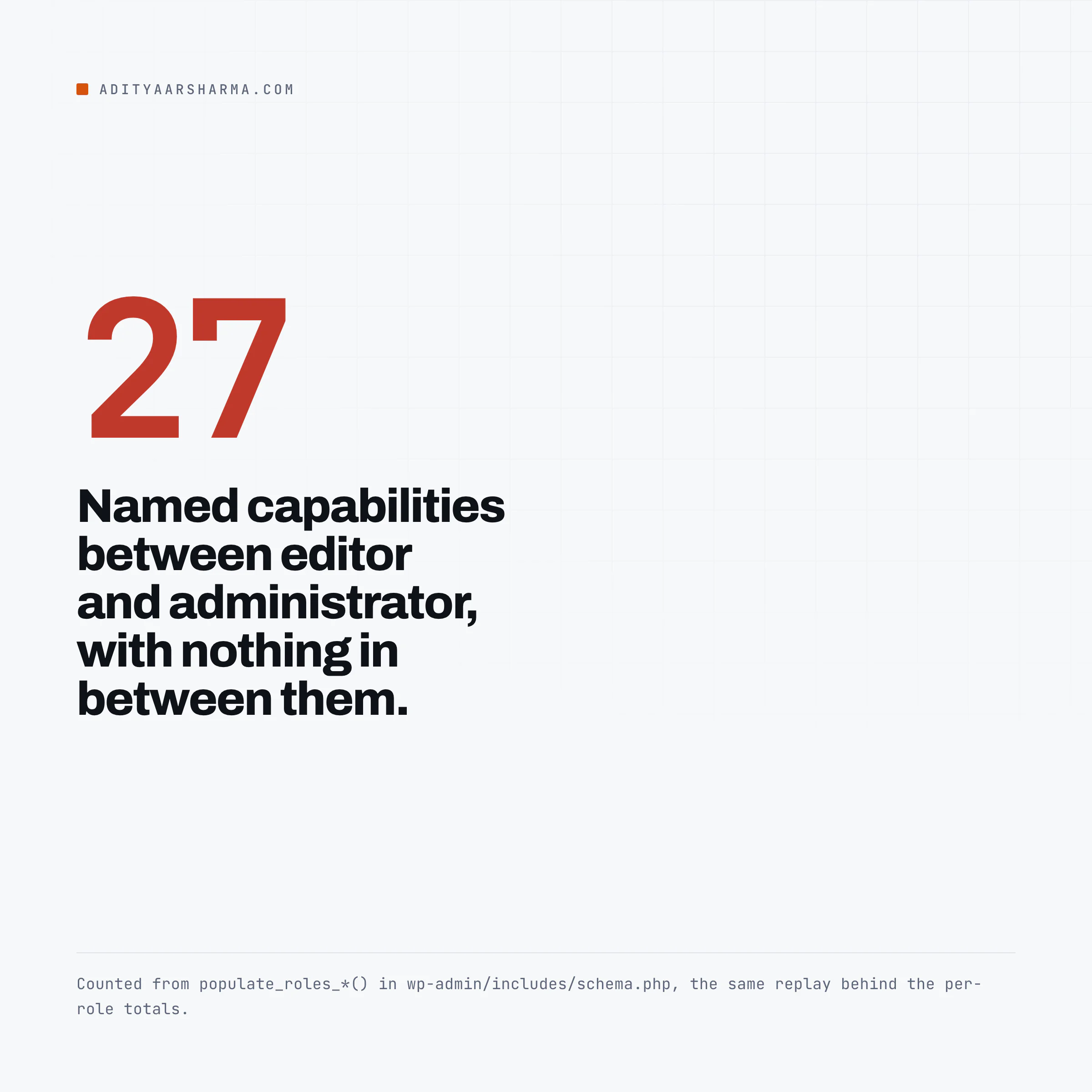
The jump from editor to administrator is 27 named capabilities, and there is nothing in between. That gap is the whole problem with role design in WordPress: the moment someone needs one administrator capability, the standard answer hands them all 27.
The roles live in one option, and it is autoloaded
The last thing populate_roles() does is update_option( $wp_roles->role_key, $wp_roles->roles, true ), inside an if ( $original_use_db ) guard.
$role_key is {prefix}user_roles. That boolean true means the entire role and capability structure for the site is one serialized array, loaded on every request.
On a site with a membership plugin that has generated dozens of roles, it is often one of the larger autoloaded rows, and it bypasses the size guard that WordPress 6.6 added, for reasons I worked through in the autoload audit.
Per-user capabilities live somewhere else
Per-user capabilities are separate. They are user meta under {prefix}capabilities, and WP_User merges the role’s caps with the user’s own into $this->allcaps. A capability granted directly to a user is invisible in any role editor that reads the roles option.
Why edit_post is not stored anywhere
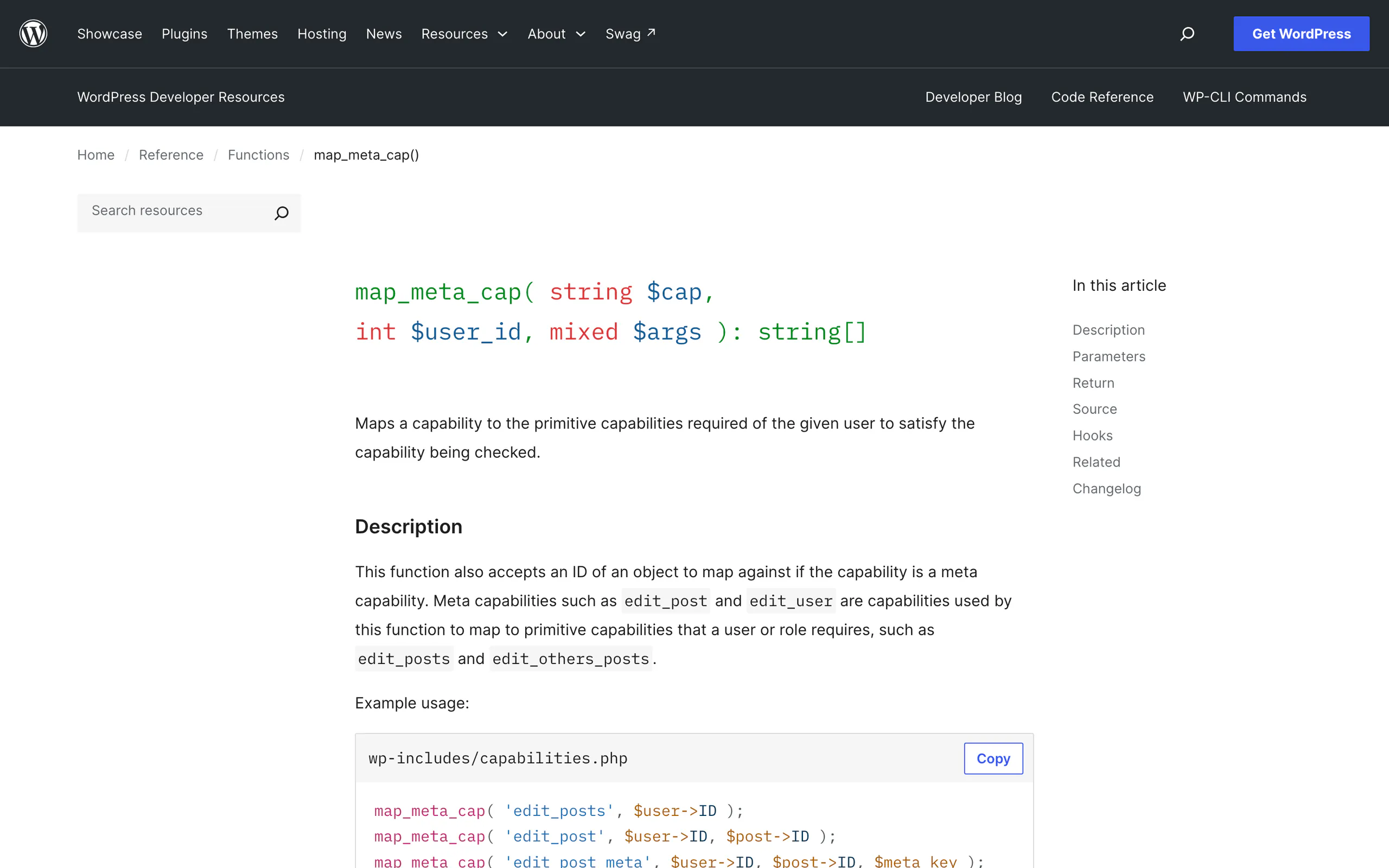
map_meta_cap() lives in wp-includes/capabilities.php line 45. Its whole job is turning a question about an object into a list of strings to look up in allcaps.
The code reference states it plainly: this function does not check whether the user has the required capabilities, it just returns what the required capabilities are.
Here is the core of the edit_post branch, once the post has been fetched and the post type resolved:
if ( $post->post_author && $user_id === (int) $post->post_author ) {
	if ( in_array( $post->post_status, array( 'publish', 'future' ), true ) ) {
		$caps[] = $post_type->cap->edit_published_posts;
	} elseif ( 'trash' === $post->post_status ) {
		// see below
	} else {
		$caps[] = $post_type->cap->edit_posts;
	}
} else {
	$caps[] = $post_type->cap->edit_others_posts;
}
The trash branch reads _wp_trash_meta_status from post meta and applies the same test to it.
What this means for a contributor
Read what that means for a contributor. A contributor holds edit_posts but not edit_published_posts. On their own draft, edit_post maps to edit_posts and they pass.
The moment that draft is published, the same check on the same post by the same user maps to edit_published_posts and they fail. Nothing about the user changed.
The post status changed, and the mapping is computed from the post.
The trash branch almost nobody knows
The trash branch is the detail almost nobody knows: a trashed post is evaluated against the status it had before it was trashed, read out of the _wp_trash_meta_status post meta. Trashing a published post does not hand editing rights back to its author.
The other half of the function is worth knowing about too. If you call current_user_can( 'edit_post' ) with no post ID, WordPress does not guess.
Since 6.1 it fires _doing_it_wrong() and then appends do_not_allow, which fails closed. Same for delete_post. If your plugin has a capability check that mysteriously always fails, look for a missing second argument.
do_not_allow is a name, not a flag
do_not_allow appears more than twenty times in capabilities.php. It is not special-cased in map_meta_cap() at all. The trick is at the end of WP_User::has_cap() in wp-includes/class-wp-user.php, and the order is the point.
$capabilities = apply_filters( 'user_has_cap', ... ) runs first. Then core sets $capabilities['exist'] = true, and then it calls unset( $capabilities['do_not_allow'] ).
The comments in core say it better than I can: everyone is allowed to exist, and nobody is allowed to do things they are not allowed to do. The function then requires ALL requested caps.
Why the filter cannot grant it
The unset() runs after the user_has_cap filter. So a plugin that tries to grant do_not_allow through that filter, deliberately or by iterating over every capability string it can find, achieves nothing.
And because the final check requires all returned caps, a single do_not_allow in the array denies the whole check regardless of what else the user holds.
That is why it is used as the deny token everywhere.
One consequence for multisite: has_cap() short-circuits for a super admin near the top, returning true for everything unless do_not_allow is in the mapped caps. A super admin is not “a user with every capability”.
They are a user for whom the capability lookup is skipped entirely.
Three capabilities that constants can take away
map_meta_cap() reads wp-config constants directly, which means a role can hold a capability and still be denied it. Three cases, all in capabilities.php: The unfiltered_html case appends do_not_allow when DISALLOW_UNFILTERED_HTML is defined and true.
Its comment says so plainly: disallow it for all users, even admins and super admins.
The second branch is the multisite one. On multisite, anyone who is not a super admin gets do_not_allow as well.
The multisite branch
Note the multisite branch. Editors and administrators are both granted unfiltered_html by populate_roles_160(), and on multisite neither of them gets it. The role data is unchanged; the mapping denies it.
The file editors are next, and they check two separate things: edit_files, edit_plugins and edit_themes share one case. It appends do_not_allow if DISALLOW_FILE_EDIT is defined and true, or if wp_is_file_mod_allowed( 'capability_edit_themes' ) returns false.
And the install and update group, which is gated only on DISALLOW_FILE_MODS through wp_is_file_mod_allowed(): update_plugins, delete_plugins, install_plugins, upload_plugins, update_themes, delete_themes, install_themes, upload_themes, update_core.
What is missing from that list
Read that list carefully for what is missing. activate_plugins is not in it. It has its own case a few lines below with no file-mod check at all.
So DISALLOW_FILE_MODS stops a user installing a plugin and stops them updating one, and does not stop them activating a plugin that is already sitting in the directory.
If your threat model includes an attacker who can write to wp-content/plugins by some other route, that constant does not close the loop. I go through the rest of those constants in the wp-config walkthrough.
Building a least-privilege role
Here is the practical payoff.
Because roles are just an array of capability strings, and because the meta caps resolve to primitives at check time, you can build a role that does one job and nothing else.
This is what I would give an automation that publishes posts and touches nothing else:
add_role(
	'content_publisher_v1',
	'Content Publisher',
	array(
		'read'                 => true,
		'edit_posts'           => true,
		'edit_published_posts' => true,
		'publish_posts'        => true,
		'upload_files'         => true,
	)
);
Run it once. add_role() is a no-op if the role already exists, so bump the slug when you change the set.
Deliberately absent: edit_others_posts, delete_posts, delete_published_posts, manage_categories, unfiltered_html and moderate_comments.
What the role can and cannot do
That role can create, publish and revise its own posts and upload media. It cannot touch anyone else’s content, cannot delete anything, and cannot create terms.
Compared against author, which is the closest built-in, it drops both delete capabilities. Compared against editor it drops 21 named capabilities.
Check it before you trust it, against a real post, as the real user:
# meta caps must be checked against an object, never bare
wp eval --user=42 'var_dump( current_user_can( "edit_post", 1234 ) );'
wp eval --user=42 'var_dump( map_meta_cap( "edit_post", 42, 1234 ) );'
Before those two, wp role list confirms the role exists and wp eval 'var_dump( array_keys( array_filter( get_role("content_publisher_v1")->capabilities ) ) );' prints exactly what it holds.
That second wp eval is the one to keep. It shows you the primitive capabilities the check will actually look up, which is the difference between debugging permissions and guessing at them.
What does not work
Removing level_* capabilities
Removing level_* capabilities to tighten a role. They are deprecated and mostly vestigial, but WP_User::has_cap() still translates a numeric argument through translate_level_to_cap(), and some old plugins still check levels. Stripping them buys you nothing measurable and can break code you did not write.
Editing a role and expecting a reset
Editing a role and expecting it to reset. populate_roles() runs at install. It does not run on update.
A role you modified stays modified through every core upgrade, which is convenient until you inherit a site where somebody granted manage_options to editor four years ago and nobody remembers.
Assuming a custom post type follows these rules. The mapping only happens when $post_type->map_meta_cap is true, which is not the default for register_post_type(). When it is false, map_meta_cap() returns the post type’s raw cap and stops.
A CPT registered without 'map_meta_cap' => true gives you none of the ownership logic above.
A role is not an authentication boundary
Treating a restricted role as an authentication boundary. A capability set limits what the account can do through WordPress. It does nothing about how the credential is transported or how long it stays valid.
Application passwords in particular map to the full user, with a filterable but wide-open default scope, which I picked apart in the application passwords security model.
If an agent is going to use this role
A narrow role is the cheapest guardrail available, because it is enforced by core on every request rather than by your prompt.
The rest of the guardrails, including what to do about the capabilities you cannot remove, are in the piece on running an agent against production WordPress, and the surface it will reach through is mapped in the REST API as an agent surface.
One thing to carry over from the code above: the REST API calls the same map_meta_cap(). There is no separate permission system for REST.
If your role is correct in wp-admin it is correct over HTTP, and if it is wrong, it is wrong in both.
The one thing to do
Run wp eval 'var_dump( array_keys( array_filter( get_role("editor")->capabilities ) ) );' on your oldest site and compare the output against the 34 above.
Anything extra was added by a plugin or a person, and on a site that has been running for years there is usually something in that list that nobody would grant today.
Resources
- map_meta_cap() in the code reference
- Roles and Capabilities in the WordPress documentation
- wp-admin/includes/schema.php, where populate_roles() lives
- wp-includes/capabilities.php on wordpress-develop
- wp role and wp cap in the WP-CLI command reference