What Web Fonts Actually Cost on WordPress, Measured With curl
On this page, 9 sections
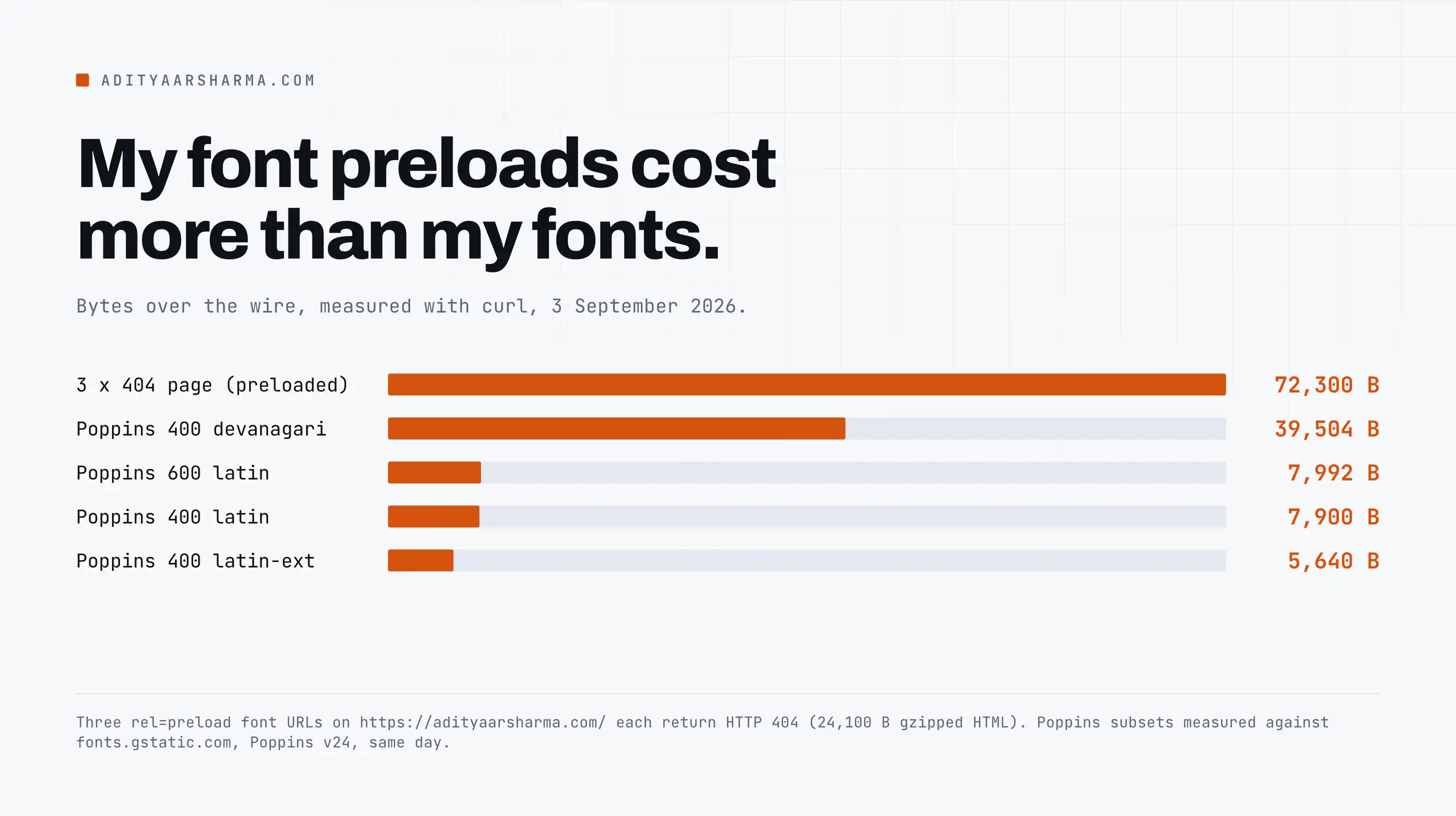
My homepage was preloading three font files. All three returned 404. I found that on the morning of 3 September 2026 with one command:
curl -s -o /dev/null \
  -w '%{http_code} %{size_download} %{content_type}\n' \
  https://adityaarsharma.com/wp-content/cache/perfmatters/adityaarsharma.com/fonts/pxiEyp8kv8JHgFVrJJfecnFHGPc.woff2

404 82010 text/html; charset=UTF-8
Three preload hints, three 404 pages. Each 404 page is 82,010 bytes of HTML, 24,100 bytes after gzip.
So the browser is instructed, at the highest priority the platform offers, to fetch 72,300 bytes of my own Page Not Found template and then throw it away.
The fonts that actually render the page are somewhere else entirely, and they get discovered late, the ordinary way, through CSS.
This is my site. I configured it.
It has been shipping that bug for long enough that I cannot date it, and no tool told me, because every performance tool I own reports the page as fast.
This post is what I learned pulling it apart, and the numbers are all measured rather than quoted.
Why there were two font systems on one page
The site runs Elementor with the Google Fonts Local option turned on, and Perfmatters on top of it. Both plugins solve the same problem and neither knows the other did.
What Elementor writes
Elementor writes the CSS. It downloads Google’s woff2 files into the uploads directory and rewrites the @font-face rules to point there.
The rules it writes point at /wp-content/uploads/elementor/google-fonts/fonts/, with a unicode-range descriptor per subset. Those are its own local copies of a Google revision of the family, not a renamed copy of anything Perfmatters holds.
Those URLs work. I checked five of them and every one returned 200 with a real woff2 body.
What Perfmatters writes
Perfmatters writes the preload hints. It has its own local-fonts cache directory and it emits <link rel=preload> tags pointing into it.
The preload it emits points at /wp-content/cache/perfmatters/adityaarsharma.com/fonts/...woff2, with as="font" type="font/woff2" crossorigin.
Nothing was ever written to that directory. It is empty.
The three preloads were orphaned configuration: three URLs sitting in Perfmatters’ preload list, pointing into a cache directory that had never been populated. The fonts the page actually renders with are Elementor’s, discovered late through CSS, exactly as they were before.
A preload the browser cannot resolve is not a partial win.
It is a full-priority download of my own Page Not Found template, competing for bandwidth with the font the CSS was about to ask for anyway.
Why a broken preload stays silent
The mechanism worth taking away: rel=preload matching is string matching on the resolved URL, plus the CORS mode.
Fonts are always fetched in CORS mode, which is why the crossorigin attribute is mandatory on a font preload even when the font is same-origin.
Get the URL wrong by one character, or drop crossorigin, and the browser downloads the resource twice and warns about it in the console.
Chrome’s warning is the one everyone has seen and ignored: the resource was preloaded but not used within a few seconds.
What the font files actually weigh
Before deciding whether any of this matters, I wanted the real byte counts rather than the ones people repeat.
I asked the Google Fonts API for Poppins at two weights, then fetched every woff2 it referenced: The method: fetch fonts.googleapis.com/css2?family=Poppins:wght@400;600&display=swap with a browser user agent, pull every fonts.gstatic.com URL out of the response with grep -o, then measure each one with curl -w "%{size_download}".
- 39,504 bytes, Poppins 400 devanagari
- 5,640 bytes, Poppins 400 latin-ext
- 7,900 bytes, Poppins 400 latin
- 39,384 bytes, Poppins 600 devanagari
Measured 3 September 2026 against fonts.gstatic.com, Poppins v24. The whole latin subset at 400 weight is 7,900 bytes. That is smaller than most of the CSS files on my homepage. Two weights of latin come to 15,892 bytes.
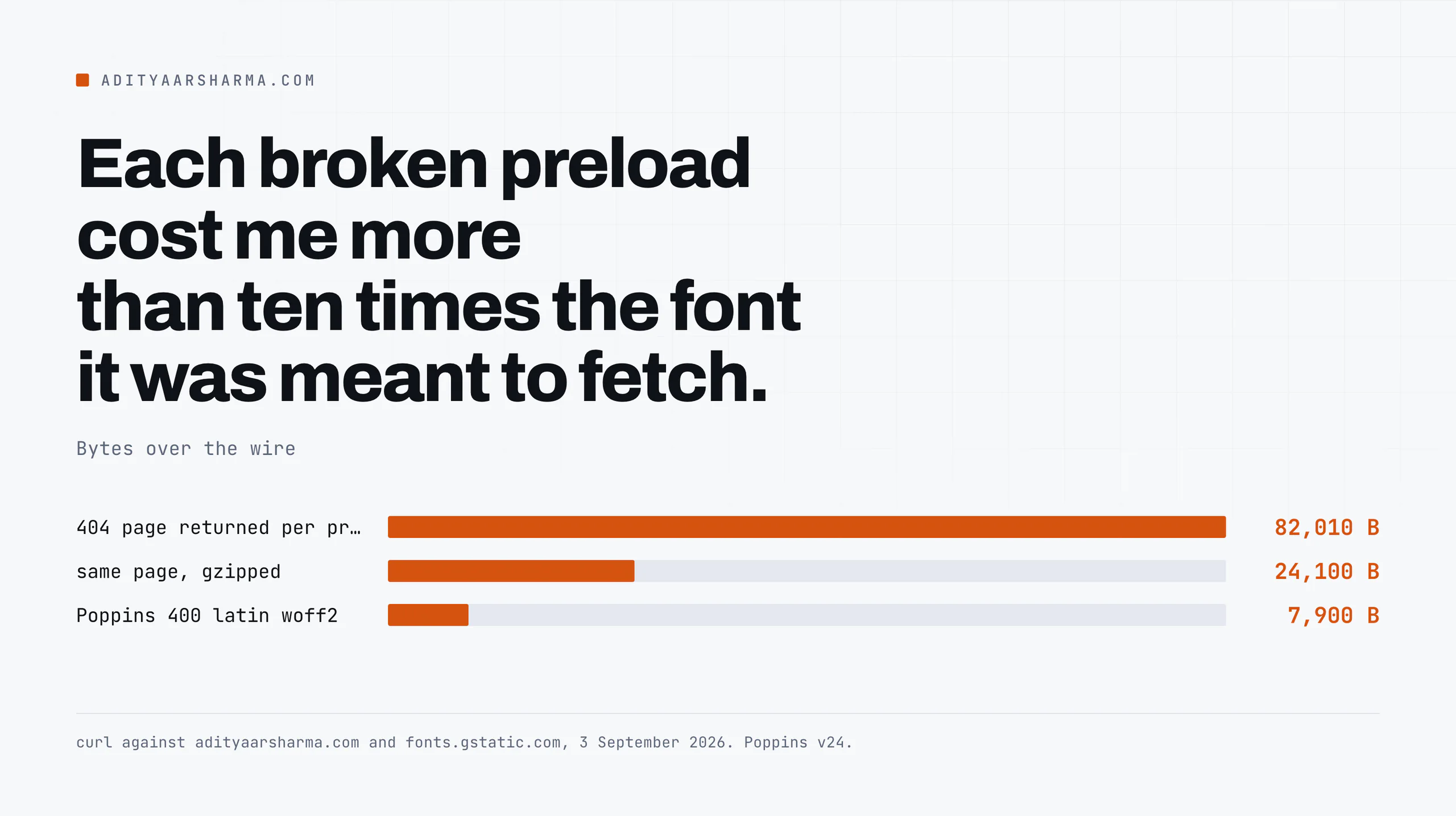
Now compare that to the 72,300 gzipped bytes of 404 HTML my preloads were pulling. The bug cost more than four times what the fonts cost.
It is a useful reminder that on a site with a page cache in front of it, most of the remaining damage is not weight, it is wrong requests.
I made the same point measuring the whole asset list in what actually makes a WordPress site slow, where the single heaviest file on the page turned out to belong to Google Tag Manager, not to WordPress.
The devanagari subset is the expensive one
The devanagari subset is the interesting line.
At 39,504 bytes it is five times the latin subset, and if you serve a font without unicode-range declarations you serve that to every visitor whether or not a single Devanagari codepoint appears on the page.
This is the single largest self-inflicted font cost I see on Indian WordPress sites, and it comes from well-meant self-hosting that concatenates all the subsets into one file.
The render-blocking path, precisely
A font never blocks rendering. The stylesheet that declares it does. The chain with Google Fonts, hosted, is:
- HTML arrives. The parser finds
<link href="https://fonts.googleapis.com/css2?...">. - DNS, TCP and TLS to fonts.googleapis.com. Rendering is blocked from here until the CSS arrives, because it is a stylesheet in the head.
- The CSS arrives. It contains
@font-facerules pointing at a second host, fonts.gstatic.com. - DNS, TCP and TLS to fonts.gstatic.com. Rendering is no longer blocked, but text using the font is now in its block period.
- The woff2 arrives. Text repaints.
What each connection actually costs
Two full connection setups on the critical path before a single glyph exists.
I measured what each one costs from my laptop, on a connection that Cloudflare routes through its Singapore colo (the cf-ray header on every response this morning ended in SIN): The loop timed dns, connect and tls against fonts.googleapis.com, fonts.gstatic.com and my own domain, two seconds apart.
Google’s edge answered in 0.017s for DNS and connected faster than my own origin did.
Here is the part that gets misreported. Google’s edge is faster to connect to than my own Cloudflare-fronted origin. 90ms to first byte of TLS against 181ms.
If you self-host and you tell people you saved them a slow third-party connection, measure it, because on my connection the third party was the fast one.
The real reason to self-host
The reason to self-host is not speed of that one hop.
It is that self-hosting collapses two connection setups into zero new ones, because the font comes off a connection the browser already opened for the HTML.
Google Fonts costs you two new hosts even when each host is quick.
The saving is roughly one full handshake, and on a warm HTTP/2 or HTTP/3 connection to your own origin it is close to free. The second reason, in the European Union, is legal rather than technical.
The Landgericht Munchen I ruled on 20 January 2022, case 3 O 17493/20, that a dynamic IP address is personal data for a site operator, that passing it to Google by embedding Google Fonts without consent violated the visitor’s right of personality, and it awarded 100 euros in damages.
If you serve European visitors that judgment settles the question on its own.
font-display, and what the four values really mean
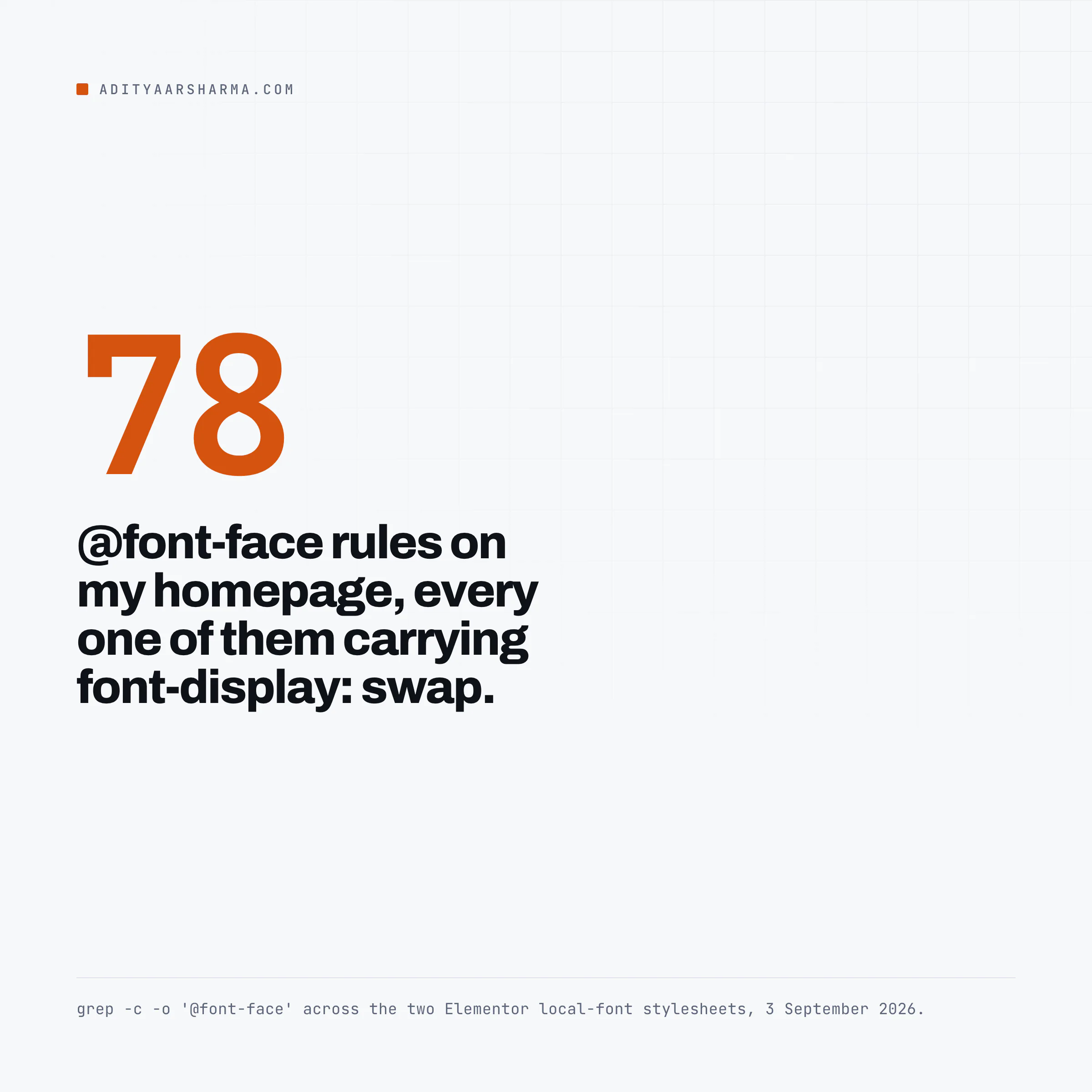
Every one of the 78 @font-face rules on my homepage carries font-display: swap. I counted them: I fetched the two minified Elementor local-font stylesheets with curl -s --compressed and counted with grep -c -o '@font-face'.
Seventy-eight rules across the two files, every one of them carrying font-display: swap.
The three periods, as MDN defines them
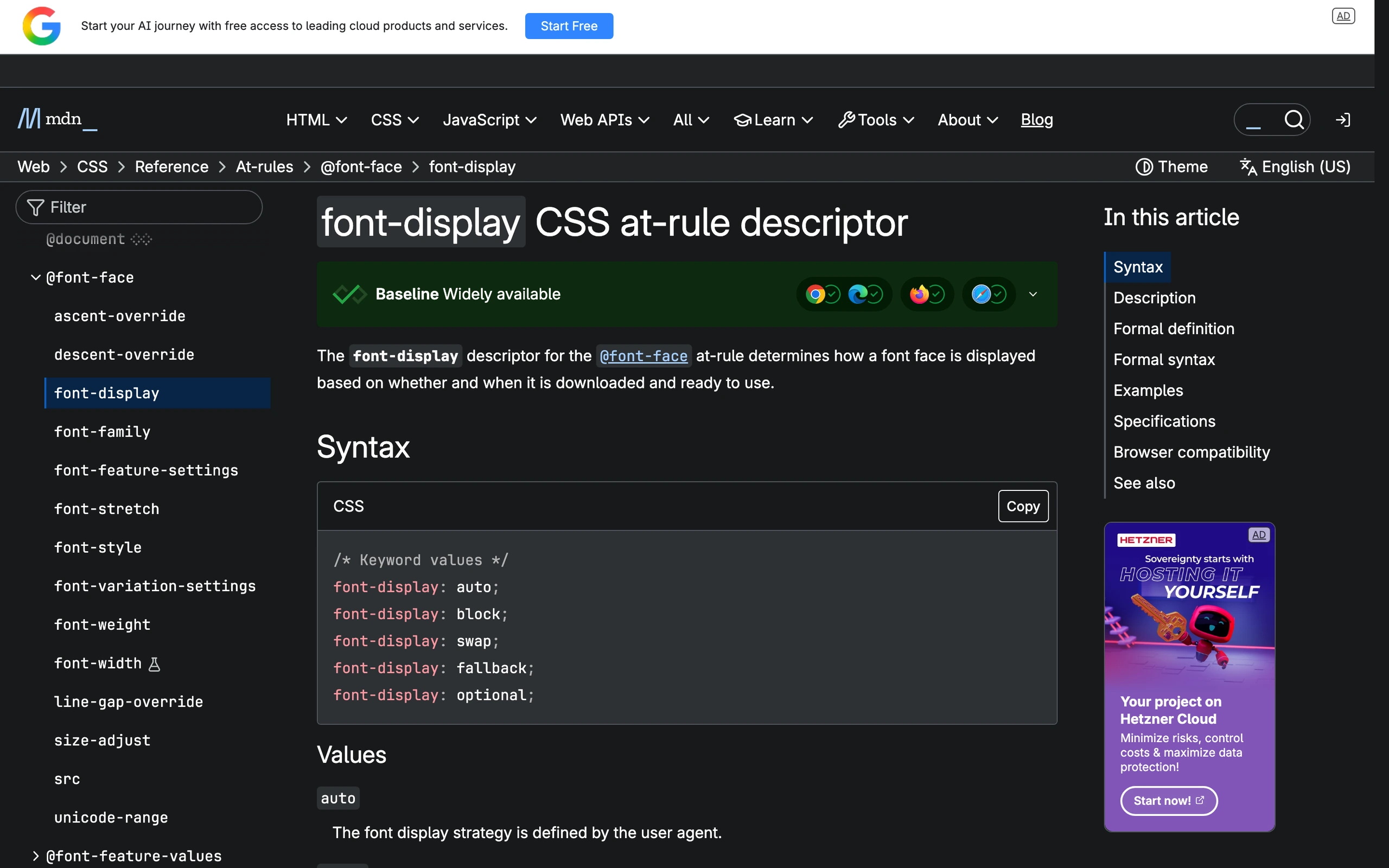
MDN’s page on the descriptor, last modified 20 April 2026, describes the timeline as three periods: a block period where an element using an unloaded font renders invisible text, a swap period where it renders a fallback, and a failure period where the browser gives up and falls back normally.
The four values differ only in how long the first two periods are:
blockgives a short block period and an infinite swap period. Invisible text first.swapgives an extremely small block period and an infinite swap period. Fallback text immediately, replaced whenever the font lands.fallbackgives an extremely small block period and a short swap period. If the font is late it is never used on this page load.optionalgives an extremely small block period and no swap period. The browser may decline the font entirely on a slow connection.
Why there are no numbers for short
MDN is deliberate about not giving you numbers for short and extremely small. The durations are defined by the user agent, and Firefox exposes them as the preferences gfx.downloadable_fonts.fallback_delay and gfx.downloadable_fonts.fallback_delay_short.
Everyone quotes 3 seconds and 100 milliseconds as if they were in the spec.
They are implementation defaults, not requirements, and I could not verify them from a normative source, so I am not going to repeat them as fact.
The practical read: swap trades a flash of unstyled text for never showing invisible text, and it is the right default for body copy.
optional is the right choice if you genuinely do not care whether the font renders on a first visit, which is a stronger statement about your brand than most people intend to make.
block is almost always wrong on the open web and it is the one that produces the complaint that the site loaded blank.
The layout shift half, which is the part swap does not fix
Why swap does not fix layout shift
swap guarantees a repaint. If the fallback font has different metrics from the web font, that repaint moves things, and that movement is scored by Cumulative Layout Shift.
I wrote up the thresholds and the field-versus-lab problem in the Core Web Vitals piece; the short version is that CLS is measured on real visits, and a font swap that only shifts text on a cold cache still counts.
The fix is metric overrides on a fake fallback face. Instead of writing font-family: Poppins, sans-serif and hoping, you declare a local face wrapping the system font, scale it to match, and put it in the stack:
@font-face {
  font-family: 'Poppins Fallback';
  src: local('Arial');
  size-adjust: 112%;
  ascent-override: 105%;
  descent-override: 35%;
  line-gap-override: 0%;
}

body { font-family: 'Poppins', 'Poppins Fallback', sans-serif; }
What the three overrides do
size-adjust multiplies all glyph outlines and metrics by a percentage, matching ex heights between the two fonts, per the MDN reference for the descriptor.
MDN records it as widely available across browsers since September 2023, so this is not a new trick you are gambling on.
The override descriptors do the same job for the ascent, descent and line gap, which is what actually determines line box height and therefore how far a paragraph moves when the swap happens.
The percentages above are illustrative.
The correct ones are specific to the pair of fonts you are matching, and you get them by reading both fonts’ unitsPerEm, ascender, descender and xHeight from their metrics tables and dividing.
I did not measure a before-and-after CLS number on my own site for this post, and I am not going to quote someone else’s percentage improvement as if it were mine.
Four things that do not work
Preloading every weight. A preload is a promise that the resource is needed immediately.
Preload four weights and you have told the browser that four fonts are all more important than your hero image, which is usually the element being measured for Largest Contentful Paint.
Preload the one face that renders above the fold, at most two.
Preloading a URL that does not exist
Preloading a URL the CSS does not request. That is my bug. The cost is silent because nothing breaks visually, and the only signal is a console warning most people have trained themselves to scroll past. Verify with curl, not with a plugin’s dashboard.
Self-hosting without subsetting. Downloading the family from a font mirror usually gives you one file per weight covering every script the family supports.
That is how a 7,900 byte latin subset becomes a 100 kilobyte all-scripts file. If your self-hosted CSS has no unicode-range declarations, you did not self-host the font, you self-hosted a bundle.
Stacking two font plugins
Stacking two font plugins. This is the general failure and it is not specific to fonts.
Two plugins each producing a correct solution to the same problem produce an incorrect combination, because neither can see the other’s output.
The same class of collision shows up in the asset pipeline generally, which I went through in the Elementor performance measurements.
If you are trying to work out which layer is responsible for a given piece of output, the caching layers post has the isolation method: change one layer, measure again, and never trust a dashboard that reports on itself.
What I did about mine
I removed the three stale entries from Perfmatters’ preload list. That is the whole fix.
I left fonts.local_google_fonts switched on, because it was not the culprit. The preloads were config pointing at an empty directory, not a naming mismatch between two plugins.
Verified with curl on 3 September 2026: curl -s https://adityaarsharma.com/ | grep -oE '<link[^>]*rel="preload"[^>]*as="font"[^>]*>' | wc -l now returns 0. It returned 3 before.
I did not add two replacement preloads back. I could not confirm which two faces actually render above the fold, and preloading the wrong face costs bandwidth for nothing. Removing three wrong ones is a verified win. Adding two guesses is not.
Run this on your own site in the next ten minutes
Pull every preloaded font off your homepage and check that each one returns 200 with a font content type. Two commands:
curl -s https://YOURSITE.com/ -o home.html

grep -oE '<link[^>]*rel="preload"[^>]*as="font"[^>]*>' home.html \
  | grep -oE 'href="[^"]+"' | cut -d'"' -f2 \
  | while read u; do
      curl -s -o /dev/null -w "%{http_code} %{size_download} %{content_type}  $u\n" "$u"
      sleep 2
    done
Any line that is not 200 with font/woff2 is a wasted high-priority request.
Any URL that does not appear verbatim inside one of your stylesheets is a duplicate download.
Both are free to fix and neither shows up in a page speed score.
Resources
- MDN: font-display, the three-period timeline and all four values. Last modified 20 April 2026.
- MDN: size-adjust, the metric multiplier used for fallback matching. Widely available since September 2023.
- CSS Fonts Module Level 5, the normative definition of size-adjust.
- Google Fonts Knowledge, including the subsetting and unicode-range behaviour the css2 API applies.
- LG Munchen I, 20 January 2022, 3 O 17493/20, the Google Fonts and IP address judgment, full text in German.