A CDN for WordPress: What Actually Helps, and the Layer My Own Site Is Failing
On this page, 7 sections
My homepage takes 1.0 seconds to start arriving. A stylesheet on the same domain takes 0.22 seconds.
Both come from the same Cloudflare edge, both are cached, and the difference between them is the entire subject of this post. Five runs each, measured this morning, 3 September 2026:
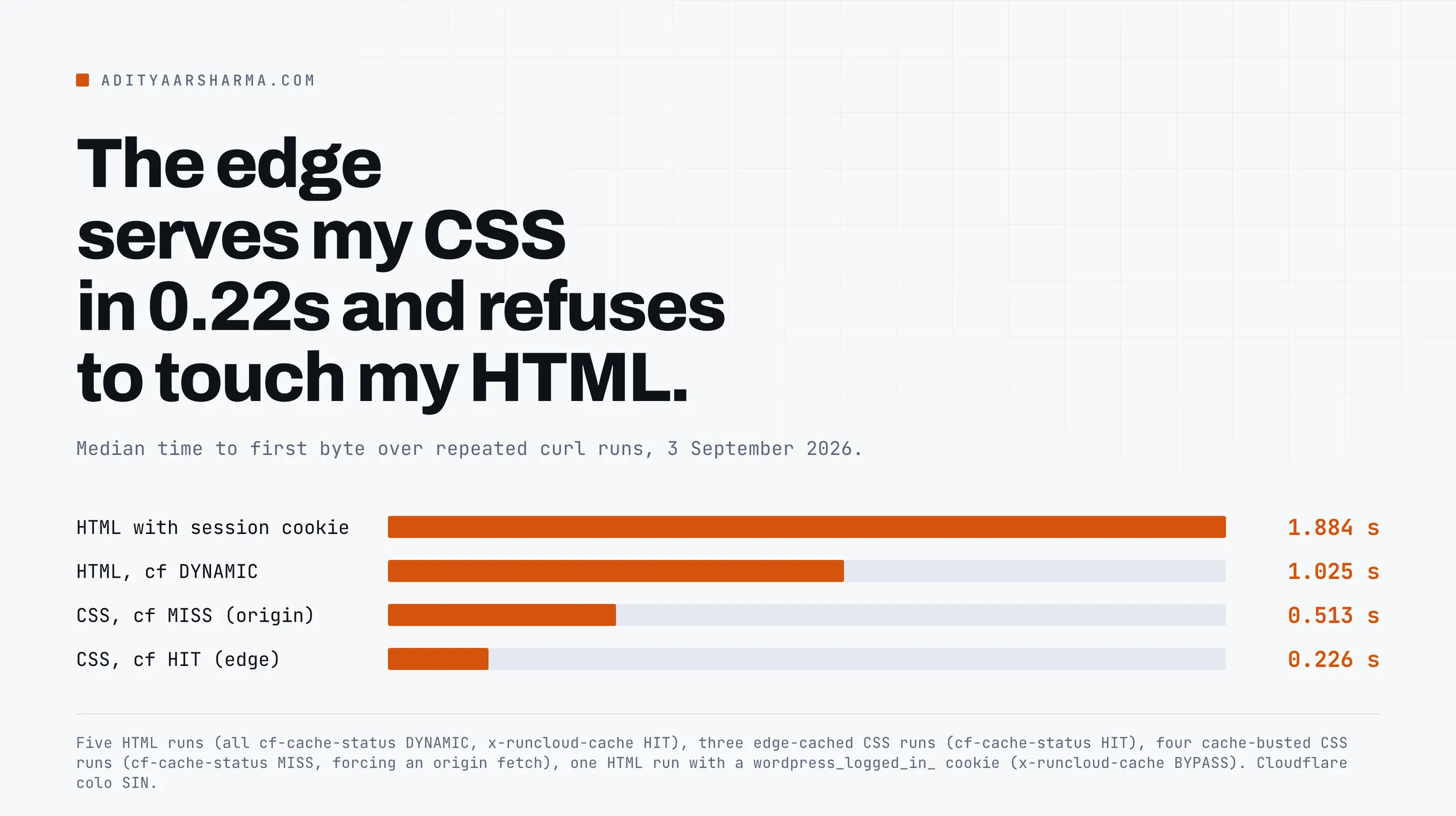
run1 ttfb=1.025484 x-runcloud-cache: HIT cf-cache-status: DYNAMIC
run2 ttfb=0.995375 x-runcloud-cache: HIT cf-cache-status: DYNAMIC
run3 ttfb=0.997329 x-runcloud-cache: HIT cf-cache-status: DYNAMIC
run4 ttfb=1.055049 x-runcloud-cache: HIT cf-cache-status: DYNAMIC
run5 ttfb=1.137921 x-runcloud-cache: HIT cf-cache-status: DYNAMIC
That is five runs of curl -w "%{time_starttransfer}" against my own homepage, three seconds apart, grepping the two cache headers out of the response.
Three runs against a cached stylesheet came back cf-cache-status: HIT with cache-control: max-age=2592000 and a rising age, at 0.226s, 0.235s and 0.219s. x-runcloud-cache: HIT on every HTML request means my origin’s page cache is working perfectly. PHP barely ran. WordPress barely ran.
And it still took a second, because cf-cache-status: DYNAMIC means Cloudflare never looked in its own cache and went straight to my origin server, every single time, for a file whose contents had not changed.
This is the layer my site is failing. I said as much when I measured what actually makes my site slow and concluded the slow part was not WordPress.
Here is the part I did not do then, which is work out exactly why the edge refuses to help, and what would have to be true before I could safely make it.
Why DYNAMIC is the default, in Cloudflare’s own words
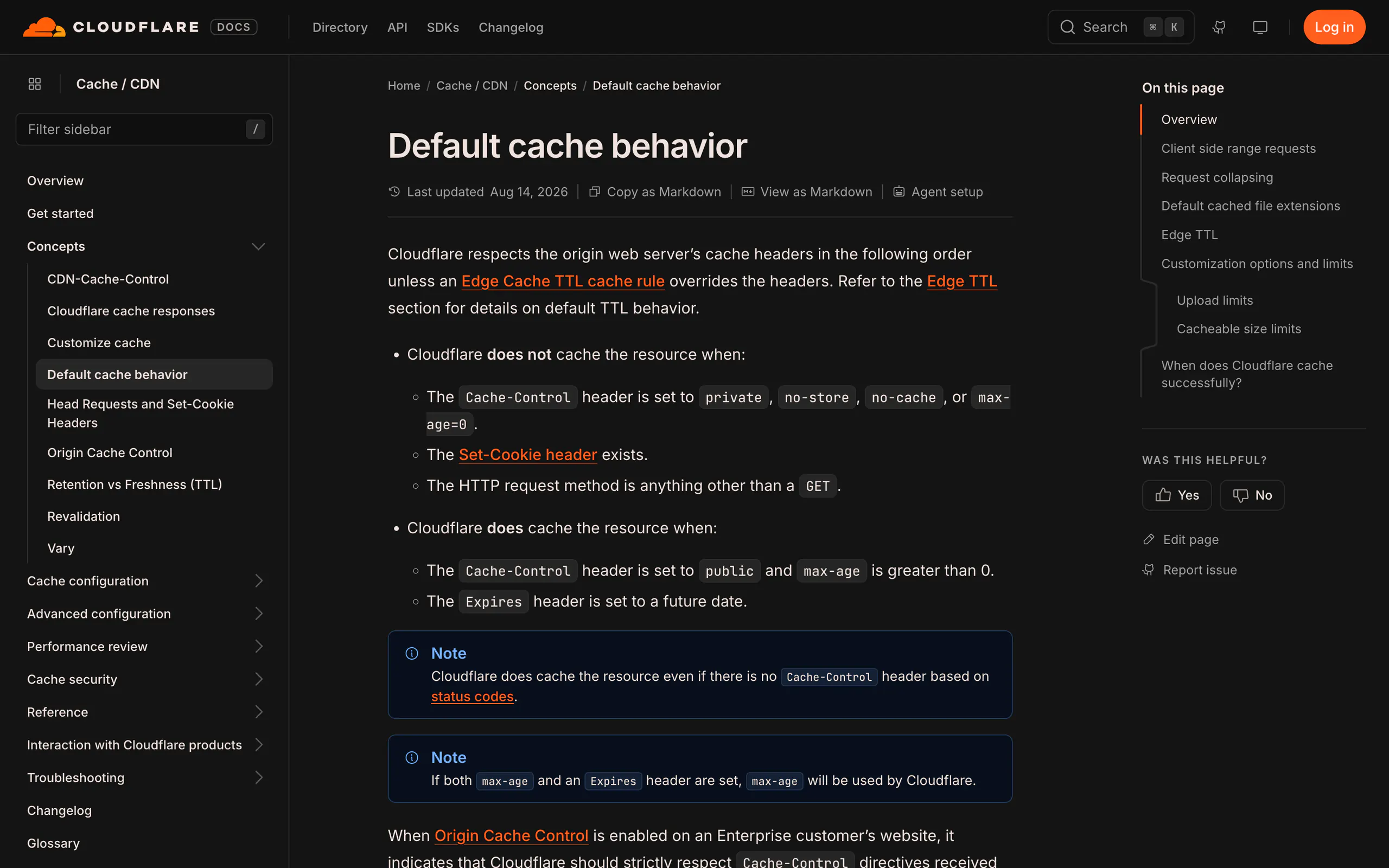
The reason is one sentence in Cloudflare’s default cache behaviour documentation, last updated 14 August 2026:
Cloudflare only caches based on file extension and not by MIME type. The Cloudflare CDN does not cache HTML or JSON by default.
Cloudflare docs, Default cache behavior, retrieved 3 September 2026
The extension list, and what is missing from it
The page lists the extensions that are cached by default, and it is a long list: 7Z, AVI, AVIF, BMP, CSS, DOC, EOT, GIF, GZ, ICO, JPG, JPEG, JS, JSON is absent, MP3, MP4, OTF, PDF, PNG, SVG, TTF, WEBM, WEBP, WOFF, WOFF2, ZIP and about thirty more.
Notice what that list is: assets. Not pages.
So the decision is made on the URL, before the request is even sent to your origin. Cloudflare’s own definition of the status makes the ordering explicit:
DYNAMIC: Cloudflare determined at request time that the asset is not eligible for cache, so the request went to the origin web server without a cache lookup.
Cloudflare docs, Cloudflare cache responses, retrieved 3 September 2026
DYNAMIC is not a miss
Without a cache lookup. That phrase is the whole mechanism. DYNAMIC is not a miss. A miss means the edge looked and found nothing, which is why the next request can be a hit.
DYNAMIC means the edge did not look and will never look, so the thousandth identical request costs exactly what the first one did.
My cache-control: public, max-age=300, stale-while-revalidate=86400 header is being ignored, not because Cloudflare disrespects it, but because the URL never got as far as the code that reads it.
Decomposing the second
With three measurements you can split that 1.0 second into named parts. First, the edge serving a cached static file, which is the floor:
Part one: the edge serving a cached file
Three runs on a cached static file: cf-cache-status: HIT at 0.219s, 0.226s and 0.235s.
Second, the same static file with a random query string appended, which forces Cloudflare to fetch it from my origin. No PHP, no MySQL, no WordPress. Just nginx opening a file:
Part two: the edge fetching from origin
The command was the same loop against a static asset with ?b=$RANDOM$RANDOM appended to defeat the edge cache. Four runs came back cf-cache-status: MISS at 0.510s, 0.588s, 0.513s and 0.525s.
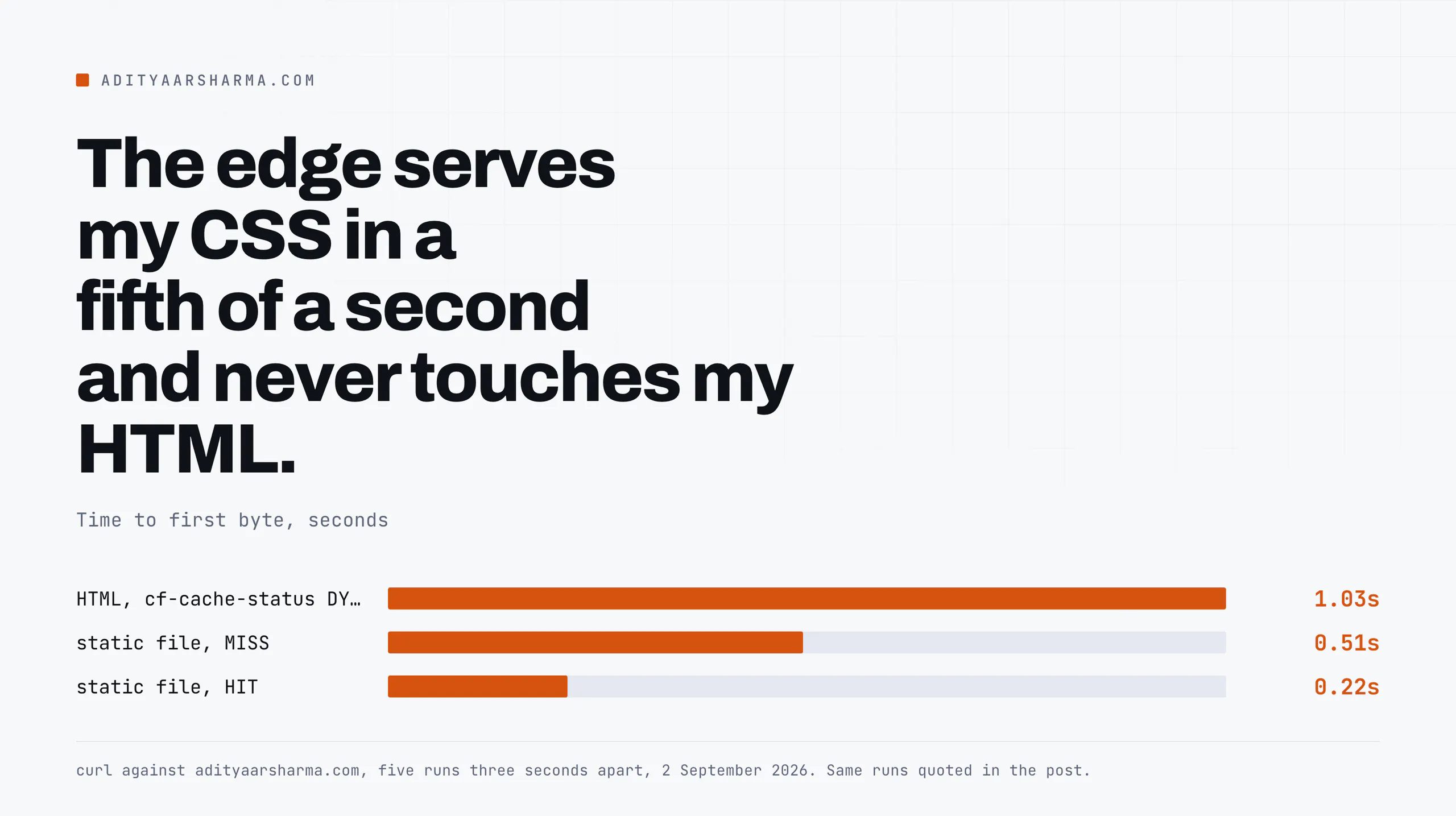
Third, the HTML, at 1.0 seconds. Subtract, and the picture is unambiguous:
- 0.22s is my client reaching the Cloudflare edge and being served from its memory. Pure network.
- +0.29s is the edge reaching my origin and back for a static file. That is the origin round trip, and it is a distance problem, not a software problem.
- +0.47s is what my origin adds for HTML over a static file, even with the page cache reporting HIT.
The uncomfortable number
The last number is the uncomfortable one and I am not going to paper over it.
A page-cache HIT is not free: nginx still has to match the request against the cache rules, check the cookie exclusions, look up the cached entry and hand back roughly 172 kilobytes rather than 679 bytes.
Nearly half a second of it, though, is more than that accounting explains, and I do not have a clean measurement of where it goes.
I can measure the outside of the box precisely and I am guessing about the inside, so I am saying so.
What the decomposition does establish, without any guessing: if Cloudflare served that HTML from the edge, the 0.29s origin trip and the 0.47s origin work both disappear.
The page would start arriving in roughly 0.22 seconds instead of 1.0.
That is a Largest Contentful Paint improvement of three quarters of a second before a single byte of the page is optimised, which is a bigger number than anything else on my performance list.
The Core Web Vitals thresholds are close enough on this site that this one change would move the grade.
What has to be true before HTML at the edge is safe
This is where most guides stop and just tell you to turn on Cache Everything. Do not, until you can answer all four of these, because a shared HTML cache serves one user’s page to another user by design.
1. Logged-in users must never get a cached page
1. Logged-in users must never receive a cached page. WordPress signals a session with cookies whose names begin wordpress_logged_in_, wp-postpass_ and comment_author_. My origin already handles this correctly.
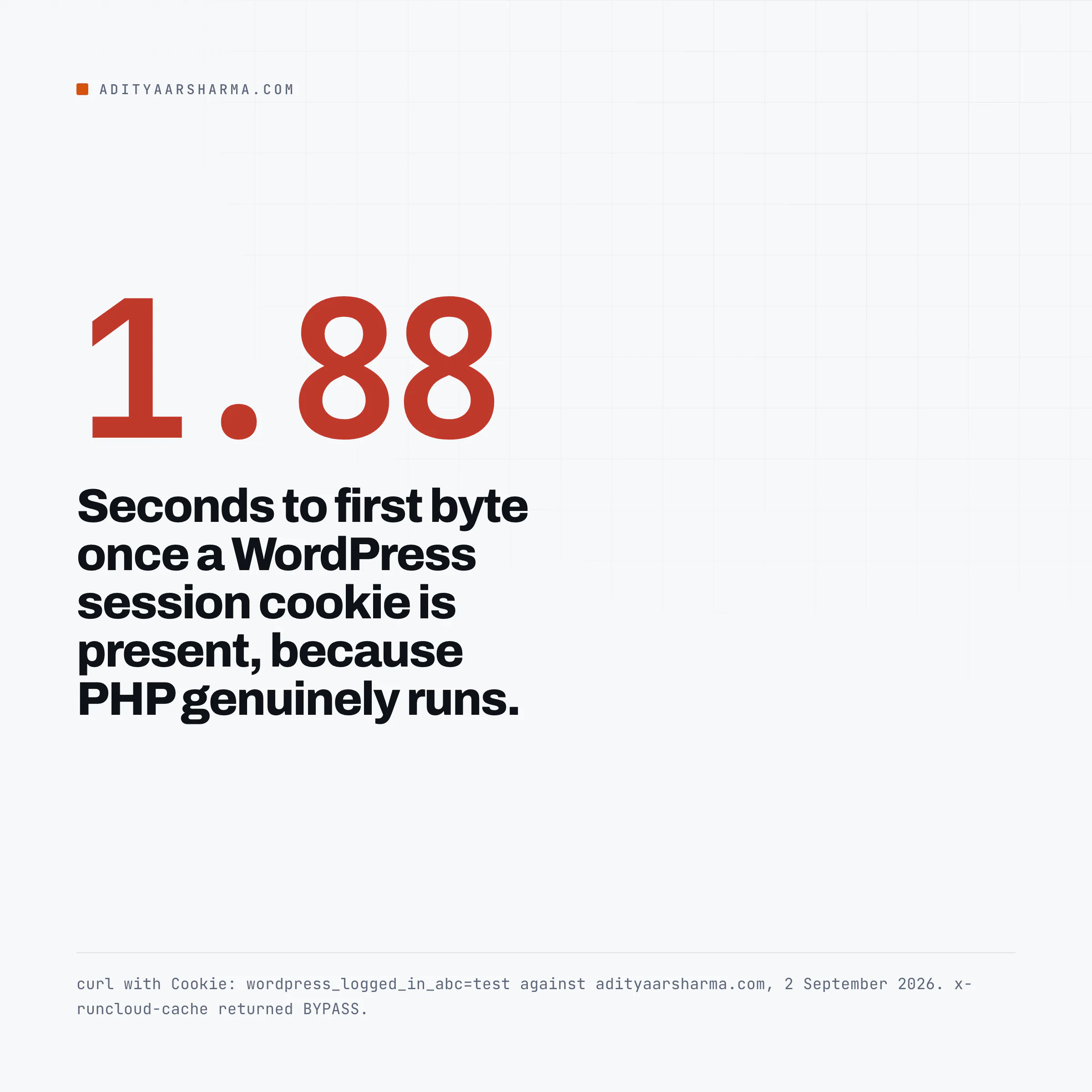
I checked, by sending the cookie: The check is one request with a fake session cookie: curl -H 'Cookie: wordpress_logged_in_abc=test' against the homepage, grepping for the two cache headers.
x-runcloud-cache: BYPASS, and the response took 1.88 seconds instead of 1.0 because PHP genuinely ran. The origin is doing the right thing.
The question is whether the edge would, and the answer with a naive Cache Everything rule is no, because a cache rule that ignores cookies will happily store the admin bar version of your homepage and serve it to the world.
The correct shape is a bypass rule evaluated before the cache rule, expressed in Cloudflare’s rules language:
# Cache rule 1, priority 1: bypass when a session cookie is present
(http.request.headers.cookie contains "wordpress_logged_in_")
or (http.request.headers.cookie contains "wp-postpass_")
or (starts_with(http.request.uri.path, "/wp-admin"))
-> Cache eligibility: Bypass cache
The full rule also matches comment_author_, woocommerce_items_in_cart and wp_woocommerce_session_ cookies, plus /wp-login.php and any path starting /wp-json.
Cache rule 2, at priority 2, is the Cache Everything rule that only sees what rule 1 lets through.
Order matters and it is the thing people get wrong. Cloudflare evaluates cache rules in order and the first match wins, so the bypass has to be first. Put the cache-everything rule first and the bypass never runs.
2. Carts and checkout, by path and by cookie
2. Carts and checkout must be excluded by path as well as by cookie. A WooCommerce cart cookie is only set once something is in the cart.
A visitor with an empty cart hitting /checkout/ has no cookie yet, so a cookie-only rule caches the empty checkout page, and the next visitor gets it.
Exclude /cart/, /checkout/, /my-account/ and the AJAX endpoints by path regardless of cookies. WooCommerce also uses a fragments call for the cart count precisely because that number cannot be part of a cached page.
3. Nonces, and the bug nobody can reproduce
3. Nonces must not be cached. This is the failure that produces bug reports nobody can reproduce.
A WordPress nonce is generated from the user, the action, a session token and a time tick, and it is valid for a bounded window.
Cache a page containing a form nonce for an hour and every visitor who submits that form after the nonce expires gets a security check failure.
It is intermittent, it depends on when the cache filled rather than when the user arrived, and it looks like nothing when you test it yourself thirty seconds later.
If a page contains a form for logged-out users, either exclude it or make the form fetch its nonce over AJAX at submit time.
The same reasoning is why application passwords and the REST API sit outside anything cacheable.
4. Purge on publish
4. You need a purge on publish. An edge TTL of one hour means an hour of stale content after every edit unless something calls Cloudflare’s purge API.
Most WordPress caching plugins with a Cloudflare integration do this on save_post and transition_post_status. Verify it rather than trusting it: edit a post, then curl the URL and look at the age header.
If age keeps climbing across the edit, nothing purged.
The one that is nearly free, and that almost nobody sets
Before Cache Everything, there is a smaller change with none of the risk.
My static assets carry cache-control: max-age=2592000, thirty days, and the age header on the CSS above was 64, 68 and 71 seconds across three requests three seconds apart.
The edge copy was about a minute old and climbing normally, so that layer is behaving.
One header for browsers, one for the edge
What is not set is a separate edge lifetime.
cache-control is a single instruction to two very different caches: a browser, which is one user’s disk and can be wrong for as long as that user does not clear it, and a shared edge cache, which you can purge from an API in seconds.
Splitting them is what CDN-Cache-Control is for, and Cloudflare’s documentation on BYPASS spells out the precedence: Cloudflare-CDN-Cache-Control beats CDN-Cache-Control, which beats Cache-Control.
In nginx, match the static extensions in a location ~* \.(css|js|woff2|jpg|jpeg|png|webp|avif|svg)$ block and add two headers: Cache-Control "public, max-age=604800" for browsers, seven days, and CDN-Cache-Control "public, max-age=31536000" for the edge, a year.
A week in the browser so a returning visitor gets an update within days, a year at the edge because you can purge it whenever you deploy. This costs nothing, breaks nothing, and needs none of the four conditions above.
What does not work
Turning on Cache Everything and hoping. Without the cookie bypass ordered first, you will eventually serve a logged-in page to an anonymous visitor. That is a data exposure, not a performance regression, and you will find out from a customer.
Development Mode is not a test
Using Development Mode as a test. Development Mode bypasses the edge cache entirely, so testing in it tells you exactly nothing about what the edge will do afterwards. Test with a cache rule scoped to a single URL path instead.
Your plugin dashboard is not evidence
Believing your plugin’s dashboard. Every caching plugin has a screen that says the cache is working.
Mine says so, and it is telling the truth about the layer it owns while the layer above it is doing nothing.
The only reliable test is a header from outside, which is the whole method in the post on which caching layer is actually failing.
Assuming the edge is close to your visitors and far from your origin. Check.
My Cloudflare colo is in Singapore, from the cf-ray suffix on every response, and the origin trip from there costs about 0.29 seconds.
If most of your traffic is in one country and your origin is in that country, edge-caching HTML buys you less than it buys me.
Reading your own access logs will tell you where your traffic is before you optimise for where you assume it is.
Do this in the next ten minutes
Run one command against your own site and read one header:
curl -s -o /dev/null -D - https://YOURSITE.com/ \
  -w "\nttfb=%{time_starttransfer}\n" | grep -iE 'cf-cache-status|age:|cache-control'
If cf-cache-status says DYNAMIC, your HTML is going to your origin on every request and you have a Cache Everything decision to make.
If it says HIT, log in and run it again with your session cookie, and make very sure it says BYPASS. That second check is the one that matters, and it takes fifteen seconds.
Resources
- Cloudflare: Default cache behavior, including the full default cached file extension list and the line about HTML. Last updated 14 August 2026.
- Cloudflare: cache responses, the normative definitions of HIT, MISS, BYPASS, DYNAMIC, REVALIDATED and UPDATING. Last updated 21 August 2026.
- Cloudflare: Cache Rules, where the bypass and cache-everything rules above are configured.
- Cloudflare: CDN-Cache-Control, and the precedence order between the three cache control headers.
- WordPress nonces in the developer handbook, for why a cached page containing a form is a problem.